![CAD Forum - tips, tricks, discussion and utilities for AutoCAD, Inventor, Revit and other Autodesk products [www.cadforum.cz]](../common/arkance_186.png "CAD Forum - ARKANCE Community - tips, tricks, discussion and utilities for AutoCAD, Inventor, Revit and other Autodesk products [www.cadforum.cz]")
CAD FORUM - TIPS & TRICKS | UTILITIES | DISCUSSION | BLOCKS | SUPPORT | HELP & ASSISTANCE

 What is the ARKANCE Community?
Over 1.124.000 registered users (EN+CZ).
AutoCAD tips, Inventor tips, Revit tips, Civil tips, Fusion tips.
The new Beam calculator, Spirograph generator and Regression curves in the Converters section.
New AutoCAD 2027 commands and sys.variables

 CAD tip # 6781:
Question
A
In many cases (parcels, rooms, lots, sheetmetal parts) you may want to split (divide) irregular closed areas to a half, or to a number of smaller lots. Typical example: divide a generic polyline shape into two parts of equal area.
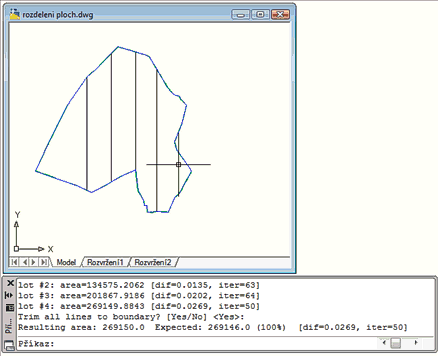
(click to start animation)
The AutoCAD LISP utility ARKANCE SplitArea can automatically split any closed polyline to a number of subdivisions defined by acreage. You can use several methods for subdivision lines - fixed direction, fixed point or any user defined division lines (curves). It supports also AutoCAD LT (2024+).
(click to start animation)
ACADACLTADTACADMMap

 *CAD
*CAD
3.7.2009
35190×
this tip shared by ARKANCE experts applies to: AutoCAD · AutoCAD LT · AutoCAD Architecture · AutoCAD Mechanical · AutoCAD Map 3D ·


CADforum
Tips, tricks, utilities, help, how-tos and FAQ for AutoCAD, LT, Inventor, Revit, Map, Civil 3D, Fusion, Forma, 3ds Max and other Autodesk software (community support by ARKANCE). See About CADforum.
Copyright © 2026 | Advertise with us | Online privacy





