![CAD Forum - tips, tricks, discussion and utilities for AutoCAD, Inventor, Revit and other Autodesk products [www.cadforum.cz]](../common/arkance_186.png "CAD Forum - ARKANCE Community - tips, tricks, discussion and utilities for AutoCAD, Inventor, Revit and other Autodesk products [www.cadforum.cz]")
CAD FORUM - TIPS & TRICKS | UTILITIES | DISCUSSION | BLOCKS | SUPPORT | HELP & ASSISTANCE

 What is the ARKANCE Community?
Over 1.124.000 registered users (EN+CZ).
AutoCAD tips, Inventor tips, Revit tips, Civil tips, Fusion tips.
The new Beam calculator, Spirograph generator and Regression curves in the Converters section.
New AutoCAD 2027 commands and sys.variables

 CAD tip # 9238:
Question
A
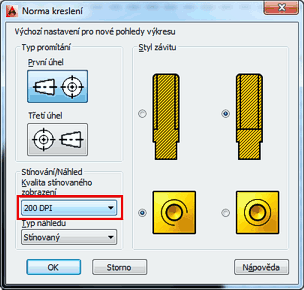
When creating a shaded documentation view on a 3D model (e.g. with the VIEWBASE command) AutoCAD uses the default resolution of 100dpi. If you want to increase the resolution (display precision, smoothness) of your shaded view - to get rid of jagged, stepped edges - set a higher dpi value.
Before you create the doc.view, run the dialog "View standard" (the command VIEWSTD or ribbon Layout > Styles and Standards > dialog arrow) and in the "Shaded view quality" list set 200 or 300 dpi.
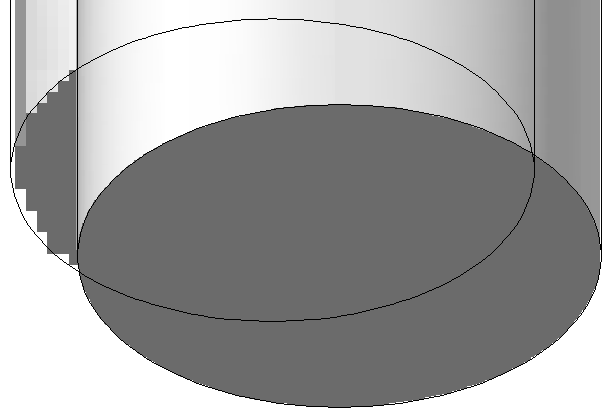
For general 3D viewports in layouts you can use the FACETRES setting to set resolution.
ACAD2014ACAD2013

 *CAD
*CAD
6.5.2013
21835×
this tip shared by ARKANCE experts applies to: AutoCAD 2014 · AutoCAD 2013 ·


CADforum
Tips, tricks, utilities, help, how-tos and FAQ for AutoCAD, LT, Inventor, Revit, Map, Civil 3D, Fusion, Forma, 3ds Max and other Autodesk software (community support by ARKANCE). See About CADforum.
Copyright © 2026 | Advertise with us | Online privacy





