![CAD Forum - tips, tricks, discussion and utilities for AutoCAD, Inventor, Revit and other Autodesk products [www.cadforum.cz]](../common/arkance_186.png "CAD Forum - ARKANCE Community - tips, tricks, discussion and utilities for AutoCAD, Inventor, Revit and other Autodesk products [www.cadforum.cz]")
CAD FORUM - TIPS & TRICKS | UTILITIES | DISCUSSION | BLOCKS | SUPPORT | HELP & ASSISTANCE

 What is the ARKANCE Community?
Over 1.124.000 registered users (EN+CZ).
AutoCAD tips, Inventor tips, Revit tips, Civil tips, Fusion tips.
The new Beam calculator, Spirograph generator and Regression curves in the Converters section.
New AutoCAD 2027 commands and sys.variables

 CAD tip # 6770:
Question
A
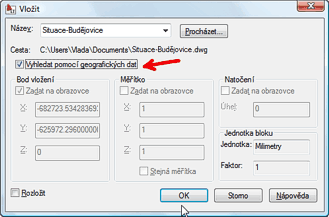
The option "Locate using geographic data" is disabled (grayed) when inserting blocks using the INSERT command or attaching external references using the XATTACH command. How to activate it?
This option is available only if both the main (current) drawing and the inserted/attached block/xref contain geographic information. Then you can use this information to automatically fit (georeference) both files together.
Thus, first use the command GEOGRAPHICLOCATION to define the true position of both DWG drawings (by entering lattitude/longitude or from Google Earth). Then this option will become enabled and you can use it to insert your block (or xref) automatically to the right position. This option is available also in AutoCAD LT.
ACAD2010ACLT2010ADT2010Civil2010Map2010

 *CAD
*CAD
29.6.2009
30184×
this tip shared by ARKANCE experts applies to: AutoCAD 2010 · AutoCAD LT 2010 · AutoCAD Architecture 2010 · Civil 3D 2010 · AutoCAD Map 3D 2010 ·


CADforum
Tips, tricks, utilities, help, how-tos and FAQ for AutoCAD, LT, Inventor, Revit, Map, Civil 3D, Fusion, Forma, 3ds Max and other Autodesk software (community support by ARKANCE). See About CADforum.
Copyright © 2026 | Advertise with us | Online privacy





