![CAD Forum - tips, tricks, discussion and utilities for AutoCAD, Inventor, Revit and other Autodesk products [www.cadforum.cz]](../common/arkance_186.png "CAD Forum - ARKANCE Community - tips, tricks, discussion and utilities for AutoCAD, Inventor, Revit and other Autodesk products [www.cadforum.cz]")

 What is the ARKANCE Community?
 CAD tip # 9123:
Question
In the Properties of this "printer" (driver, PC3) you can then define any custom "paper sizes" which are defined in the case of this raster driver by the number of pixels (width and height). A new paper size can be added using Properties > Device and Document Settings > Custom Paper Sizes > Add and in the wizard the specify the number of pixels for Width and Height. The maximum number of pixels, i.e. the highest resolution supported by AutoCAD, is here 320000 x 320000 (320 thousand) pixels in each direction.
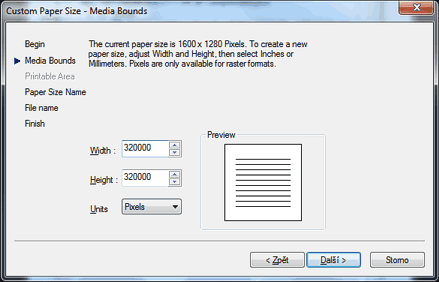
If you have a given paper size and given resolution in dpi (dots-per-inch), you can calculate the number of pixels by multiplying. An example - format A0 at 300dpi:
the A0 page format has (see the Tip 5255) a size of 841 x 1189 mm, which is (/25.4): 33.11 x 46.81 inches
33.11" x 300dpi = 9933 pixels
46.81" x 300dpi = 14043 pixels
These values should be entered in the above shown AutoCAD dialog.

 *CAD
*CAD







