![CAD Forum - tips, tricks, discussion and utilities for AutoCAD, Inventor, Revit and other Autodesk products [www.cadforum.cz]](../common/arkance_186.png "CAD Forum - ARKANCE Community - tips, tricks, discussion and utilities for AutoCAD, Inventor, Revit and other Autodesk products [www.cadforum.cz]")
CAD FORUM - TIPS & TRICKS | UTILITIES | DISCUSSION | BLOCKS | SUPPORT | HELP & ASSISTANCE

 What is the ARKANCE Community?
Over 1.124.000 registered users (EN+CZ).
AutoCAD tips, Inventor tips, Revit tips, Civil tips, Fusion tips.
The new Beam calculator, Spirograph generator and Regression curves in the Converters section.
New AutoCAD 2027 commands and sys.variables

 CAD tip # 8672:
Question
A
The new unified material library in Inventor 2013 and other Autodesk products allows to manage both visual (color, appearance, transparency...) and physical material properties in a single place.
You can extend the predefined material library with your own materials, create new libraries, or change properties of the existing materials.
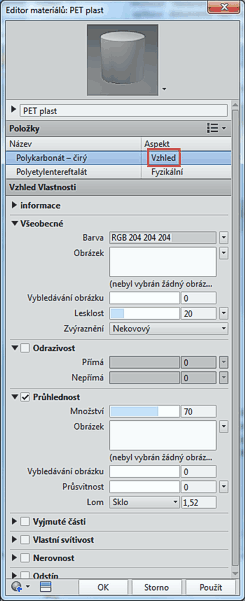
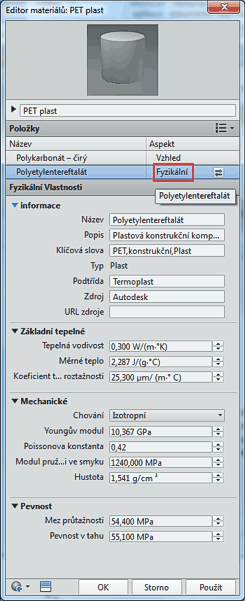
The material editor can be invoked through the ribbon Tools > Material and appearance > Material. Double-click on a material to launch the editor dialog, where you can adjust the material properties and assets - color hue, reflections, transparency, but also thermal conductance, Young modulus, density, yield strength, etc. The editor window is split by aspect to "Appearance" and "Physical" tabs:
 -
- 
Inventor2013

 *CAD
*CAD
7.6.2012
11115×
this tip shared by ARKANCE experts applies to: Inventor 2013 ·


CADforum
Tips, tricks, utilities, help, how-tos and FAQ for AutoCAD, LT, Inventor, Revit, Map, Civil 3D, Fusion, Forma, 3ds Max and other Autodesk software (community support by ARKANCE). See About CADforum.
Copyright © 2026 | Advertise with us | Online privacy





