![CAD Forum - tips, tricks, discussion and utilities for AutoCAD, Inventor, Revit and other Autodesk products [www.cadforum.cz]](../common/arkance_186.png "CAD Forum - ARKANCE Community - tips, tricks, discussion and utilities for AutoCAD, Inventor, Revit and other Autodesk products [www.cadforum.cz]")
CAD FORUM - TIPS & TRICKS | UTILITIES | DISCUSSION | BLOCKS | SUPPORT | HELP & ASSISTANCE

 What is the ARKANCE Community?
Over 1.124.000 registered users (EN+CZ).
AutoCAD tips, Inventor tips, Revit tips, Civil tips, Fusion tips.
The new Beam calculator, Spirograph generator and Regression curves in the Converters section.
New AutoCAD 2027 commands and sys.variables

 CAD tip # 9240:
Question
A
One of new features in Autodesk 3ds Max 2014 is the function Populate (originally "Project Geppetto"). It allows to automatically generate animated, realistic groups of people and add life-like features to your architectural visualizations and animations.
Populate offers two main functions - "Create Flow" for walking pro kráèející characters (pavements, corridors, halls, passages) and "Idle Area" for loitering groups of people. Both functions offer automatic creation of animated 3D people with realistic behaviour.
Video-tip with the procedure of creating idling groups on the terrace of the sample project directly imported to 3ds Max Design 2014 from Revit 2014 (the rac_basic_sample_project.rvt file) can be found in the CAD Video section - see:
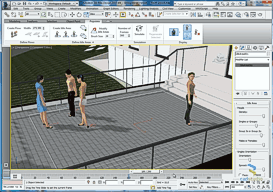
or on the CAD Studio's YouTube channel:
3ds Max is included in several types of Autodesk Collections
max2014Revit

 *CAD
*CAD
7.5.2013
9920×
this tip shared by ARKANCE experts applies to: 3ds Max 2014 · Revit ·


CADforum
Tips, tricks, utilities, help, how-tos and FAQ for AutoCAD, LT, Inventor, Revit, Map, Civil 3D, Fusion, Forma, 3ds Max and other Autodesk software (community support by ARKANCE). See About CADforum.
Copyright © 2026 | Advertise with us | Online privacy





