![CAD Forum - tips, tricks, discussion and utilities for AutoCAD, Inventor, Revit and other Autodesk products [www.cadforum.cz]](../common/arkance_186.png "CAD Forum - ARKANCE Community - tips, tricks, discussion and utilities for AutoCAD, Inventor, Revit and other Autodesk products [www.cadforum.cz]")
CAD FORUM - TIPS & TRICKS | UTILITIES | DISCUSSION | BLOCKS | SUPPORT | HELP & ASSISTANCE

 What is the ARKANCE Community?
Over 1.124.000 registered users (EN+CZ).
AutoCAD tips, Inventor tips, Revit tips, Civil tips, Fusion tips.
The new Beam calculator, Spirograph generator and Regression curves in the Converters section.
New AutoCAD 2027 commands and sys.variables

 CAD tip # 4161:
Question
A
A dormer is basically only another roof attached to an existing roof. You can create the opening in the roof with the Opening command in the Modelling menu.
Use the following steps:
- Create a model with an attached roof as a dormer and with walls attached to the dormer.
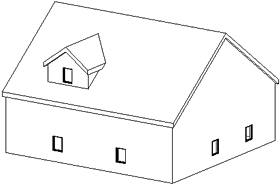
- Go to a plan view where you can see both the dormer and the attached walls.
- In the Modelling menu select Opening...
- In the resulting dialog box, select 'Pick a roof to be cut by a dormer opening'.
- Pick a roof in which you want to make an opening.
Revit will switch to the sketch mode and prompts to select the boundaries for the opening. Valid boundaries are - the attached roof, wall faces and model lines. In this case we select the wall faces and the attached roof.
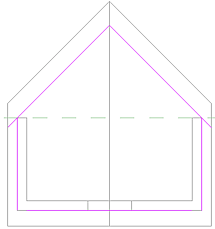
- Select Finish boundary.
See also the video-tip for a dormer in Revit 2013 - Tip 8906.
Revit7

 *CAD
*CAD
7.12.2004
31692×
this tip shared by ARKANCE experts applies to: Revit 7 ·


CADforum
Tips, tricks, utilities, help, how-tos and FAQ for AutoCAD, LT, Inventor, Revit, Map, Civil 3D, Fusion, Forma, 3ds Max and other Autodesk software (community support by ARKANCE). See About CADforum.
Copyright © 2026 | Advertise with us | Online privacy





