Vytisknout stránku | Zavřít okno

Revit 2017.2

Vytištěno z: CAD Fórum
Kategorie: Autodesk - stavebnictví, strojírenství, CAD/GIS
Název fóra: Revit, BIM
Popis fóra: Diskuse k AEC CAD/BIM aplikacím Autodesk Revit, Revit LT, AEC Collection, Autodesk Forma, Dynamo, ACC
URL: https://www.cadforum.cz/forum/forum_posts.asp?TID=23804
Datum vytištění: 28.čer.2026 v 06:46


Téma: Revit 2017.2
Odeslal: Vladimír Michl
Předmět: Revit 2017.2
Datum odeslání: 27.led.2017 v 23:00
Na Autodesk Accounts je ke stažení aktualizace pro Revit 2017 - verze 2017.2 obsahuje tyto funkce a opravy:
2017.2 Update
  • Platform
    • Collaboration for Revit
      • Includes assorted fixes to improve service and data reliability.
    • Align
      • Improves stability when aligning structural elements in plan view.*
    • Annotation
      • Corrects an issue with scaling of the Operating System text, so that it no longer has any effects text within a view.*
      • Improves stability when using calculated parameter in an annotation tag label.*
    • Family
      • Corrects an issue where instances of shared nested families were not updating when more than one level deep.*
      • Corrects an issue which prevented type duplication of families with shared project parameters associated to formula driven family parameters.*
    • File Open/ Save/ Upgrade
      • Corrects an issue which causes model corruption when enabling work-sharing and replacing an existing model.*
      • Improves stability when opening project which contains model corruption.*
      • Improves stability when opening a project with 'Constrain to routing preferences' filter checked.*
    • Graphics
      • Improves stability when you by double-click to edit a family from the Work Plane Viewer.*
    • Import/Export
      • Improves stability when opening the Workset dialog, and the model was not saved successfully.*
      • Corrects the display of some imported DWG files in section views.*
      • Adds the option to set the color for the hatch pattern background when exporting to DWG/DXF.
      • Adds the option to export to DWG/DXF and DGN in True Color (RGB Values), as specified in the view.
    • Keynotes
      • Corrects an issue in which Keynotes By Sheet could lose their numerical value.*
    • Materials
      • Improves stability when working with the Material Browser and Paint tool.*
    • Projects
      • Improves stability when mirroring a project.*
      • Improves stability when Load Types are copied between projects or transferred with project standards.*
    • Options
      • Corrects an issue which prevented a newly added path in the Options dialog from being saved correctly.*
      • Improves stability when adding keyboard shortcuts for a command with an empty Paths field.*
    • Rendering
      • Corrects an issue where an error message was presented when rendering with a transparent background in the cloud.*
    • User Interface
      • For the UK terminology, corrects missing User Interface components which were introduced with Revit 2017.1 update.*
      • Improves stability when right clicking on the drop down list when changing a view reference.*
      • Changes the keyboard shortcut for the Location tool from "L" to "O" in the Manage and Analyze tabs to avoid a conflict.*
      • Corrects an issue in which the Space Naming tool dialog display did not scale correctly when DPI is set above 100%.*
    • WorkSharing
      • Improves stability when opening the Workset dialog, and the model was not saved successfully.*
  • MEP
    • Electrical
      • Corrects an issue that could cause Revit to hang when creating a circuit with a wire type using a material of 0A for sizing.*
    • Fabrication
      • Corrects an issue with route and fill when finding solutions for vertical risers.*
    • Piping
      • Improves stability when adding a fitting to a piping network.*
  • Structural
    • Reinforcement
      • Improves the performance of Multiple Rebar Annotation on rebar sets.*
    • Structural Families
      • Corrects an issue during upgrade of project which caused the loss of associated parameters to Offsets in Structural Foundations.*                   
                • Platform
            • Collaboration for Revit
              • Includes assorted fixes to improve service and data reliability.
            • Align
              • Improves stability when aligning structural elements in plan view.*
            • Annotation
              • Corrects an issue with scaling of the Operating System text, so that it no longer has any effects text within a view.*
              • Improves stability when using calculated parameter in an annotation tag label.*
            • Family
              • Corrects an issue where instances of shared nested families were not updating when more than one level deep.*
              • Corrects an issue which prevented type duplication of families with shared project parameters associated to formula driven family parameters.*
            • File Open/ Save/ Upgrade
              • Corrects an issue which causes model corruption when enabling work-sharing and replacing an existing model.*
              • Improves stability when opening project which contains model corruption.*
              • Improves stability when opening a project with 'Constrain to routing preferences' filter checked.*
            • Graphics
              • Improves stability when you by double-click to edit a family from the Work Plane Viewer.*
            • Import/Export
              • Improves stability when opening the Workset dialog, and the model was not saved successfully.*
              • Corrects the display of some imported DWG files in section views.*
              • Adds the option to set the color for the hatch pattern background when exporting to DWG/DXF.
              • Adds the option to export to DWG/DXF and DGN in True Color (RGB Values), as specified in the view.
            • Keynotes
              • Corrects an issue in which Keynotes By Sheet could lose their numerical value.*
            • Materials
              • Improves stability when working with the Material Browser and Paint tool.*
            • Projects
              • Improves stability when mirroring a project.*
              • Improves stability when Load Types are copied between projects or transferred with project standards.*
            • Options
              • Corrects an issue which prevented a newly added path in the Options dialog from being saved correctly.*
              • Improves stability when adding keyboard shortcuts for a command with an empty Paths field.*
            • Rendering
              • Corrects an issue where an error message was presented when rendering with a transparent background in the cloud.*
            • User Interface
              • For the UK terminology, corrects missing User Interface components which were introduced with Revit 2017.1 update.*
              • Improves stability when right clicking on the drop down list when changing a view reference.*
              • Changes the keyboard shortcut for the Location tool from "L" to "O" in the Manage and Analyze tabs to avoid a conflict.*
              • Corrects an issue in which the Space Naming tool dialog display did not scale correctly when DPI is set above 100%.*
            • WorkSharing
              • Improves stability when opening the Workset dialog, and the model was not saved successfully.*
          • MEP
            • Electrical
              • Corrects an issue that could cause Revit to hang when creating a circuit with a wire type using a material of 0A for sizing.*
            • Fabrication
              • Corrects an issue with route and fill when finding solutions for vertical risers.*
            • Piping
              • Improves stability when adding a fitting to a piping network.*
          • Structural
            • Reinforcement
              • Improves the performance of Multiple Rebar Annotation on rebar sets.*
            • Structural Families
              • Corrects an issue during upgrade of project which caused the loss of associated parameters to Offsets in Structural Foundations.*


          -------------
          Vladimír Michl (moderátor)
          ARKANCE CZ - https://arkance.world - arkance.world
          (podpora viz emea.support.arkance.world)


          Odpovědi:
          Odeslal: Peter Jirat
          Datum odeslání: 30.led.2017 v 09:40
          Tak jsem vyzkoušel, zda už není odstraněná reportovaná chyba  http://www.cadforum.cz/forum/forum_posts.asp?TID=22689&title=chyba-ve-vykazech - http://www.cadforum.cz/forum/forum_posts.asp?TID=22689&title=chyba-ve-vykazech
          a zatím nic Angry . Může někdo z betatesterů vyzkoušet, jestli to v 2018 už odstranili? Jinak je celé vykazování materiálů na vodě.

          Díky


          -------------
          PJ

          http://www.jirat.cz" rel="nofollow - www.jirat.cz


          Odeslal: Peter Jirat
          Datum odeslání: 30.led.2017 v 13:55
          :-(
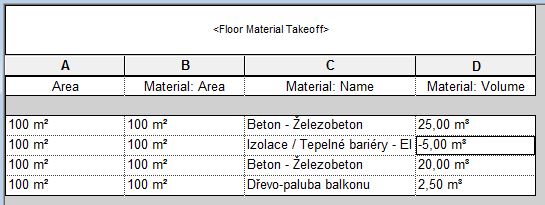


          Chápu, že mám málo izolace, že nemám žádnou izolaci, ale záporné množství objemu materiálu? To jako že něco dlužím? Jsou to jen dvě podlahy přes sebe.


          -------------
          PJ

          http://www.jirat.cz" rel="nofollow - www.jirat.cz


          Odeslal: sonicer
          Datum odeslání: 30.led.2017 v 16:55
          Uvedená chyba je špatný mezi výpočet a předání dat do tabulky.

          Když si stěnu rozložíte na parts. Tak při kliknutí na určitou vrstvu jsou ve vlastnostech objemy  stále správně...Jen v tabulce je špatně hodnota.;)


          -------------
          Sonicer - Revit master, plugin developer
          http://www.bimrvt.cz" rel="nofollow - BimRvt.cz


          Odeslal: PepaR
          Datum odeslání: 30.led.2017 v 17:59
          Ahoj Petře, 

          mohl by jsi mi prosím poslat soubor, kde to máš nasimulováno?  Zkusím to jak bude chvilka ve 2018.


          -------------
          PepaR
          https://www.jremes.cz" rel="nofollow - jremes.cz | https://www.stavlab.cz" rel="nofollow - stavlab.cz


          Odeslal: sonicer
          Datum odeslání: 30.led.2017 v 19:20
          Viz. odkaz

          http://help.autodesk.com/view/RVT/2016/CSY/?guid=GUID-F8270A42-CA71-46C7-B145-85EC2CB8E4A1" rel="nofollow - http://help.autodesk.com/view/RVT/2016/CSY/?guid=GUID-F8270A42-CA71-46C7-B145-85EC2CB8E4A1


          text v poznámce;)


          -------------
          Sonicer - Revit master, plugin developer
          http://www.bimrvt.cz" rel="nofollow - BimRvt.cz


          Odeslal: Peter Jirat
          Datum odeslání: 31.led.2017 v 09:25
          Původně odeslal(a) sonicer sonicer napsal(a):

          Viz. odkaz

          http://help.autodesk.com/view/RVT/2016/CSY/?guid=GUID-F8270A42-CA71-46C7-B145-85EC2CB8E4A1" rel="nofollow - http://help.autodesk.com/view/RVT/2016/CSY/?guid=GUID-F8270A42-CA71-46C7-B145-85EC2CB8E4A1


          text v poznámce;)

          Díky, ale k rozdílům dochází vždy, když spojíte dvě stěny, z nichž jedna má více než dvě vrstvy. To podle mne není odhadem kvůli výkonu, ale chybou v programu. Nebo můžeme ke každému projektu přidávat i odkaz na help, kde to klientovi zdůvodníte (nám se stalo, že klient na takovouto chybu odhadu přišel). 
          Parts sice vykazují přesné údaje o objemu, ale nedají se vždy použít, ne vše lze na Parts převést, není to živý element, musíte mít nad nimi dohled, a výrazně zatíží velké modely. A i Parts mají problém, ale zas s vykazovanou plochou materiálů...


          -------------
          PJ

          http://www.jirat.cz" rel="nofollow - www.jirat.cz


          Vytisknout stránku | Zavřít okno