Vytisknout stránku | Zavřít okno

Uvedena aktualizace Revit 2018.3

Vytištěno z: CAD Fórum
Kategorie: Autodesk - stavebnictví, strojírenství, CAD/GIS
Název fóra: Revit, BIM
Popis fóra: Diskuse k AEC CAD/BIM aplikacím Autodesk Revit, Revit LT, AEC Collection, Autodesk Forma, Dynamo, ACC
URL: https://www.cadforum.cz/forum/forum_posts.asp?TID=25933
Datum vytištění: 29.čer.2026 v 21:15


Téma: Uvedena aktualizace Revit 2018.3
Odeslal: Vladimír Michl
Předmět: Uvedena aktualizace Revit 2018.3
Datum odeslání: 09.dub.2018 v 17:04
Byla uvedena aktualizace Autodesk Revit 2018.3. Přináší podporu nové generace nástrojů BIM 360 pro online sdílení BIM projektů ( https://www.cadstudio.cz/nova-generace-nastroju-bim-360-art3405 - viz ) a desítky různých oprav a vylepšení. Aktualizaci si můžete stáhnout a nainstalovat pomocí Desktop App nebo z Autodesk Account.

Přehled změn ve verzi 2018.3, build 20180329_1100.

2018.3 Update
      • Resolved Issues
        • Platform
          • Annotation
            • Improved stability when canceling in-canvas dimensions and tag controls.
            • Fixed an issue that caused underlined small font to display incorrectly.
          • Cloud Rendering
            • Fixed an issue with the image file size rendering on the cloud when using the highest setting.
          • Collaboration for Revit
            • Fixed an issue that could cause DWG file link paths to be corrupted when collaboration for Revit is initiated.
            • Improved stability when loading larger files or working across a slow network connection.
            • Improved messaging at the start of the initiate collaboration process.
            • Improved stability when reloading latest if the active viewport has been deleted by another user.
            • Improved stability when user signs out of Autodesk A360 and then attempts to sync with central.
          • Color Fill
            • Improved stability when working with color fills.
          • Dimensions
            • Improved stability when adjusting the temporary dimension witness line during the creation of doors.
            • Improved the warning displayed when dimensions are not copied because they did not find a reference.
          • Export
            • Fixed an issue in which exporting sheets with section views to DWG could result in blocks being incorrectly positioned in the DWG file.
            • Improved stability when cancelling a DWF Export.
          • File Open/Save/Upgrade
            • Fixed an issue that could cause files and folder to be displayed in an incorrect order after selecting the BIM 360 location in the Open dialog.
            • Improved stability when saving models immediately after upgrading a Revit 2017 project.
            • Improved stability when upgrading a Revit project.
          • In-Place Families
            • Improved stability when editing an in-place component and modifying a view placed on a sheet.
            • Improved stability when copying and pasting in-place families, which could lead to file corruption.
            • Improved stability when associating family parameters to global parameters for in-place families.
          • Materials
            • Improved stability when using the Material Browser to edit materials.
            • Fixed an issue to allows patterns to be set in the Materials dialog when the project included multiple solid fill patterns.
          • Offset
            • Improve accuracy of the offset command when the copy option is unchecked.
          • Phasing
            • Improved stability when placing or modifying a room in a model that contains invalid phase information.
          • Printing
            • Fixed an issue where polymeshes (such as topography and RPC content) lose color when printing in Consistent Color mode.
          • Schedules
            • Improved stability when working with schedule view.
            • Improve stability when exporting a schedule.
          • Shared Coordinates
            • Improved results when linking multiple instances of a Revit project with geolocation and shared poisitioning is disabled.
          • Shutdown
            • Improved stability when exiting a Revit session.
          • Startup/Save
            • Improved stability when launching Revit as a restricted Windows user.
          • User Interface
            • Fixed an issue that prevented minimized view windows from being activated and displayed correctly when using the Switch Windows command.
            • Fixed an issue where Revit could run of out windows resources when working with multiple projects.
          • Worksharing
            • Prevents use of the Sync with Central command until background model calculations are complete.
        • Architecture
          • Stairs
            • Improved stability when upgrading Revit 2017 or earlier projects that contain multistory stairs.
          • Walls
            • Improved stability when opening views that include wall joins.
        • MEP
          • Conduit
            • Improved stability when editing conduit elements.
          • Duct/Pipe
            • Improved stability when editing pipe elements that are members of a group.
            • Fixed an issue that could cause the calculated pressure drop of the network to change when stretching an analytical pipe connection whose pressure drop is set to zero.
            • Fixed an issue that could cause systems to be removed or assigned improperly when using analytical pipe connections to connect network components.
            • Improved analytical pipe connections by maintaining their connection to pipes when using the Change Type or Reapply Type commands.
          • Fabrication
            • Improved stability when deleting a fabrication part coupling.
            • Fixed an issue that caused the MEP fabrication part browser to display blank services after upgrading a project.
            • Improved stability when using the Change Size command while working with MEP fabrication pipework.
            • Fixed an issue to improve stability when loading services containing dummy buttons.
            • Improved CID pattern 64 to support shape changes on the branch connector for ductwork.
            • Fixed an issue that caused the product entry of fittings to display as blank in the Properties palette.
            • Fixed an issue with the change service feature that caused the available service list to be over filtered.
            • Improved the snap accuracy when picking end points on stacks while using the Multi-Point Routing tool.
            • Added the oversize reviewable warning to oversized pars when using the multi-point routing feature.
            • Improved the behavior of pipe taps to maintain the original size after placement.
            • Fixed an issue that could occur when changing the service group and size from round to rectangular in a plan or elevation view.
            • Improved the behavior of fabrication taps so they resize correctly when re-hosting to different size pipe.
            • Fixed an issue that resulted in unwanted propagation when moving sloped fittings that are not perfectly aligned.
          • Family Editor
            • Improved stability when modifying a nested family in Family Editor and running the Add Insulation command.
          • Flex Pipe
            • Improved stability when a project contains a flex pipe that has lost its associated geometry.
          • Lookup Table
            • Improved stability when importing lookup tables into Revit families.
          • P&ID Modeler
            • Improved performance when working with Revit projects that are not associated with a P&ID project.
            • Fixed an issue with the display of the P&ID Modeler browser between Revit sessions.
            • Fixed an issue with handling localized P&ID Modeler help page links.
          • Schedules
            • Improved stability when using highlight in model command from a conduit run schedule.
          • System Inspector
            • Fixed an issue where pipe accessories and fittings were adding static pressure to the return system piping instead of subtracting static pressure.
        • Structure
          • Reinforcement
            • Fixed an issue where the reinforcement cover could be reset to the default value after upgrading Revit 2017 or earlier projects to Revit 2018.
          • Steel Connections
            • Fixed an issue that could lead to project corruption when adding or modifying structural connections in a multi-user project.

        • API
          • Improved stability when printing sheets through the API.
      • Improvements
        • Added connection to Next Gen BIM 360 for cloud worksharing, which allows flexible access permissions for cloud workshared models within the same project.
        • Updated the Scope Box drop-down list in the Properties Panel to display the scope boxes in alpha-numeric order.
        • Improved the pipe sizing feature by basing the size of a single pipe attached with taps or analytical pipe connections on the worst case.


  • -------------
    Vladimír Michl (moderátor)
    ARKANCE CZ - https://arkance.world - arkance.world
    (podpora viz emea.support.arkance.world)


    Odpovědi:
    Odeslal: milan d
    Datum odeslání: 10.dub.2018 v 17:39
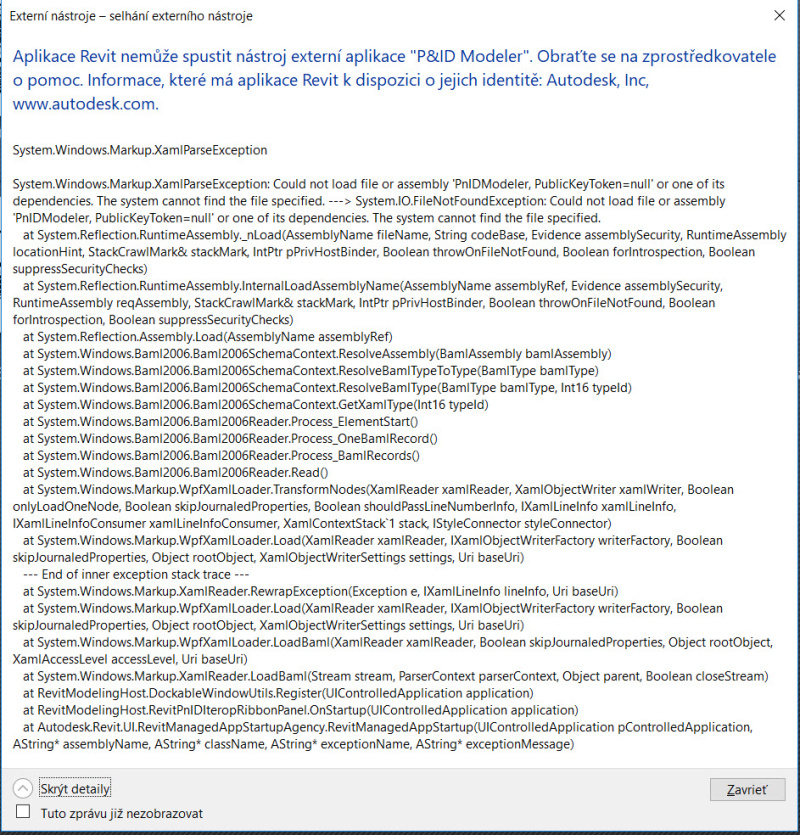
    Po instalaci nebehne chybove hlasenico delat.....

    -------------
    milan


    Odeslal: Vladimír Michl
    Datum odeslání: 10.dub.2018 v 18:56
    je to jen varování, nicméně také jsme na to narazili (pokud PID Modeler nepoužíváte, ignorujte)

    -------------
    Vladimír Michl (moderátor)
    ARKANCE CZ - https://arkance.world - arkance.world
    (podpora viz emea.support.arkance.world)


    Odeslal: milan d
    Datum odeslání: 10.dub.2018 v 19:14
    Ďakujem,
    problém mám ten, že pri každom spustení RT daná hláška nabehne a nijako sa daná správa nedá odstrániť.
    Ani zaškrtnutím "Tuto zprávu již nezobrazovat". Modeler nepouživám, ako ho viem odinštalovať, popr. zrušiť vyskakovanie daného okna. 


    -------------
    milan


    Odeslal: Marfry
    Datum odeslání: 11.dub.2018 v 07:37
    Dobrý den,
    podle databáze znalostí Autodesku je P&ID Modeller plně integrovaný do Revitu 2018.2+, takže ho nelze odinstalovat.
    Od verze 2018.3 pravděpodobně způsobuje nějaké problémy, takže se nespustí a zobrazí chybové hlášení, které opravdu nejde vypnout a zobrazuje se po každém spuštění Revitu 2018.3 ...

    Existuje cesta jak z toho ven a to, že přejmenujete složku  "PnIDModeler.addin" na např. "PnIDModeler.addin-zaloha" nebo ji smažete (vhodnější bude ji přejmenovat).
    Složka se nachází v "c:\Program Files\Autodesk\Revit 2018\AddIns\"

    Po provedení výše uvedeného a dalším spuštění Revitu 2018.3 se hlášení už nezobrazí a také nebude fungovat P&ID Modeller.


    Odeslal: milan d
    Datum odeslání: 11.dub.2018 v 08:42
    Ďakujem za "riešenie", ale funguje - daná hláška sa nezobrazuje.


    -------------
    milan


    Odeslal: Peter Jirat
    Datum odeslání: 11.dub.2018 v 09:53
    Asi to bude problém české verze (tam se to objevuje), v anglické se nic nezobrazí (alespoň u mne).

    -------------
    PJ

    http://www.jirat.cz" rel="nofollow - www.jirat.cz


    Odeslal: milan d
    Datum odeslání: 11.dub.2018 v 10:15
    Máte pravdu, je to problém iba české verze. V EN je to OK. "soudruzi ....udělali chybu" :-)


    -------------
    milan


    Odeslal: Bonavox
    Datum odeslání: 12.dub.2018 v 11:19
    Pro představu báječné funkčnosti pro naplnění vize vlády, jak se od roku 2022 vše pojede přes IFC:
    Exporty stavby (cca 200 MB) do IFC v Revit LT 2018.3


    nastavení exportu "IFC 2x3 Coordination View 2.0"
    kratší čekání (Revit neodpovídá)
    výsledek: úspěšný IFC (80 MB)
    DDS-CAD: ve vyšších podlažích chybí ve 3D pohledu obvodové stěny (jsou všechny v 1. NP)


    nastavení exportu "IFC 2x3 Coordination View"
    dlouhé čekání (Revit neodpovídá)
    výsledek: úspěšný IFC (187 MB)
    DDS-CAD: ve vyšších podlažích chybí ve 3D pohledu obvodové stěny (jsou všechny v 1. NP)


    nastavení exportu "IFC 2x3 GSA Concept Design BIM 2010"
    dlouhé čekání (Revit neodpovídá)
    výsledek: úspěšný IFC (190 MB)
    DDS-CAD: ve vyšších podlažích chybí ve 3D pohledu obvodové stěny (nejsou vidět ani v 1. NP)


    nastavení exportu "IFC 2x3 Basic FM Handover View"
    dlouhé čekání (Revit neodpovídá)
    výsledek: úspěšný IFC (182 MB)
    DDS-CAD: ve vyšších podlažích chybí ve 3D pohledu obvodové stěny (nejsou vidět ani v 1. NP)


    nastavení exportu "IFC2x2 Coordination View"
    dlouhé čekání (Revit neodpovídá)
    výsledek: 712 chyb, IFC nelze exportovat
    následuje pád Revitu


    nastavení exportu "IFC 2x2 Singapore BCA e-Plan Check"
    dlouhé čekání (Revit neodpovídá)
    výsledek: 867 chyb, IFC nelze exportovat
    následuje pád Revitu


    nastavení exportu "IFC2x3 COBie 2.4 Design Deliverable View"
    dlouhé čekání (Revit neodpovídá)
    výsledek: úspěšný IFC (184 MB)
    DDS-CAD: ve vyšších podlažích chybí ve 3D pohledu obvodové stěny (jsou všechny v 1. NP)


    nastavení exportu "IFC4 Reference View"
    dlouhé čekání (Revit neodpovídá)
    výsledek: sice 0 chyb ale 3 výstrahy, IFC nelze exportovat


    nastavení exportu "IFC4 Design Transfer View"
    kratší čekání (Revit neodpovídá)
    výsledek: sice 0 chyb ale 3 výstrahy, IFC nelze exportovat


    Vytisknout stránku | Zavřít okno