Automatizace - otevření modelu, export dxf...
Vytištěno z: CAD Fórum
Kategorie: Autodesk - stavebnictví, strojírenství, CAD/GIS
Název fóra: iLogic a ETO
Popis fóra: Funkce a makra iLogic, Inventor Engineering to Order (ETO), automatizace a konfigurace výrobků
URL: https://www.cadforum.cz/forum/forum_posts.asp?TID=29274
Datum vytištění: 04.říj.2026 v 05:40
Téma: Automatizace - otevření modelu, export dxf...
Odeslal: michalkopriva
Předmět: Automatizace - otevření modelu, export dxf...
Datum odeslání: 20.srp.2019 v 09:59
|
Zdravím, Zatím se mi nepovedlo něco podobného najít, tak snad někdo poradí. Je možné využít iLogic + Macro k tomu, aby mi Inventor sám otevřel model, vyexportoval dxf dle nějakého pravidla (to mám), bez uložení model zavřel... a tak pořád dokola? V excelu by byly názvy modelů (např.: A-321654, A123456, 123456, 19-108539...), které by vyhledával. Bohužel nevyužíváme Vault od Autodesku, máme BlueCielo Meridian. :-/ Děkuji za nápady a pomoc.
|
Odpovědi:
Odeslal: Vladimír Michl
Datum odeslání: 20.srp.2019 v 11:06
|
Asi by šlo řešit přes Plánovač úloh, iLogic a X-Tools, ale bude to výrazně složitější než s Vaultem. ------------- Vladimír Michl https://CADs.cz - CADs.cz , https://www.linkedin.com/in/vmichl/ - LinkedIn Autodesk Expert Elite |
Odeslal: Navara
Datum odeslání: 20.srp.2019 v 11:16
|
Řešitelné to určitě je. Nicméně v rámci stability a odolnosti bych to dělal jako AddIn, který nevyžaduje například otevřený soubor pro spuštění. Jinak jako zdroj je asi vhodnější použít nějaký textový soubor, než excel, ale to už je čistě na vás. EDIT: Kromě samotného exportu do DXF by to mohlo vypadat asi nějak takhle...
|
Odeslal: michalkopriva
Datum odeslání: 20.srp.2019 v 15:39
|
Super, moc děkuji za řešení. Jen tedy nevím, jak vytvořím AddIn. Jako makro mi to v Inventoru nefunguje :-/
|
Odeslal: Navara
Datum odeslání: 20.srp.2019 v 21:19
Jak psát addin je trochu na delší povídání/psaní  Nicméně jako makro to funguje. Jenom je potřeba mít vytvořený zdrojový soubor "C:\Temp\PartsForDxf. Nicméně jako makro to funguje. Jenom je potřeba mít vytvořený zdrojový soubor "C:\Temp\PartsForDxf.Samozřejmě tohle není kompletní řešení, ale jenom první návrh a ukázka jak otevírat, exportovat a zavírat soubory definované v excelovské tabulce pomocí iLogicu. |
Odeslal: michalkopriva
Datum odeslání: 21.srp.2019 v 08:40
|
To chápu :-) Budu si muset v práci vydupat nějaké školení....  Stále se mi to jako makro nedaří zprovoznit. Mám s tím problém ve VBA Editoru :-/ Zdrojový soubor jsem si změnil, názvy souborů ve sloupci "A" mám. 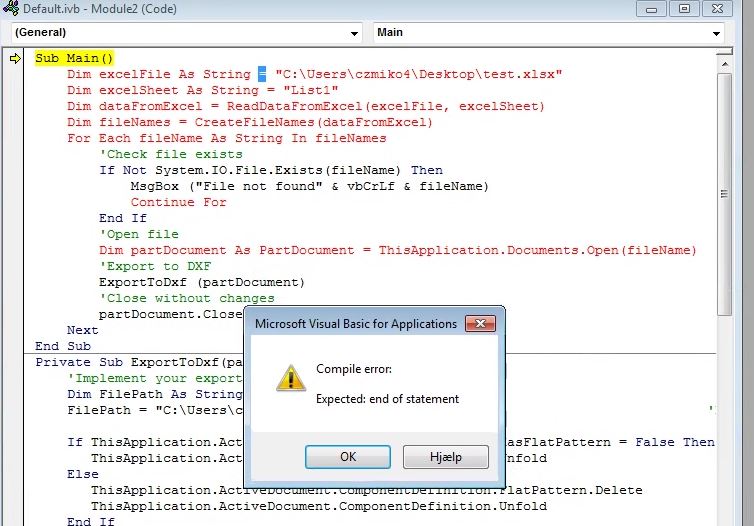 |
Odeslal: Navara
Datum odeslání: 21.srp.2019 v 09:09
|
Ten kód je v iLogicu, ne ve VBA. Tam by to bylo podstatně horší, až neřešitelné. Už jenom to čtení z excelu by byl docela ořech. Takže spusťte to jako pravidlo iLogic a bude to chodit. |
Odeslal: michalkopriva
Datum odeslání: 21.srp.2019 v 11:18
|
Aha, no tak trochu jsem to tušil, ale zmátlo mě jak jsme se bavili o makru :-D Nevím, proč jsem to nevyzkoušel :-D Paráda, funguje to :-) Jen to tedy nenajde žádný model :-/ Jakou cestu k modelům nastavit, když používáme BlueCielo - Meridian?  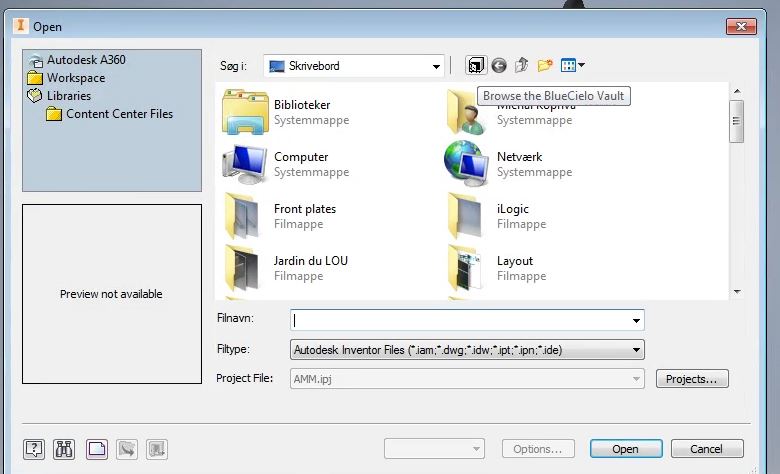 |
Odeslal: Navara
Datum odeslání: 21.srp.2019 v 14:55
|
To už je věc implementace. Já nevím, kam se ty soubory stahujou, ale aby tohle makro fungovalo, tak to musí být někde na lokálním disku. Čekal bych, že budou někde v pracovním adresáři Inventoru. Pokud nevíte, jestli jsou na disku a chcete je stahovat z Meridianu, tak to se musíte obrátit na ně. V tom už vám nepomůžu.
|
Odeslal: michalkopriva
Datum odeslání: 21.srp.2019 v 15:15
|
Dobře, myslel jsem jestli není nějaká možnost, jak inventoru říct, že to má hledat v Meridianu. Pokusím se to zjistit u nich. Jinak tedy u modelů co jsou na disku to funguje. Jen když to exportuje dxf, tak ho to nepojmenuje dle modelu ze kterého se exportuje... Název exportovaného dxf je prázdný. Sub Main() Dim excelFile As String = "C:\Users\czmiko4\Desktop\Test-excel-export\Test.xlsx" Dim excelSheet As String = "List1" Dim dataFromExcel = ReadDataFromExcel(excelFile, excelSheet) Dim fileNames = CreateFileNames(dataFromExcel) For Each fileName As String In fileNames 'Check file exists If Not System.IO.File.Exists(fileName) Then MsgBox ("File not found" & vbCrLf & fileName) Continue For End If 'Open file Dim partDocument As PartDocument = ThisApplication.Documents.Open(fileName) 'Export to DXF ExportToDxf (partDocument) 'Close without changes partDocument.Close (True) Next End Sub Private Sub ExportToDxf(partDocument As partDocument) 'Implement your export to DXF here Dim FilePath As String FilePath = "C:\Users\czmiko4\Desktop\Test-excel-export\" If ThisApplication.ActiveDocument.ComponentDefinition.HasFlatPattern = False Then ThisApplication.ActiveDocument.ComponentDefinition.Unfold Else ThisApplication.ActiveDocument.ComponentDefinition.FlatPattern.Delete ThisApplication.ActiveDocument.ComponentDefinition.Unfold End If Dim fSett As String fSett = "FLAT PATTERN DXF?AcadVersion=2000&OuterProfileLayer=IV_INTERIOR_PROFILES" Dim fSname As String fSname = FilePath & ThisDoc.FileName(False) & ".dxf" ThisApplication.ActiveDocument.ComponentDefinition.DataIO.WriteDataToFile( fSett, fSname) 'MessageBox.Show("DXF uložen jako: " & fSname ,"Uložení DXF rozvinu", MessageBoxButtons.OK) ThisApplication.ActiveDocument.ComponentDefinition.FlatPattern.ExitEdit ' MsgBox(String.Format("Exporting to dxf...{1}{0}", partDocument.FullFileName, vbCrLf)) End Sub Private Function CreateFileNames(dataFromExcel As List(Of String)) As List(Of String) Dim fileNames As New List(Of String) For Each fileName As String In dataFromExcel fileNames.Add(String.Format("C:\Users\czmiko4\Desktop\Test-excel-export\{0}.ipt", fileName)) Next Return fileNames End Function Private Function ReadDataFromExcel(excelFile As String, excelSheet As String) As List(Of String) Dim cellValues As New List(Of String) Dim column As String = "A" Dim row As Integer = 1 GoExcel.Open(excelFile, excelSheet) Do Dim cellAddress As String = String.Format("{0}{1}", column, row) Dim cellValue = GoExcel.CellValue(cellAddress) If (cellValue Is Nothing OrElse cellValue.ToString() = "") Then Exit Do End If cellValues.Add (cellValue) row += 1 Loop GoExcel.Close() Return cellValues End Function |
Odeslal: Navara
Datum odeslání: 26.srp.2019 v 10:37
|
Problém je v tom, že při vytváření jména souboru používáte ThisDoc, což není v daném přípapadě možné. Dim fSname As String fSname = FilePath & ThisDoc.FileName(False) & ". Je potřeba vycházet z argumentu partDocument Např.:
Dále je potřeba se v této metodě vyvarovat používání ThisApplication.ActiveDocument. To nemusí skončit dobře.
|