Non-linear gradient
Printed From: CAD Forum
Category: EN
Forum Name: Civil 3D, Map, InfraWorks
Forum Description: Discussion about mapping and GIS applications Map, Civil3D, InfraWorks, MapGuide and Raster Design
URL: https://www.cadforum.cz/forum_en/forum_posts.asp?TID=10017
Printed Date: 12.Oct.2026 at 08:42
Topic: Non-linear gradient
Posted By: GerroffMe
Subject: Non-linear gradient
Date Posted: 03.Feb.2014 at 11:46
|
Hi all, I am trying to recreate a .dwg version of a logo for a company called RWE. Their logo has a gradient in it, but it does not appear to be a linear transition from dark to light. I have tried using the gradient/hatch feature but it has not given the desired results. Does anyone have any recommendations how I can achieve an exact match for the gradient? Here is the logo I am trying to recreate: https://www.google.co.uk/search?q=rwe&safe=off&espv=210&es_sm=122&source=lnms&tbm=isch&sa=X&ei=mHLvUpC1NcSq7QaS1YH4Aw&ved=0CAoQ_AUoAg&biw=1920&bih=1085#facrc=_&imgrc=TBpUD18xHDpaHM%253A%3B_FSQzhJncE4PsM%3Bhttp%253A%252F%252Fwww.refitsmarthomes.org%252Fwp-content%252Fuploads%252F2012%252F08%252FRWE_UK_Logo_3C_P_M.jpg%3Bhttp%253A%252F%252Fwww.refitsmarthomes.org%252Findex.php%252Findustry-partners%252F%3B1108%3B561" rel="nofollow - https://www.google.co.uk/search?q=rwe&safe=off&espv=210&es_sm=122&source=lnms&tbm=isch&sa=X&ei=mHLvUpC1NcSq7QaS1YH4Aw&ved=0CAoQ_AUoAg&biw=1920&bih=1085#facrc=_&imgrc=TBpUD18xHDpaHM%253A%3B_FSQzhJncE4PsM%3Bhttp%253A%252F%252Fwww.refitsmarthomes.org%252Fwp-content%252Fuploads%252F2012%252F08%252FRWE_UK_Logo_3C_P_M.jpg%3Bhttp%253A%252F%252Fwww.refitsmarthomes.org%252Findex.php%252Findustry-partners%252F%3B1108%3B561 |
Replies:
Posted By: Vladimir Michl
Date Posted: 03.Feb.2014 at 13:06
|
Just pick the two "extreme" colors - e.g. Color 152 and White and use the GR_LINEAR gradient with 90° angle. ------------- Vladimir Michl //CADs.cz" rel="nofollow - //CADs.cz , https://www.linkedin.com/in/vmichl/" rel="nofollow - LinkedIn Autodesk Expert Elite |
Posted By: GerroffMe
Date Posted: 03.Feb.2014 at 13:13
|
GR_LINEAR gives a linear gradient, however I am looking for a non-linear one, i.e. a gradient that is logarithmic that starts off dark, gets suddenly lighter and then from the middle point starts getting lighter slower and slower. |
Posted By: Kent Cooper
Date Posted: 04.Feb.2014 at 15:14
|
Their logos are .BMP files, which is one of the file types supported in AutoCAD's IMAGEATTACH command, so you can just insert one that way into an AutoCAD drawing. |
Posted By: GerroffMe
Date Posted: 04.Feb.2014 at 15:16
| Would you be able to elaborate a bit on the process, I am not familiar with that command. |
Posted By: GerroffMe
Date Posted: 04.Feb.2014 at 15:21
| Oh actually I misunderstood you, I have already attached the image, as I am tracing it. I cannot use the original image for the gradient because I need it to be compatible with other pieces of software, therefore it all needs to recreated purely using cad and not the original image. |
Posted By: Kent Cooper
Date Posted: 04.Feb.2014 at 20:30
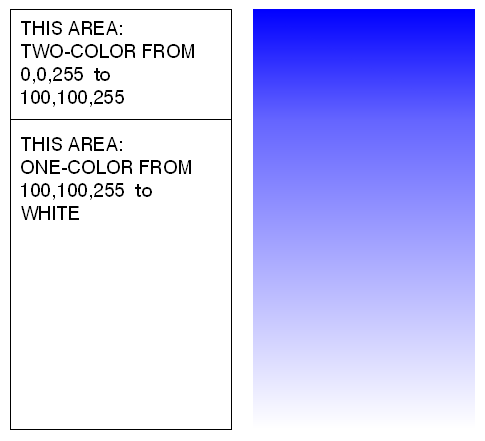
How about an approach like this? You can vary the proportions between the two areas, or use more than two areas if that gets you the look you want. Just make sure the "end" color of one gradient is the same as the "start" color of the next one.
 |
Posted By: GerroffMe
Date Posted: 05.Feb.2014 at 10:13
|
Cheers Kent, I did approach it like that and it worked great. I was hoping there would be easier/quicker way, but this way although a bit time consuming did work well. Cheers for your response.
|
Posted By: John Connor
Date Posted: 05.Feb.2014 at 12:54
|
Brilliant solution Mr. Cooper! I'll have to make note of it. ------------- "Humans have a strength that cannot be measured. This is John Connor. If you are reading this, you are the resistance." <<AutoCAD 2015>> |