ploting
Printed From: CAD Forum
Category: EN
Forum Name: AutoCAD
Forum Description: Discussion about AutoCAD and AutoCAD LT, viewers, DWG and DXF formats, Design Review, AutoCAD web, Drive, add-ons
URL: https://www.cadforum.cz/forum_en/forum_posts.asp?TID=10037
Printed Date: 23.Oct.2026 at 23:16
Topic: ploting
Posted By: sungik
Subject: ploting
Date Posted: 11.Feb.2014 at 06:16
|
i have set up the margin are narrow as i want(e.g 3mm),but its result on the printed paper are not.even large than 10 mm wide arround. help me please ------------- blackjeans |
Replies:
Posted By: John Connor
Date Posted: 11.Feb.2014 at 11:30
|
What paper size are you printing to? Some sizes will accommodate wider margins. ------------- "Humans have a strength that cannot be measured. This is John Connor. If you are reading this, you are the resistance." <<AutoCAD 2015>> |
Posted By: sungik
Date Posted: 11.Feb.2014 at 16:07
|
yes i am,, i have used a4 297x210 mm paper ------------- blackjeans |
Posted By: John Connor
Date Posted: 11.Feb.2014 at 16:51
|
I think it is also dependent on the printer you are using. For example I print to Canon large format inkjet printer that lists both borderless and extended sizes for certain size papers. ------------- "Humans have a strength that cannot be measured. This is John Connor. If you are reading this, you are the resistance." <<AutoCAD 2015>> |
Posted By: philippe JOSEPH
Date Posted: 12.Feb.2014 at 07:53
|
Hello sungik, If I understand your needs I supose that you want to print an A4 format ( 297 x 210 mm ) or A3 format ( 420 x 297 mm ).
I propose you to draw a rectangle of 297x210 mm ( or 420x297 mm ) to send on your printer.
Your little printer has margins that will spoil the scale of your print but when you will launch the plot you will have the message in the printer dialog box :
Plot scale : ( Apply Fit to paper ) 1 mm = 1.05 unit ( for example ).
If you do a copy/scale of your 297x210 / 1.05 = 282.857... x 200.000..., then when you print this rectangle of 282... x 200... the print will be at scale 1/1.
You can use this rectangle ( I use a double rectangle with the exact + little format together ) for a 1/1 scale.
You can do a scale by x 5 for a 1/5 print directly from the model space or use it at scale 1/1 in the layout space and open a viewport.
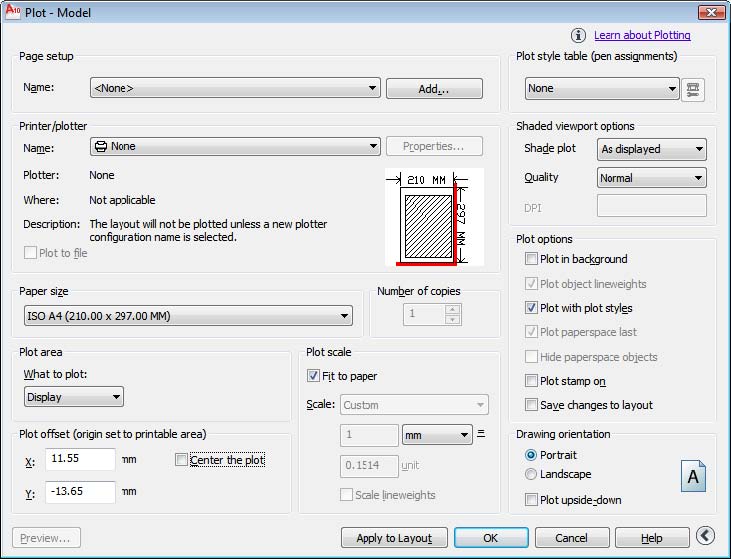 Please tell us if this helped or not.
Ask for more and have a good day.
|