pdf format
Printed From: CAD Forum
Category: EN
Forum Name: AutoCAD
Forum Description: Discussion about AutoCAD and AutoCAD LT, viewers, DWG and DXF formats, Design Review, AutoCAD web, Drive, add-ons
URL: https://www.cadforum.cz/forum_en/forum_posts.asp?TID=10065
Printed Date: 06.Sep.2026 at 15:31
Topic: pdf format
Posted By: FUE
Subject: pdf format
Date Posted: 19.Feb.2014 at 10:51
|
Hi, How can I convert a dwg.file into a pdf.file? regards, ------------- E.FURR PIPING SPECIALIST |

Replies:
Posted By: John Connor
Date Posted: 19.Feb.2014 at 11:26
|
There is an option to plot to PDF file format. Find it under Printer/plotter name. It will say DWG to PDF.pc3. ------------- "Humans have a strength that cannot be measured. This is John Connor. If you are reading this, you are the resistance." <<AutoCAD 2015>> |
Posted By: oktri ps
Date Posted: 25.Feb.2014 at 06:59
|
before you print/plott file become pdf file, you must instals pdf converter, ex. : dopdf, etc. |
Posted By: John Connor
Date Posted: 25.Feb.2014 at 11:34
|
NO you do not have to install a converter to plot a drawing in PDF file format. You can even do it in AutoCAD 2010. From the AutoCAD 2010 Help file, topic: PDF.... Using the DWG to PDF driver, you can create Adobe® Portable Document Format (PDF) files from drawings. ------------- "Humans have a strength that cannot be measured. This is John Connor. If you are reading this, you are the resistance." <<AutoCAD 2015>> |
Posted By: John Connor
Date Posted: 25.Feb.2014 at 11:44
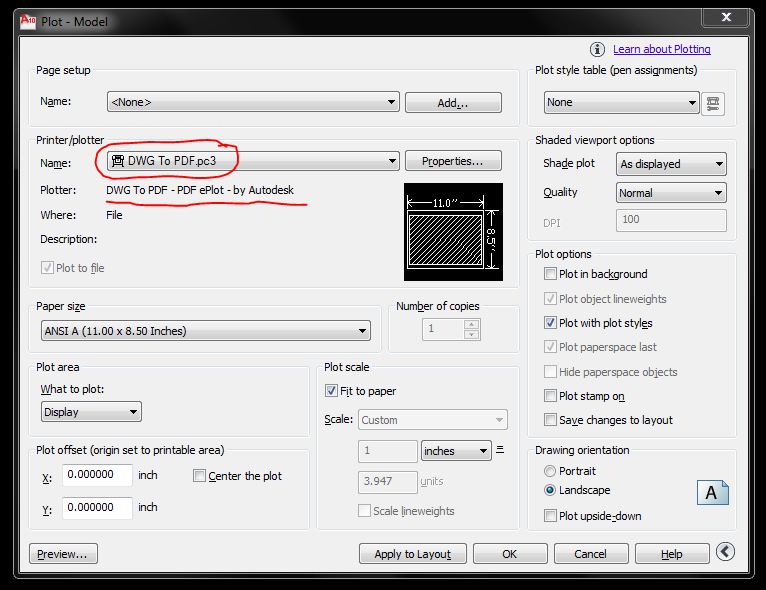 This screenshot was taken from AutoCAD 2010. ------------- "Humans have a strength that cannot be measured. This is John Connor. If you are reading this, you are the resistance." <<AutoCAD 2015>> |