2D Problem with circles in an equilateral tringle
Printed From: CAD Forum
Category: EN
Forum Name: AutoCAD
Forum Description: Discussion about AutoCAD and AutoCAD LT, viewers, DWG and DXF formats, Design Review, AutoCAD web, Drive, add-ons
URL: https://www.cadforum.cz/forum_en/forum_posts.asp?TID=10110
Printed Date: 06.Sep.2026 at 12:32
Topic: 2D Problem with circles in an equilateral tringle
Posted By: sadiq3210
Subject: 2D Problem with circles in an equilateral tringle
Date Posted: 08.Mar.2014 at 21:29
|
Hi, its my first post here, i use AutoCAD2010. Below is the link of pic of the drawing i m talking about. I can create this drawing by. 1. making 1 circle of bottom row 10 radius. 2. copy that to the right 3 times 3. make another circle with ttr of above row 4. copy that to right 2 times 5. repeating same steps 2nd row 6. and top circle . 7. then making boundary line with xline (horizontal) and using line command + tan + bject snap tracking. 8. Trim and scale the whole figure with reference of given dimension. I have 2 questions here. 1) Is there any simpler way to make this drawing? 2) How can i build this drawing if i first make the triangle and then circle? |
Replies:
Posted By: sadiq3210
Date Posted: 08.Mar.2014 at 21:32
| http://s38.photobucket.com/user/sadiq3210/media/triangle_zpsc641fbe7.png.html |
Posted By: John Connor
Date Posted: 09.Mar.2014 at 00:25
|
An easier way to create the drawing would take another program. Have you ever heard of "nesting" software? ------------- "Humans have a strength that cannot be measured. This is John Connor. If you are reading this, you are the resistance." <<AutoCAD 2015>> |
Posted By: sadiq3210
Date Posted: 09.Mar.2014 at 08:45
| i mean, another way via the same software |
Posted By: John Connor
Date Posted: 09.Mar.2014 at 11:53
|
The nesting program would be an AutoCAD add-on. Another option would be a custom lisp routine. ------------- "Humans have a strength that cannot be measured. This is John Connor. If you are reading this, you are the resistance." <<AutoCAD 2015>> |
Posted By: sadiq3210
Date Posted: 09.Mar.2014 at 15:36
| i have no idea what custom lisp routine is. i searched on autocad help. but i found nothing. would you please explain a bit |
Posted By: John Connor
Date Posted: 10.Mar.2014 at 13:38
|
Lisp is a programming language that is support in AutoCAD as well as .NET and VBA. Some AutoCAD users create their own lisp programs to do repetitive tasks or to help them do a complex task more easily. ------------- "Humans have a strength that cannot be measured. This is John Connor. If you are reading this, you are the resistance." <<AutoCAD 2015>> |
Posted By: John Connor
Date Posted: 10.Mar.2014 at 14:03
|
I tried your little exercise and despite doing it differently it still took me eight steps. However, if the triangle was drawn first then it could be done in seven steps. ------------- "Humans have a strength that cannot be measured. This is John Connor. If you are reading this, you are the resistance." <<AutoCAD 2015>> |
Posted By: John Connor
Date Posted: 10.Mar.2014 at 14:06
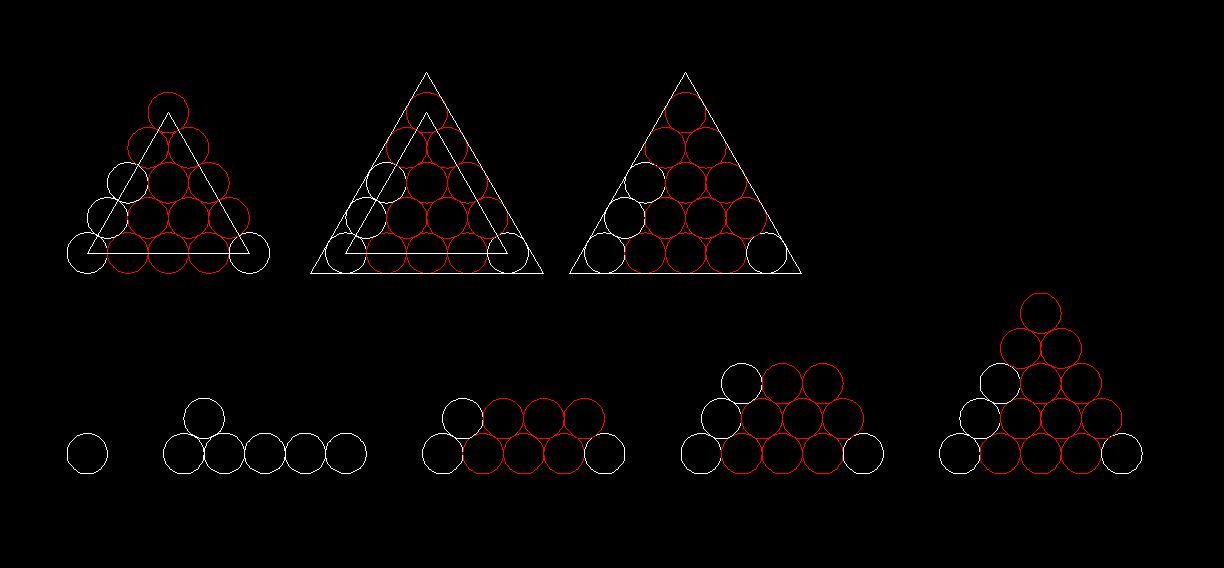 . I used the Circle, Array, Copy, Polyline, Offset and Erase commands. ------------- "Humans have a strength that cannot be measured. This is John Connor. If you are reading this, you are the resistance." <<AutoCAD 2015>> |
Posted By: John Connor
Date Posted: 10.Mar.2014 at 14:15
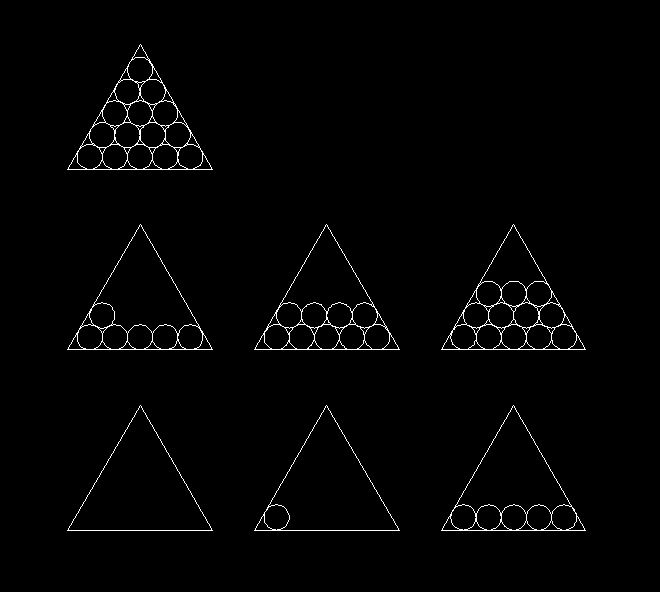 The seven step plan. ------------- "Humans have a strength that cannot be measured. This is John Connor. If you are reading this, you are the resistance." <<AutoCAD 2015>> |
Posted By: sadiq3210
Date Posted: 10.Mar.2014 at 15:26
|
firstly, the object you made is a bit different. i would like to ask some questions here. About 1st picture that you attached. Q1 : why the circles are in different colors? Ans : Q2 : how you made the 6th circle; did you used circle with ttr; yes or no? Ans : About 1st picture that you attached. Q1 : how you made the 1st circle; did you used circle with ttr; yes or no?
|
Posted By: John Connor
Date Posted: 10.Mar.2014 at 15:44
|
The circles are different colors so I could keep track of the ones I copied. The 6th circle was made using the TTR option. The first circle in the 2nd image I attached was made using the TTR option. ------------- "Humans have a strength that cannot be measured. This is John Connor. If you are reading this, you are the resistance." <<AutoCAD 2015>> |
Posted By: Robert_D
Date Posted: 10.Mar.2014 at 16:10
|
 John Connor wrote:
Posted By: John Connor
Date Posted: 10.Mar.2014 at 16:17
|
There would be no easy way to determine what R to use. In this case I basically backed into it since the triangle was derived from the first exercise. In other words...I cheated the system. Your question is quite valid. ------------- "Humans have a strength that cannot be measured. This is John Connor. If you are reading this, you are the resistance." <<AutoCAD 2015>> |
Posted By: sadiq3210
Date Posted: 10.Mar.2014 at 16:38
The only dimension given is the length of side(s) of equilateral triangle.
So, once you make the circles and the sides of triangle. You can scale the whole diagram by using command scale with reference option and entering the given dimension. |
Posted By: John Connor
Date Posted: 10.Mar.2014 at 16:40
|
Now that I think of it Robert you might very well be able to come very close to determining the size of that first circle (second image) with a little math. ------------- "Humans have a strength that cannot be measured. This is John Connor. If you are reading this, you are the resistance." <<AutoCAD 2015>> |
Posted By: sadiq3210
Date Posted: 10.Mar.2014 at 16:42
|
I know the technique of making the circles first and make triangle and then scale. But the question is that if i want to make the triangle first and then make the circles, how can i do it ??  |
Posted By: sadiq3210
Date Posted: 10.Mar.2014 at 16:44
I thing more, You can make all the circles in just three steps. Guess how !!! 
|
Posted By: John Connor
Date Posted: 10.Mar.2014 at 16:53
Well I figured it out but this damn website won't post the image file correctly (comes up blank) and I've used the exact same method as before. Crap! ------------- "Humans have a strength that cannot be measured. This is John Connor. If you are reading this, you are the resistance." <<AutoCAD 2015>> |
Posted By: John Connor
Date Posted: 10.Mar.2014 at 16:59
Path array and copy? ------------- "Humans have a strength that cannot be measured. This is John Connor. If you are reading this, you are the resistance." <<AutoCAD 2015>> |
Posted By: Robert_D
Date Posted: 10.Mar.2014 at 21:06
|
Posted By: philippe JOSEPH
Date Posted: 11.Mar.2014 at 07:45
|
http://www.cadforum.cz/forum_en/uploads/175428/TRIANGLE+CIRCLES_01_A.dwg" rel="nofollow - uploads/175428/TRIANGLE+CIRCLES_01_A.dwg
No Robert_D, your method is aproximate.
John'n first drawing with the colored circles is OK.
The good method is align with "scale to fit".
Or maybe you can do it with "parametric constrains"?
Find here mine.
|
Posted By: sadiq3210
Date Posted: 11.Mar.2014 at 10:18
upload the image somewhere and post link here
|
Posted By: John Connor
Date Posted: 11.Mar.2014 at 10:32
|
I'm beginning to lose interest as I no longer see where this is all going. Is there a practical reason for this discussion or are we having it because someone got bored at work? ------------- "Humans have a strength that cannot be measured. This is John Connor. If you are reading this, you are the resistance." <<AutoCAD 2015>> |
Posted By: sadiq3210
Date Posted: 11.Mar.2014 at 10:32
the link is not working. can't see the image
|
Posted By: sadiq3210
Date Posted: 11.Mar.2014 at 10:36
the only question remaining is that, how to find the radius of circle ?
|
Posted By: John Connor
Date Posted: 11.Mar.2014 at 11:02
|
Robert_D answered that question yesterday. Did you try his method or not? Doesn't matter. It works. Time to move on. ------------- "Humans have a strength that cannot be measured. This is John Connor. If you are reading this, you are the resistance." <<AutoCAD 2015>> |
Posted By: sadiq3210
Date Posted: 11.Mar.2014 at 12:14
| that method ill not give the exact radius. |
Posted By: John Connor
Date Posted: 11.Mar.2014 at 12:34
|
I tested the method only once so what can I say. If it doesn't work for you then find another way. ------------- "Humans have a strength that cannot be measured. This is John Connor. If you are reading this, you are the resistance." <<AutoCAD 2015>> |
Posted By: sadiq3210
Date Posted: 11.Mar.2014 at 15:32
|
the length of side of triangle is 109.6966 after dividing by 11.464101615137753 it give. r=9.66870442 hich is wrong.
the correct radius of circle is 11.5908 |
Posted By: Robert_D
Date Posted: 11.Mar.2014 at 15:32
Drawing triangle w/ arbitrary sides of 10 units in length, radius = 0.87228815093505. (@ max LUPREC in AutoCAD, radius properties = 0.87228815) Zooming in max on intersections of circumferential circles and triangle, there is no gap or overage. AutoCAD recognizes them as intersections. How much more precision is required? PS: formula= 8+(2xsqrt3) Courtesy Erdős/Groemer (1961) |
Posted By: Robert_D
Date Posted: 11.Mar.2014 at 15:48
Check your math. r=9.56870444. If you say r= 11.59, something has changed with your geometry. PS: I just drew it up quickly (@109.6966) and it is quite precise. |
Posted By: Robert_D
Date Posted: 11.Mar.2014 at 16:15
Whereby formula now is 6+(2xsqrt3) & r = 11.5908096152033 |
Posted By: John Connor
Date Posted: 11.Mar.2014 at 16:24
|
Maybe if the OP wouldn't change the rules in the middle of the game we'd all have a better idea of what is going on. Go figure. ------------- "Humans have a strength that cannot be measured. This is John Connor. If you are reading this, you are the resistance." <<AutoCAD 2015>> |
Posted By: Kent Cooper
Date Posted: 11.Mar.2014 at 21:26
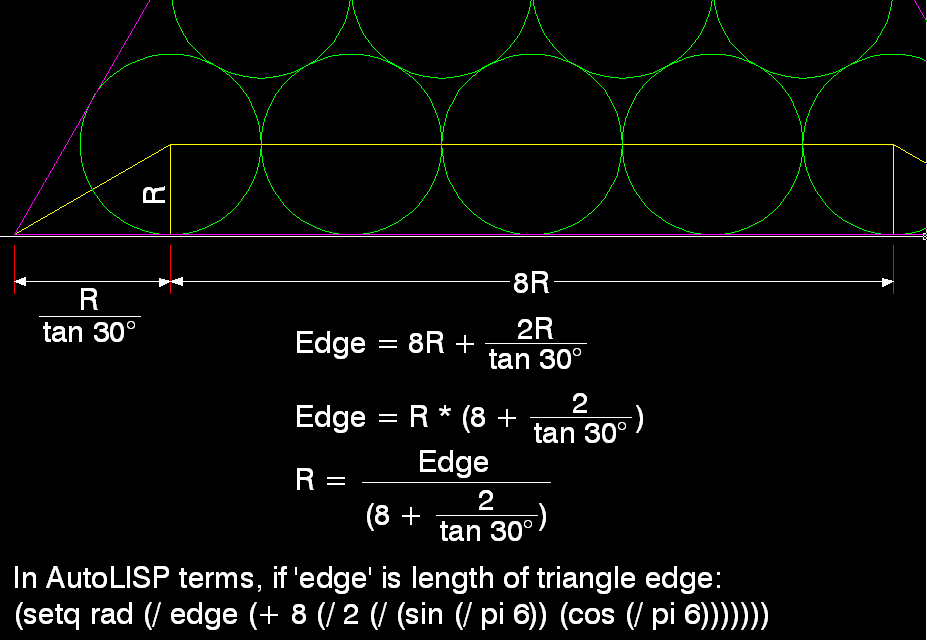
That's for FIVE Circles in the bottom row. Change the 8 to 6 for FOUR Circles, etc.
Copy/pasteable:
(setq rad (/ edge (+ 8 (/ 2 (/ (sin (/ pi 6)) (cos (/ pi 6)))))))
|
Posted By: Kent Cooper
Date Posted: 11.Mar.2014 at 22:24
|
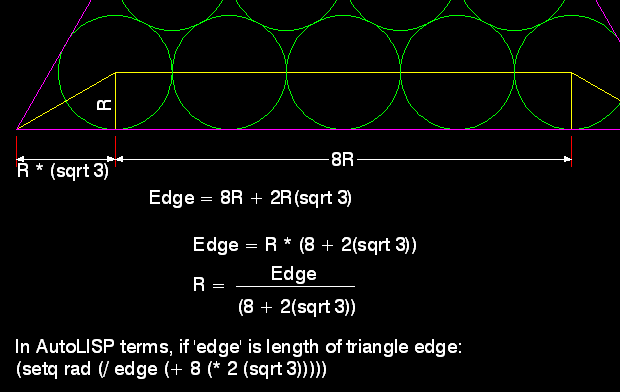
Or, yes, the square root of 3 works too -- a little less code:
(setq rad (/ edge (+ 8 (* 2 (sqrt 3)))))
[Again, substitute 6 for 8 to get the radius for four Circles.]
 |
Posted By: Robert_D
Date Posted: 11.Mar.2014 at 23:24
Yup, and substitute 4 for 8 to fit 3 circles, 2 for 8 to fit 2 circles. 4 + 2âš3, 2 + 2âš3 |
Posted By: sadiq3210
Date Posted: 12.Mar.2014 at 16:16
Sorry again, that wasn't three. That were 5 steps. I just didn't count the copy of circle. 1) once you make a circle (central). 2) Copy to adjacent location. 3) polar array to make 6 circles in 360 degrees 4) then again copy a circle to make the cornered circle. 5) polar array to make 3 circles in 360 degrees
|
Posted By: sadiq3210
Date Posted: 12.Mar.2014 at 17:57
|
Kent Cooper, Did autoCAD generated all these equations automatically? or you manually did all these ? If AutoCAD automatically created this, then how? |
Posted By: rs_higgins
Date Posted: 12.Mar.2014 at 21:24
|
This is a tangent exercise. Start by building you triangle 95 high then draw a line from endpoint top to midpoint bottom. repeat all three sides so you have a 3 way cross it the middle of the triangle. using the circle command CIRCLE then type 3p enter then pick your points as tangent the color X's will create the circle of the same color. You will need to complete the red or green first to use it to make the blue. Then you can work you way around from there. A quick note the center circle is created for 3 circle. 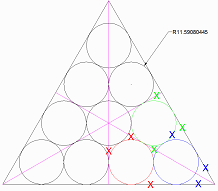 Okay did this yesterday did not see the part about 3 time to get all the circles. |
Posted By: Kent Cooper
Date Posted: 13.Mar.2014 at 14:00
|
>>Kent Cooper, Did autoCAD generated all these equations automatically? or you manually did all these ? I came up with the formulas myself. It's only a little trigonometry and algebra, and finally a conversion into AutoLISP syntax.
|
Posted By: Kent Cooper
Date Posted: 13.Mar.2014 at 14:07
|
>>... Start by building you triangle 95 high >> then draw a line from endpoint top to midpoint .... [That works when you want four Circles along each triangle edge, but not for other quantities such as the five in the original image.]
|
Posted By: rs_higgins
Date Posted: 13.Mar.2014 at 15:52
Ok got in late I guess for the original image from the link "http://s38.photobucket.com/user/sadiq3210/media/triangle_zpsc641fbe7.png.html" shows 4 must have changed. 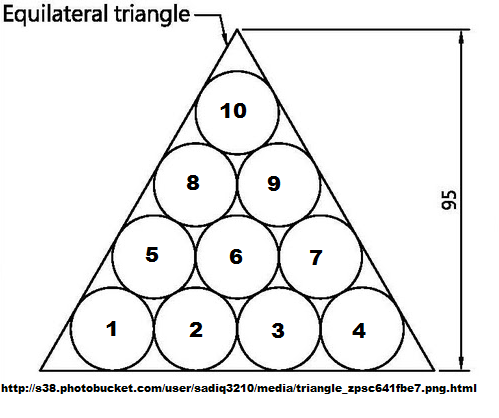 If you would for those that came in late. What are the list of thing you would like for this. I enjoy this type of thing but need all the rules in one place. Thanks |
Posted By: sadiq3210
Date Posted: 13.Mar.2014 at 17:21
|
rs_higgins Okay did this yesterday did not see the part about 3 time to get all the circles. what you mean to say? i don't understand.
And thanks for the technique. i thought there is no way without finding R trignomatrically. |
Posted By: sadiq3210
Date Posted: 13.Mar.2014 at 17:23
What is autoLISP ?
|
Posted By: rs_higgins
Date Posted: 13.Mar.2014 at 17:45
|
AutoLISP is a dialect of Lisp programming language built specifically for use with the full version of AutoCAD and its derivatives, which include AutoCAD Map 3D, AutoCAD Architecture and AutoCAD Mechanical. Lisp is a family of computer programming languages with a long history and a distinctive, fully parenthesized Polish prefix notation. Originally specified in 1958, Lisp is the second-oldest high-level programming language in widespread use today; only Fortran is older (by one year). Like Fortran, Lisp has changed a great deal since its early days, and a number of dialects have existed over its history. Today, the most widely known general-purpose Lisp dialects are Common Lisp and Scheme. Disclamer: The above statment is to be creited to Wikipedia Encyclopedia. Just wanted to know what you wanted in one post. It seem that this has evolved as we go along. Please indicate all that you would like to see in this problem. The puzzle I showed was given to us in class (Not to give away my age) using AutoCAD Version 2.6 took me some time to find it. A little tougher then "no m-button for on snap to tangent." type it all. Sorry rambling on. As I read the thread it gets confusing we started with 4 or 5 circles not sure but how to simplify the drawing. now if I'm reading this right once we find the right circle then we need to fill the triangle in three commands. If you would be so kind as to put all the limitations set for this problem and you requirements in one reply. |
Posted By: sadiq3210
Date Posted: 13.Mar.2014 at 18:14
|
I got the solution to my question. I want to discuss AutoLisp now, which was mentioned earlier in this thread multiple times. what is autoLisp? |
Posted By: Kent Cooper
Date Posted: 13.Mar.2014 at 19:41
|
I couldn't resist working this out.... http://www.cadforum.cz/forum_en/uploads/353260/CirclesFillPolygon.lsp" rel="nofollow - uploads/353260/CirclesFillPolygon.lsp
To demonstrate the power of AutoLISP, since you apparently are not familiar with it, the attached is an AutoLISP routine that automates the process in AutoCAD, and will do it in any regular triangle, square or hexagon. Save the file into some known location; open it with Notepad and read the commentary at the top. In AutoCAD, type APPLOAD, navigate to that location and Load the file. Type CFP, and follow the prompts -- select a regular triangle/square/hexagon and tell it how many Circles you want along each edge. [If you're not in the World Coordinate System, and/or your polygon isn't in a plane parallel to it, it will draw Circles, but they won't be where you expect them -- it could be modified to account for that if necessary.]
|
Posted By: rs_higgins
Date Posted: 13.Mar.2014 at 20:55
|
This is a step by step to get you started. www.g-wlearning.com/CAD/9781605255637/.../pdf/ch27_695_716.pdf you can do a search for----pdf on autolisp programming--- and find a lot of downloads on how. |
Posted By: rs_higgins
Date Posted: 13.Mar.2014 at 21:01
[QUOTE=Kent Cooper]I couldn't resist working this out.... http://www.cadforum.cz/forum_en/uploads/353260/CirclesFillPolygon.lsp" rel="nofollow - uploads/353260/CirclesFillPolygon.lsp
 |
Posted By: sadiq3210
Date Posted: 14.Mar.2014 at 16:51
|
thanks guyz for the idea about AutoLisp. The fact is that i don't know the Lisp language, although i learned C language. So i have rough idea how the sript is made. Now the question is that, when i typed cfp and hit enter. it said : Select Polyline triangle/square/hexagon to fill with Circles: but it was not recognizing the triangle made by lines, not a triangle made by poly line as it said (Nothing selected, or not a closed planar Triangle/Square/Hexagon.) It recognize the triangle made by polygon command. Is it a bug in script or something else. |
Posted By: rs_higgins
Date Posted: 14.Mar.2014 at 17:13
|
NO not a bug that is how it determines the area you want to add the circles to. COOL is it not. |
Posted By: rs_higgins
Date Posted: 14.Mar.2014 at 17:17
By the By what was the answer you came up with that worked for you. Good info is always needed |
Posted By: sadiq3210
Date Posted: 14.Mar.2014 at 17:33
when i tried that script, it worked.
|
Posted By: sadiq3210
Date Posted: 14.Mar.2014 at 17:39
| Now I am trying to make the object (circles in triangle - 5 row) using constraint. |
Posted By: John Connor
Date Posted: 14.Mar.2014 at 17:49
|
Select Polyline triangle/square/hexagon to fill with Circles: The program is expecting to see polylines not lines. That is how it was written. The code would have to be altered to be able to use lines. ------------- "Humans have a strength that cannot be measured. This is John Connor. If you are reading this, you are the resistance." <<AutoCAD 2015>> |
Posted By: rs_higgins
Date Posted: 14.Mar.2014 at 18:02
When it ask the number of just hit 5 of any number you want. 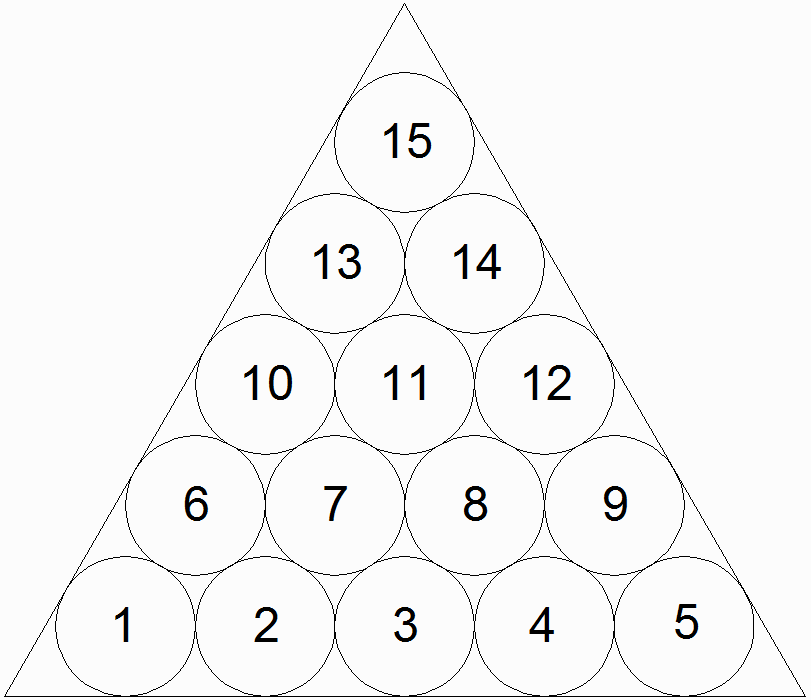 I have tried up to 9 it did them all. ------------- No electrons were harmed in the making of this post. I will admit a few protons were momentarily Inconvenienced |
Posted By: sadiq3210
Date Posted: 14.Mar.2014 at 18:07
|
no, no want to make it with constraints.
see this half worked diagram http://i38.photobucket.com/albums/e109/sadiq3210/Untitled_zps1e5de5c4.png
|
Posted By: Kent Cooper
Date Posted: 14.Mar.2014 at 19:42
|
It doesn't use constraints, but assuming Circle 3 in your diagram is supposed to remain tangent to the crossing Lines in the middle, the criteria in the diagram will be met by using CFP and 5 Circles along each edge. And yes, the CFP command is built to require closed Polylines, because it would be hugely more complicated otherwise, since separate Lines have no inherent relationship to each other. Just determining whether a collection of six Lines form a regular hexagon would be a difficult task, considering that the Lines might not all have been drawn in the same direction around the shape, and other complications. |
Posted By: sadiq3210
Date Posted: 15.Mar.2014 at 07:46
|
thank you guyz, time to close discussion here. I would like if some one make a summary of whole thread and post in a single post to make thread clean. and then i will delete my later posts to clear the thread |
Posted By: John Connor
Date Posted: 15.Mar.2014 at 17:16
|
Since it is YOUR thread perhaps YOU should do the summary. Seems only fair. ------------- "Humans have a strength that cannot be measured. This is John Connor. If you are reading this, you are the resistance." <<AutoCAD 2015>> |
Posted By: Kent Cooper
Date Posted: 18.Mar.2014 at 17:44
| Here's a better version of the same thing. It uses a different way to make the Circles that's faster [try both with 100 Circles per edge, and you'll really see what I mean]: http://www.cadforum.cz/forum_en/uploads/353260/CirclesFillPolygonII.lsp" rel="nofollow - uploads/353260/CirclesFillPolygonII.lsp |