Multiple dwg to one pdf file issue
Printed From: CAD Forum
Category: EN
Forum Name: AutoCAD
Forum Description: Discussion about AutoCAD and AutoCAD LT, viewers, DWG and DXF formats, Design Review, AutoCAD web, Drive, add-ons
URL: https://www.cadforum.cz/forum_en/forum_posts.asp?TID=10124
Printed Date: 20.Oct.2026 at 19:07
Topic: Multiple dwg to one pdf file issue
Posted By: ventour
Subject: Multiple dwg to one pdf file issue
Date Posted: 13.Mar.2014 at 07:50
|
Hi everyone. I was using AutoCad 2009 for designing electrical schematic drawings and plot them to one PDF file using PrintContuctor. For example 200 dwgs to one pdf file. Recently i installed AutoCad 2012 and i can't use PrintContuctor for printing. Is there an application to do this multiple plotting to one file? For AutoCad 2004 i know there's a software called AutoCad batchplot utility which is doing this job. |
Replies:
Posted By: philippe JOSEPH
Date Posted: 13.Mar.2014 at 08:29
|
Hello ventour, I don't know if you are used to it but your answer comes right here under in the related tips :
Tip 5677 : How to print a multi-pages PDF from AutoCAD?
|
Posted By: ventour
Date Posted: 13.Mar.2014 at 08:45
i was trying do to apply that tip but after that the result is AutoCad when starting stays at the loading screen "Preparing working environment...LAYER",attached screenshot. |
Posted By: philippe JOSEPH
Date Posted: 13.Mar.2014 at 10:04
| Hello again ventour, I don't know your problem, I use publish to do a multi-pages PDF and have a full release of Adobe Acrobat. |
Posted By: John Connor
Date Posted: 13.Mar.2014 at 10:27
|
There is no way that running the PUBLISH command when then cause AutoCAD not to load the next time round. Use Task Manager to kill the frozen start up. Shut down the computer completely. Wait 20 seconds then start it up. Open AutoCAD. What happens? ------------- "Humans have a strength that cannot be measured. This is John Connor. If you are reading this, you are the resistance." <<AutoCAD 2015>> |
Posted By: ventour
Date Posted: 13.Mar.2014 at 11:04
|
Still AutoCAD is not loading. It freezes to the point i mentioned. |
Posted By: philippe JOSEPH
Date Posted: 13.Mar.2014 at 11:27
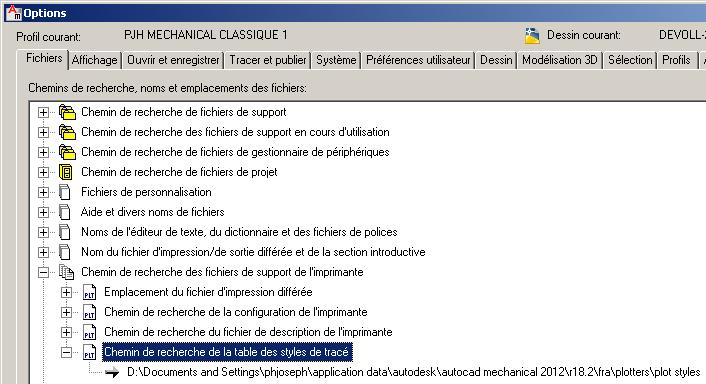
Yes, AutoCAD shouldn't freeze with a PDF print.
I remember that our AutoCAD slowed when we had our .ctb files not loaded in our (C) or (D) disks but in the standard place defined in :
options, files, ... as shown up here.
|
Posted By: John Connor
Date Posted: 13.Mar.2014 at 12:23
|
Sounds like something else is going on. Is this computer networked? ------------- "Humans have a strength that cannot be measured. This is John Connor. If you are reading this, you are the resistance." <<AutoCAD 2015>> |
Posted By: ventour
Date Posted: 14.Mar.2014 at 07:00
|
Uninstall,install AutoCad 2012 and everything is fixed now. Thanks for your answers |