Custom command/Macro help
Printed From: CAD Forum
Category: EN
Forum Name: CAD - general
Forum Description: General discussion about CAD, formats, standards, management, licensing, networking, harware, other CAD applications
URL: https://www.cadforum.cz/forum_en/forum_posts.asp?TID=10160
Printed Date: 30.Sep.2026 at 05:06
Topic: Custom command/Macro help
Posted By: ebrody
Subject: Custom command/Macro help
Date Posted: 21.Mar.2014 at 23:43
|
so here is what I am trying to achieve: I typically like to draw in my P_DIM layer that is set to a different color other than ByLayer. This means that when I am finished drawing and I flip it to the correct layer, it needs to be adjusted to ByLayer for all properties. I'm trying to create a command that will change THE SELECTED object(s) to ByLayer for Color, Linetype, and Lineweight. Closest I've found is ^C^C(setvar “cecolor” “ByLayer”) (setvar “celweight” -1) (setvar “celtype” “ByLayer”) But this sets the current drawing properties to bylayer for all the above mentioned. Attempting these variables without the ^C^C still sets the current draw type. Is there a function that I am unable to find to set the color of the current selected object to by layer that I am missing?
|
Replies:
Posted By: Kent Cooper
Date Posted: 24.Mar.2014 at 17:11
|
Here's what I use. Despite its name, it forces more properties than you mention to BYLAYER and other standard defaults [e.g. Linetype Scale to 1, Thickness to 0], so you may want to edit it to do fewer of them if necessary. Its BYs command would do what you want [the s is for doing it to a User Selection], but it also contains a BYce command to set all Current-Entity properties in the drawing [and all the other commands include doing that], a BYall command to do it to All objects in the current space, and a BYevery command to do it to Everything in the entire drawing, in all spaces.
http://www.cadforum.cz/forum_en/uploads/353260/ByLayer.lsp" rel="nofollow - uploads/353260/ByLayer.lsp
|
Posted By: ebrody
Date Posted: 24.Mar.2014 at 18:41
| How should I import that, can I copy the command from opening it as a text file, or is there a method to straight import it into cad as a custom command? |
Posted By: John Connor
Date Posted: 24.Mar.2014 at 19:20
|
Lisp routines are not imported. You can use the APPLOAD command to load it or auto-load via the Startup Suite. You could also make it part of you acad.lsp file. See this...http://lee-mac.com/runlisp.html ------------- "Humans have a strength that cannot be measured. This is John Connor. If you are reading this, you are the resistance." <<AutoCAD 2015>> |
Posted By: ebrody
Date Posted: 24.Mar.2014 at 19:32
|
Ok, so correct me if I am wrong on what I just did here. Apploading that .lsp essentially defines a new command within autoCAD? Doing so also loads the command line shortcuts you defined within the .lsp So to get this onto a toolbar, I'd just have to manually add it through customization. Thanks for the help!
|
Posted By: ebrody
Date Posted: 24.Mar.2014 at 19:35
|
When I just looked at it, when going to customize the toolbars, the functions are not showing in the command list. Is there a way to show them, or would I need to just make a command through macro that just does the "BYce" for instance? |
Posted By: rs_higgins
Date Posted: 25.Mar.2014 at 14:51
|
I'm trying to create a command that will change THE SELECTED object(s) to ByLayer for Color, Linetype, and Lineweight. If I'm reading this right there is a command in AutoCad to do this. "setbylayer" you select the object's you want to change then typ "s" to change the setting if you do not want it all to go to bylayer. answer the next two questions. and your done. Or select the objects first and type "setbylayer" hit enter twice this will set every thing you selected to by bylayer. 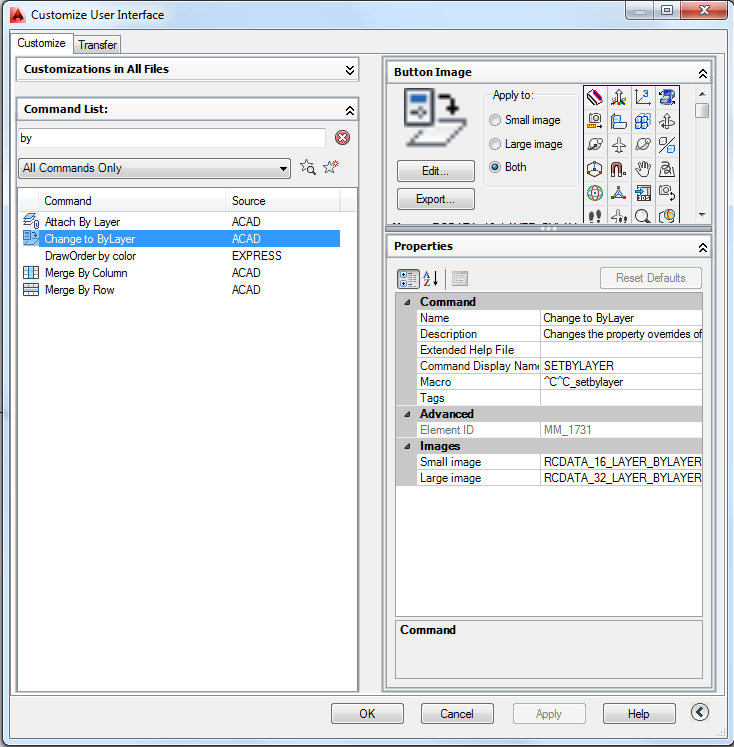 ------------- No electrons were harmed in the making of this post. I will admit a few protons were momentarily Inconvenienced |
Posted By: Kent Cooper
Date Posted: 25.Mar.2014 at 15:33
|
>> How should I import that, can I copy the command from opening it as a text file, or is there a method to straight import it into cad as a custom command?
Save the file into some folder in your Support File Search Path list in Options. Type APPLOAD [or just AP], navigate to that location, and load it.
If you include this line:
(autoload "ByLayer" '("BYce" "BYs" "BYall" "BYevery"))
in your acaddoc.lsp file, the commands it defines will be available in any drawing, though the file itself will not be loaded unless and until the User enters one of those command names.
You can also make toolbar buttons or other kinds of menu items to invoke the commands. For instance, to return all current-entity settings to the defaults, you could make a toolbar button that contains:
^C^CBYce
|
Posted By: ebrody
Date Posted: 25.Mar.2014 at 20:16
| Wwhere is the acaddoc.lsp located? |
Posted By: ebrody
Date Posted: 25.Mar.2014 at 20:26
|
Found it under acad2013doc.lsp So that command can go anywhere in that text, as in right at the bottom?
|
Posted By: Kent Cooper
Date Posted: 25.Mar.2014 at 21:02
|
>> Found it under acad2013doc.lsp
I have an older version here, so maybe it's different now, but I assume there's a header with some information, which you should read carefully. At least in some earlier versions, it is not recommended to edit the acad2xxx.lsp file, but there isn't an acad2xxxdoc.lsp file until some later version than mine, so maybe it's okay to edit that. If so, yes, you can just add that line anywhere other than inside some other function in it. If it's not recommended, and you don't have an acaddoc.lsp file already, you can make one, in some folder that's in your Support File Search Path list, even if it contains only that one (autoload) function -- you'll develop other things you want to put in it. It is run every time a drawing is opened, so things in it are available in all drawings, and maybe that's done with acad2013doc.lsp, too. The issue is that some related files, like the one you probably have without the doc in its name, may be loaded only once when AutoCAD is started, and not with every drawing that's opened, so commands defined in them won't necessarily be available in all drawings. So read up on the files and which are loaded when.
|
Posted By: ebrody
Date Posted: 25.Mar.2014 at 21:05
|
Good advice Kent, I'll take a look into that. For now though, putting that line in the acad21013doc.lsp did indeed work, and it autoloaded it as soon as I fired the command, so I'm happy with that for now. Just got to learn some of the programming syntax for cad commands, and I'm sure ill be rolling along with many-a-custom commands. Thanks for the help!
|