How to define wire size in Circuit Builder ???
Printed From: CAD Forum
Category: EN
Forum Name: AutoCAD
Forum Description: Discussion about AutoCAD and AutoCAD LT, viewers, DWG and DXF formats, Design Review, AutoCAD web, Drive, add-ons
URL: https://www.cadforum.cz/forum_en/forum_posts.asp?TID=10238
Printed Date: 30.Oct.2026 at 10:26
Topic: How to define wire size in Circuit Builder ???
Posted By: busy7700
Subject: How to define wire size in Circuit Builder ???
Date Posted: 21.Apr.2014 at 16:47
|
Hi All, I was wondering if someone could help me please with Circuit Builder. How can I define the wire size by using API calls or call out value of attribute from the table ? or if you know another way please let me know. Thanks in advance! |
Replies:
Posted By: John Connor
Date Posted: 21.Apr.2014 at 18:27
|
Isn't wire size handled in the Create/Edit Wire Type dialog box? Wire types are controlled by layers. Size: Wire size property for the wire type. Replaceable parameter %S in Layer Name. ------------- "Humans have a strength that cannot be measured. This is John Connor. If you are reading this, you are the resistance." <<AutoCAD 2015>> |
Posted By: busy7700
Date Posted: 21.Apr.2014 at 18:48
|
Yes I did this step already but I was wondering how I could call out the value when I run the circuit builder? Thanks
|
Posted By: John Connor
Date Posted: 21.Apr.2014 at 18:50
|
You want the wire size to be called out like a wire number? ------------- "Humans have a strength that cannot be measured. This is John Connor. If you are reading this, you are the resistance." <<AutoCAD 2015>> |
Posted By: busy7700
Date Posted: 21.Apr.2014 at 19:08
|
Thank you John for reply. Yes, I want to call out them as wire number. 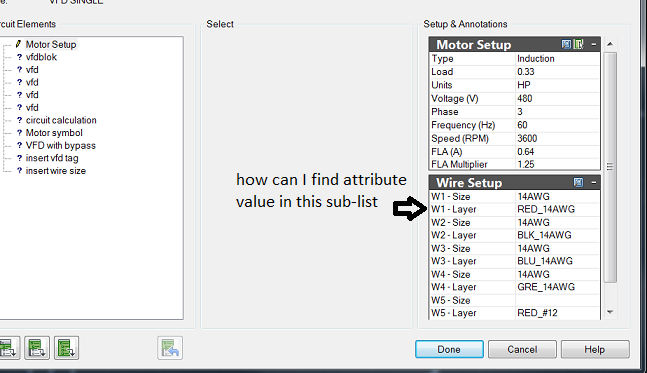 |
Posted By: John Connor
Date Posted: 21.Apr.2014 at 19:16
|
Did you try clicking on the icon to the right of Wire Setup to launch the Wire Size Lookup dialog? ------------- "Humans have a strength that cannot be measured. This is John Connor. If you are reading this, you are the resistance." <<AutoCAD 2015>> |
Posted By: busy7700
Date Posted: 21.Apr.2014 at 19:35
|
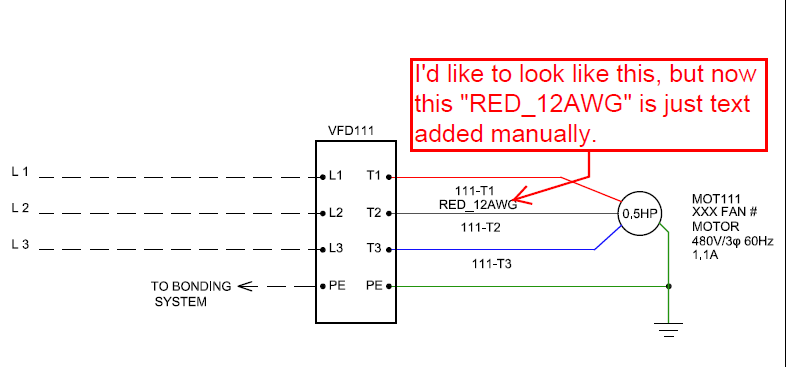
I want to access the sub-list table (or something else if is possible) to call out value ("WIRE SIZE") Please see attached photo for a better understanding of what I want.
 |
Posted By: John Connor
Date Posted: 21.Apr.2014 at 19:50
|
I don't know how you would add that unless you edited the wire number block by adding an attribute for size. The block name is WD_WNH. ------------- "Humans have a strength that cannot be measured. This is John Connor. If you are reading this, you are the resistance." <<AutoCAD 2015>> |
Posted By: John Connor
Date Posted: 21.Apr.2014 at 20:03
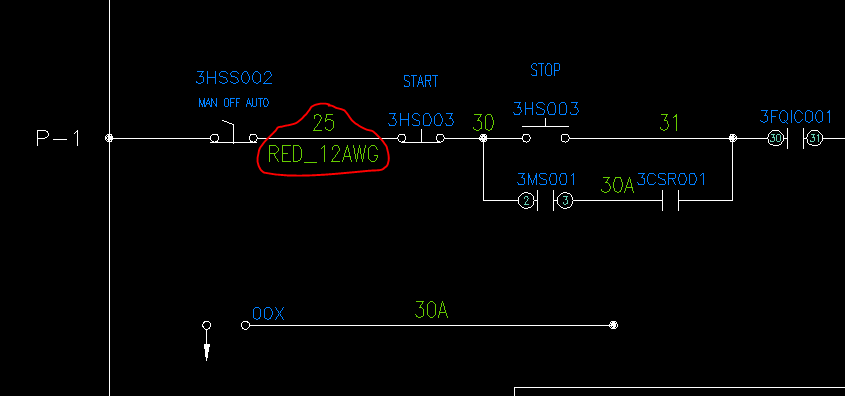 > >There you go. Now when I insert a wire I get to tell ACADE not only what the number is but the size as well. Just be careful what you wish for because it could come back to haunt you later on. You might be better off creating a brand new wire number block instead of using the one ACADE provides. You'll have to determine for yourself if that is a wise move or not. ------------- "Humans have a strength that cannot be measured. This is John Connor. If you are reading this, you are the resistance." <<AutoCAD 2015>> |
Posted By: busy7700
Date Posted: 21.Apr.2014 at 20:34
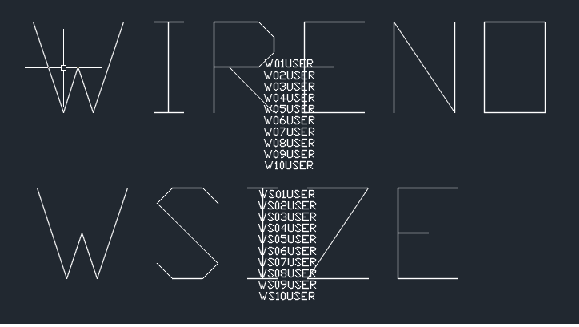 I tried to edit the block "WD_WNH" with a new attribute "WSIZE". Next I inserted a new marker_blocks "WS01" in my "ace_cb1_***" and I called in spreed sheet "(c:ace_cb_wnum nil 1 nil) Could you please tell me what I'm doing wrong? because something is not working. Would be very much appreciated your help. Thanks in advance.
|
Posted By: John Connor
Date Posted: 21.Apr.2014 at 23:04
|
It looks like you copied what was there then renamed WIRENO to WSIZE. Probably not a good idea. Try creating a brand new block instead. ------------- "Humans have a strength that cannot be measured. This is John Connor. If you are reading this, you are the resistance." <<AutoCAD 2015>> |
Posted By: busy7700
Date Posted: 22.Apr.2014 at 17:03
|
Hi John, Could you please share with me how is look your new block? I am a beginner in using AutoCAD Electrical and Circuit Builder. (you can contact me sandumariana7@gmail.com if is works for you) Thank You in advance! |
Posted By: John Connor
Date Posted: 22.Apr.2014 at 17:56
|
I am a beginner too as far as AutoCAD Electric goes (2012 version) and I am not familiar with Circuit Builder. But I do have extensive knowledge of AutoCAD. Maybe I am not the best person to be giving you advice. ------------- "Humans have a strength that cannot be measured. This is John Connor. If you are reading this, you are the resistance." <<AutoCAD 2015>> |
Posted By: busy7700
Date Posted: 22.Apr.2014 at 18:23
|
I need your help, please help me. Please let me know how you did arise the WiRE SIZE "RED_12AWG" when you run your circuit. I created a new block from the scratch. I followed the steps:: Schematic -- Symbol Builder -- OK (Block Editor Open) -- Add Atrribute -- "WIRENO" and "WIRES" -- Save the block in the path When I run my circuit the new block is show up whit WIRENO "111-T1" but when I check the properties the WIRES attribute value is empty. I do wrong? 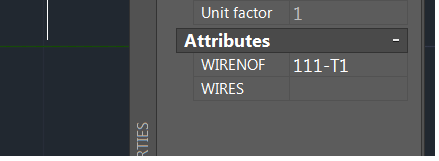 |
Posted By: John Connor
Date Posted: 22.Apr.2014 at 19:42
|
I created a temporary block for testing purposes only. After I proved I could do it, and after posting the image here, I closed the drawing without saving the block because I did not need or want it anymore. ------------- "Humans have a strength that cannot be measured. This is John Connor. If you are reading this, you are the resistance." <<AutoCAD 2015>> |
Posted By: busy7700
Date Posted: 22.Apr.2014 at 19:49
| How you made the connection between the attribute and wire size? |
Posted By: John Connor
Date Posted: 22.Apr.2014 at 19:57
|
I copied the original block [WD_WNH] off to one side of my drawing then exploded it. I added the new attribute then I created a new block and called it WD_WSH. When I insert the new block into my drawing the first two attributes to be filled in are for the wire number and the wire size. All the W*USER attributes I ignore. ------------- "Humans have a strength that cannot be measured. This is John Connor. If you are reading this, you are the resistance." <<AutoCAD 2015>> |
Posted By: John Connor
Date Posted: 22.Apr.2014 at 19:58
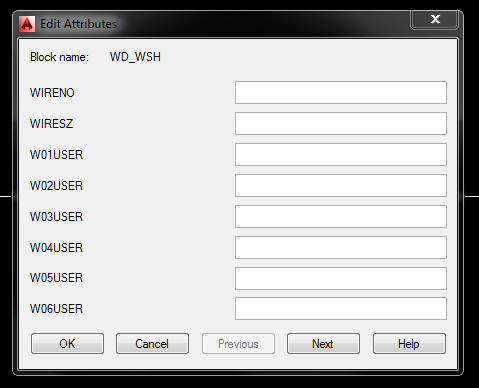 This is what I see on my screen when I insert the new block. ------------- "Humans have a strength that cannot be measured. This is John Connor. If you are reading this, you are the resistance." <<AutoCAD 2015>> |
Posted By: John Connor
Date Posted: 22.Apr.2014 at 20:02
 This is what the exploded block looks like with the new attribute added. The line is only for referencing the basepoint for my new block. The number and size will be equidistance from either side of the wire. ------------- "Humans have a strength that cannot be measured. This is John Connor. If you are reading this, you are the resistance." <<AutoCAD 2015>> |
Posted By: John Connor
Date Posted: 22.Apr.2014 at 20:05
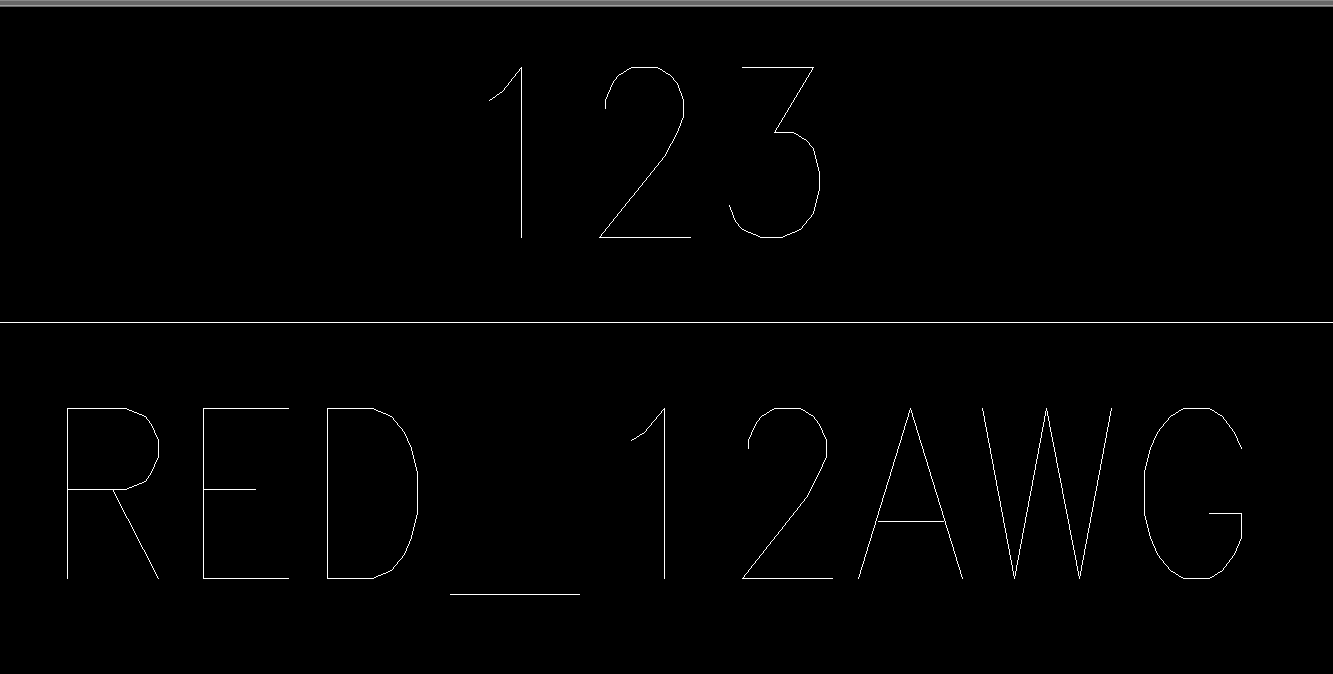 And this is what the block looks like after it has been created and inserted into my drawing. The white line is a wire. The spacing between the bottom of the wire number and the wire itself is 0.0625 inches. The spacing between the top of the wire size number and the wire itself is 0.0625 inches. ------------- "Humans have a strength that cannot be measured. This is John Connor. If you are reading this, you are the resistance." <<AutoCAD 2015>> |
Posted By: John Connor
Date Posted: 22.Apr.2014 at 20:24
|
I've got to run off for a while so I can't provide any further help. I'll try to check back later. Good luck. ------------- "Humans have a strength that cannot be measured. This is John Connor. If you are reading this, you are the resistance." <<AutoCAD 2015>> |
Posted By: John Connor
Date Posted: 23.Apr.2014 at 13:15
|
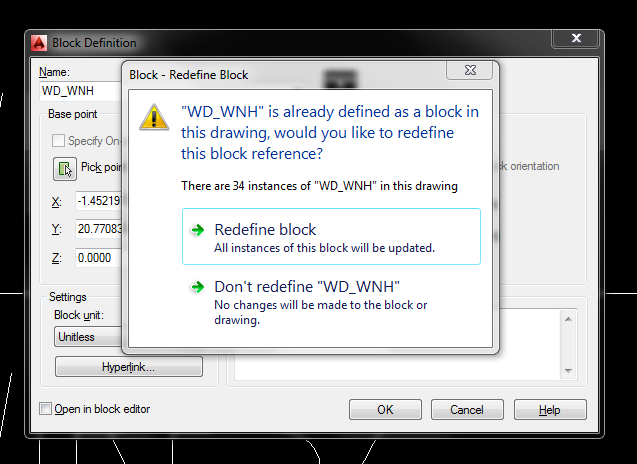
If you want to you can keep the block name the same. When it comes time to save your block give it the name WD_WNH. You'll be told there is already a block by that name (and the number of instances of the block) in the drawing and asked if you want to redefine it. In this case the answer would be yes so click on Redefine Block. Once you have done that run the ATTSYNC command and go with the default option "Select". Click on one of the WD_WNH blocks. It has been redefined. Now double-click on one of the blocks to bring up the Enhanced Attribute Editor. You should now see WIRESZ as one of the tags that can be filled in. ------------- "Humans have a strength that cannot be measured. This is John Connor. If you are reading this, you are the resistance." <<AutoCAD 2015>> |
Posted By: John Connor
Date Posted: 23.Apr.2014 at 13:17
 This is what you'll see on your screen when you try to save the revised version of the WD_WNH block. You want to pick the Redefine block option. ------------- "Humans have a strength that cannot be measured. This is John Connor. If you are reading this, you are the resistance." <<AutoCAD 2015>> |