a problem with CTB
Printed From: CAD Forum
Category: EN
Forum Name: AutoCAD
Forum Description: Discussion about AutoCAD and AutoCAD LT, viewers, DWG and DXF formats, Design Review, AutoCAD web, Drive, add-ons
URL: https://www.cadforum.cz/forum_en/forum_posts.asp?TID=10409
Printed Date: 04.Sep.2026 at 22:51
Topic: a problem with CTB
Posted By: shrinkas
Subject: a problem with CTB
Date Posted: 24.Jun.2014 at 20:03
|
Hello, After doing a repair to my autocad 2013 I had some problem with the plotting. in the "plot style table" there is just "none" and "***.ctb(missing)"(in some of the files) and no more "monochrome". I tried to install my ctb files but it didn't worked. thanks for your help, shiran 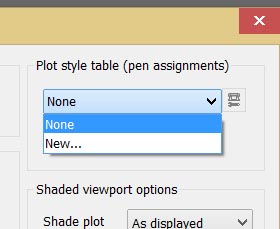 |
Replies:
Posted By: John Connor
Date Posted: 24.Jun.2014 at 20:23
|
Did you actually use the REPAIR option or did you use another method to "repair" your installation? Do you know exactly where to reinstall the missing files? Did you shut down AutoCAD prior to trying to reinstall the missing files? ------------- "Humans have a strength that cannot be measured. This is John Connor. If you are reading this, you are the resistance." <<AutoCAD 2015>> |
Posted By: shrinkas
Date Posted: 24.Jun.2014 at 20:33
|
hey I actually use the repair option throw the control panel. I tried to reinstall the missing files in option- plot&publish - plot style table setting - add... but it open the documents folder. I also copied the ctb files to the plotstyle folder in c:\. and I shut down AutoCAD. There is something else I should do?
|
Posted By: John Connor
Date Posted: 25.Jun.2014 at 00:49
|
You have to copy the files to the correct folder. It may not be readily apparent which one that is if you are running AutoCAD on a 64-bit system. ------------- "Humans have a strength that cannot be measured. This is John Connor. If you are reading this, you are the resistance." <<AutoCAD 2015>> |