TRIM comand - LISP
Printed From: CAD Forum
Category: EN
Forum Name: CAD - general
Forum Description: General discussion about CAD, formats, standards, management, licensing, networking, harware, other CAD applications
URL: https://www.cadforum.cz/forum_en/forum_posts.asp?TID=10550
Printed Date: 30.Sep.2026 at 08:14
Topic: TRIM comand - LISP
Posted By: Cuty
Subject: TRIM comand - LISP
Date Posted: 30.Jul.2014 at 21:45
|
Hello to you all. I need some help please. I have a huge amount of points in my project and I need to trim all lines that intersect (or begin and end) in those points. I have attached a picture that visualizes what I need to do. The space between a point and the beginning of a line, depending on the demand, must be 0.25, 0.5, 1.0, 1.5, 2.0, 2.5 OR 2.88 ( in the picture I have attached the space is 1.0 ). I am not a CAD guru and hope somebody can help me with a lisp routine that solves this problem in a second. Thank you Tony ATTACHMENT 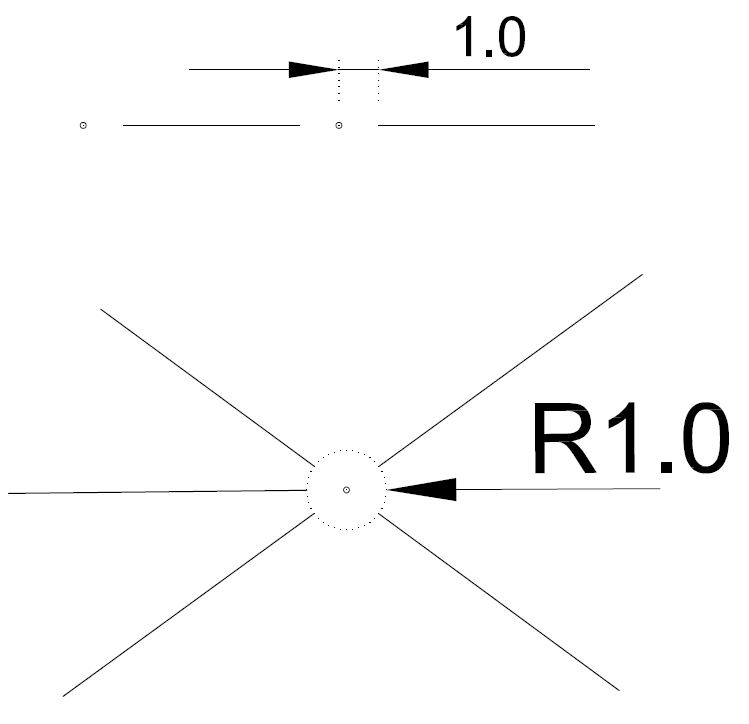 ------------- Cuty |
Replies:
Posted By: John Connor
Date Posted: 31.Jul.2014 at 00:51
|
You'll have to do an Internet search for a custom lisp routine that does what you want. If that fails to turn up anything useful you'll have to write it yourself or get a lisp guru to do it for you. ------------- "Humans have a strength that cannot be measured. This is John Connor. If you are reading this, you are the resistance." <<AutoCAD 2015>> |
Posted By: Kent Cooper
Date Posted: 31.Jul.2014 at 17:41
| Consider using a Wipeout, contained in a Block which you could Insert at every Point entity, using appropriate scales presumably based on the drawing scale, and then bring the Point to the front of the Draworder so it would show above the Wipeout, which would hide the Lines and anything else in the area. Maybe something like a 12-sided-polygon-based Wipeout to handle your lower image appropriately. It would have the advantage that it wouldn't alter the things that you would otherwise Trim, which will save a little memory from not breaking them into multiple entities, and [for example] Lines representing things like property boundary edges will still be at their defined lengths, and you will still be able to snap to places like their endpoints for dimensioning, etc. If that seems worth pursuing, I am willing to try working it out. |