ucs
Printed From: CAD Forum
Category: EN
Forum Name: AutoCAD
Forum Description: Discussion about AutoCAD and AutoCAD LT, viewers, DWG and DXF formats, Design Review, AutoCAD web, Drive, add-ons
URL: https://www.cadforum.cz/forum_en/forum_posts.asp?TID=10645
Printed Date: 05.Sep.2026 at 10:36
Topic: ucs
Posted By: Rico69
Subject: ucs
Date Posted: 26.Aug.2014 at 00:54
|
Hello you all, Need help please Running autocad 2014. My cross-hairs do not align with the UCS. Is this common? or did I toggle a wrong switch... please help Thank you Rico ------------- happycad |
Replies:
Posted By: philippe JOSEPH
Date Posted: 26.Aug.2014 at 07:35
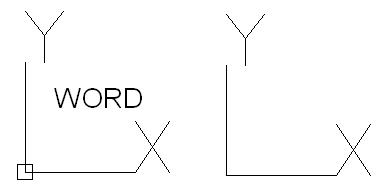
Hello Rico69, check if your UCS is set on word.
You should see your UCS icon ( if UCSICON = 1 ) with a little square if set on word.
|
Posted By: John Connor
Date Posted: 26.Aug.2014 at 11:18
|
Shouldn't that be WORLD? If you set the PLAN command to WORLD it will reset your crosshairs correctly. ------------- "Humans have a strength that cannot be measured. This is John Connor. If you are reading this, you are the resistance." <<AutoCAD 2015>> |
Posted By: philippe JOSEPH
Date Posted: 26.Aug.2014 at 11:43
| Yes John it's WORLD and not WORD. |
Posted By: Rico69
Date Posted: 26.Aug.2014 at 17:19
|
Hi guys, thank you very much for your replies. I did follow all of your instructions and this are my findings: It does work for 2D, but when it comes to work on 3D it does not. This why. (by trial and error) If you go to options, on the 3D modeling tab make sure at the box 3D crosshairs that "Show Z axis in crosshairs" is checked. I understand that some people working on 3D only like two crosshairs. How do they do it to align 2 crosshairs with the UCS, I don't know. What do you think, please let me know if you can find how to do it for 2 crosshairs. I am pretty new to AutoCAD 2014 Thanks again. Rico ------------- happycad |
Posted By: John Connor
Date Posted: 26.Aug.2014 at 18:08
|
I don't know of a single user working in 3D who doesn't utilize three crosshairs with the exception of you. Maybe users such as yourself rely more upon the Dynamic UCS feature to keep things straight. ------------- "Humans have a strength that cannot be measured. This is John Connor. If you are reading this, you are the resistance." <<AutoCAD 2015>> |
Posted By: Rico69
Date Posted: 27.Aug.2014 at 23:31
|
John,Thank you. This is the first time I am working in 3d. I definetively have to have the 3 crosshairs. I tried the two crosshairs, sometimes works, sometimes does does not. I am going to talk to the owner of the drawing. Perhaps he/she can explain. Will let you know. ------------- happycad |
Posted By: John Connor
Date Posted: 27.Aug.2014 at 23:52
|
You don't have to talk to the owner; just change the setting in Options. ------------- "Humans have a strength that cannot be measured. This is John Connor. If you are reading this, you are the resistance." <<AutoCAD 2015>> |
Posted By: philippe JOSEPH
Date Posted: 28.Aug.2014 at 07:58
|
Rico69, when working in 3D with a 3D point of view and if you have ORTHO on ( F8 ) you can work in the 3 directions safely. The 3 different colors of you crosshair will indicate the X or Y or Z direction.If you just begin 3D with AutoCAD ( please indicate the year of your AutoCAD or AutoCAD Mechanical in your personnal datas ) you will have to learn a lot.
We can help you...
|