My New Topic
Printed From: CAD Forum
Category: EN
Forum Name: AutoCAD
Forum Description: Discussion about AutoCAD and AutoCAD LT, viewers, DWG and DXF formats, Design Review, AutoCAD web, Drive, add-ons
URL: https://www.cadforum.cz/forum_en/forum_posts.asp?TID=10657
Printed Date: 04.Sep.2026 at 11:14
Topic: My New Topic
Posted By: John Connor
Subject: My New Topic
Date Posted: 05.Sep.2014 at 15:45
|
Ask your question here. Provide as much detail as possible. Do not make us have to play 20 questions. ------------- "Humans have a strength that cannot be measured. This is John Connor. If you are reading this, you are the resistance." <<AutoCAD 2015>> |
Replies:
Posted By: thinker
Date Posted: 08.Sep.2014 at 10:13
|
Thank you in advance I have a lisp for basic calculation but it works only for integers, if any other lisp is available please provide it, i need that the answer should get by replacing of existing text or mtext. Regards. uploads/381267/mMath.lsp" rel="nofollow - uploads/381267/mMath.lsp
|
Posted By: John Connor
Date Posted: 08.Sep.2014 at 11:29
|
There are lisp routines that will perform mathematical calculations using numbers entered as text. Find such routines either at the website of Cadalyst magazine and/or over at The Swamp where many lisp gurus tend to congregate. ------------- "Humans have a strength that cannot be measured. This is John Connor. If you are reading this, you are the resistance." <<AutoCAD 2015>> |
Posted By: Kent Cooper
Date Posted: 08.Sep.2014 at 20:50
|
In a very quick look through that code, I would guess that if you change 'atoi to 'atof instead, it may possibly solve your problem. |
Posted By: gugamg
Date Posted: 08.Sep.2014 at 22:48
|
I'm sorry if I'm posting this question on the wrong place, it's my first one on the forum :P I have a drawing in which there are some polylines/objects drawn (usually rectangles) with some text next to them. I'm using a lisp to get their x and y coordinates to excel, but my problem is that I have to associate them to the text somehow. Just so you'll understand, I'm doing this because I'm trying to automatize my project drawings, in which I have to paste blocks to the center of each of these rectangles. I’ll use excel to build the command lines for a script with the block name and x,y coordinates, and the script will paste the blocks on these coordinates provided by the lisp. But without the text there’s no reference of which block belongs to which line on excel. I have a simple drawing to illustrate it, along with the lisps and script I'm using. If anybody could help me I would really appreciate it, since these projects can sometimes add up to more than a 100 rectangles. If you have any other solutions I’ll be happy to try them. Thank you very much PS: I don't know how to attach the files, but I can email them if they'll help.
|
Posted By: Ejas
Date Posted: 09.Sep.2014 at 01:44
|
One question over here: I came across the command "eattext" in school. can you explain what is this command is for? and where is this best used. thanks.
|
Posted By: philippe JOSEPH
Date Posted: 09.Sep.2014 at 07:14
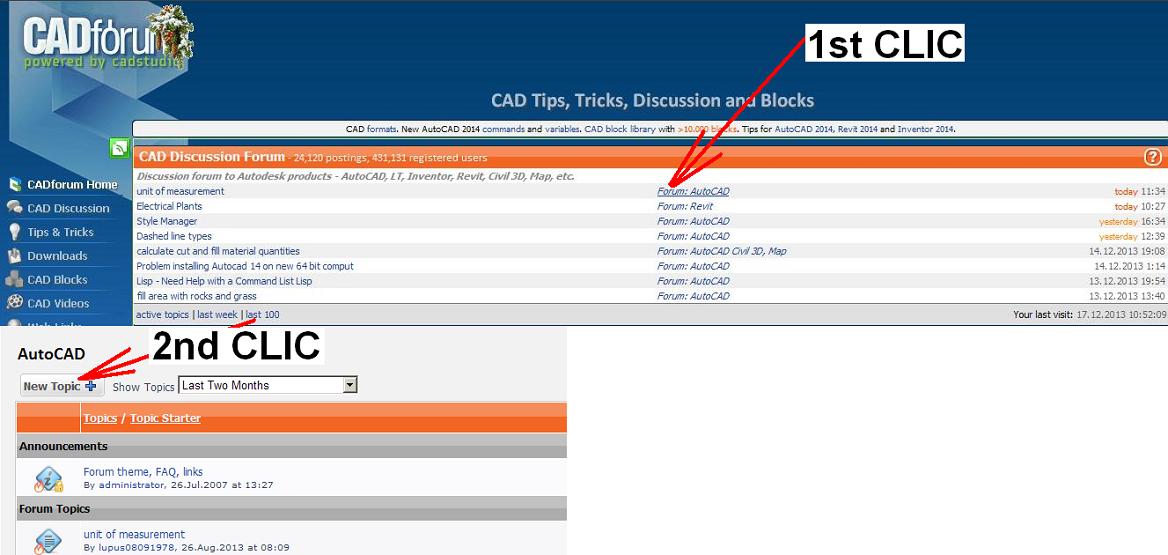
GUGAMG AND EJAS, THIS IS FOR YOU POSTING YOUR OWN NEW TOPIC :
 |
Posted By: John Connor
Date Posted: 09.Sep.2014 at 11:38
EATTEXT Used to export block attribute information to a table or an external file. Its use is explained in your AutoCAD Help file. ------------- "Humans have a strength that cannot be measured. This is John Connor. If you are reading this, you are the resistance." <<AutoCAD 2015>> |
 Ejas wrote:
Posted By: Ejas
Date Posted: 10.Sep.2014 at 05:58
|
Thanks John, apologies on my part for placing my question in the wrong place
|
Posted By: gugamg
Date Posted: 10.Sep.2014 at 13:37
|
Thank you philippe, just made a new topic for my question Sorry for posting on the wrong place
|