Imported points with flipped x ad y coordinates
Printed From: CAD Forum
Category: EN
Forum Name: AutoCAD
Forum Description: Discussion about AutoCAD and AutoCAD LT, viewers, DWG and DXF formats, Design Review, AutoCAD web, Drive, add-ons
URL: https://www.cadforum.cz/forum_en/forum_posts.asp?TID=10685
Printed Date: 05.Sep.2026 at 00:03
Topic: Imported points with flipped x ad y coordinates
Posted By: Encomium
Subject: Imported points with flipped x ad y coordinates
Date Posted: 19.Sep.2014 at 11:49
|
Hello, I have a dwg file with a contour made from coordinates, but the x and y values are flipped so everything is mirrored. Is there any way of changing all of the elements in the drawing to correct this? thanks! |
Replies:
Posted By: philippe JOSEPH
Date Posted: 19.Sep.2014 at 12:57
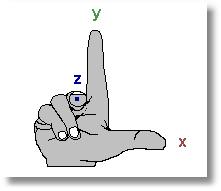
Hello Encomium, maybe you could do a mirror in clicking 2 points of a line 1st point 0,0 and 2nd point 100,100.
Is only the contour NOT OK or all the drawing ?
I've had this kind of problem with some X,Y coordinates given by an asian civil engineer and it's after 2 tests that I realised that he was using a "rule of the left hand" instead of the traditionnal "rule of the right hand".
|
Posted By: Vladimir Michl
Date Posted: 20.Sep.2014 at 14:10
|
You can use the [CMD]MIRROR[/CMD] command to put all objects "back to normal". ------------- Vladimir Michl (moderator) https://www.linkedin.com/in/vmichl/" rel="nofollow - LinkedIn , Autodesk Expert Elite |
Posted By: Kent Cooper
Date Posted: 23.Sep.2014 at 15:33
| Specifically, if you want the X coordinate of every position to become the Y coordinate, and vice versa, Mirror everything with 0,0,0 as the base and anything along a 45-degree line from there as the other mirror axis point [e.g. 1,1,0]. |