TEXT WITHIN A MULTI LINE
Printed From: CAD Forum
Category: EN
Forum Name: AutoCAD
Forum Description: Discussion about AutoCAD and AutoCAD LT, viewers, DWG and DXF formats, Design Review, AutoCAD web, Drive, add-ons
URL: https://www.cadforum.cz/forum_en/forum_posts.asp?TID=10743
Printed Date: 05.Sep.2026 at 23:13
Topic: TEXT WITHIN A MULTI LINE
Posted By: CAD7875
Subject: TEXT WITHIN A MULTI LINE
Date Posted: 22.Oct.2014 at 15:27
|
IS THERE A WAY OF PUTTING TEXT WITHIN A MULTI LINE - KEEPING THE TXT THE SAME HEIGHT EVEN WHEN CHAGE THE SCALE OF THE MULTILINE - I NEED TO PLOT A SERIES OF DIFFERENT WIDTH ROUTES AND WANT THE NAME OF EACH ROUTE TO BE WITHIN THE MULTILINE THANKS
|
Replies:
Posted By: Kent Cooper
Date Posted: 22.Oct.2014 at 16:25
|
Well, there's always the TEXT command, middle- or middle-center justified with its insertion point halfway between [M2P object snap in new-enough versions], for example, the midpoints of MLine edges.... But seriously, some more information, please. Are you looking for something that works like a complex linetype, so that the same text element occurs at regular intervals along the Multiline? That may not be possible -- in a very quick look, it seems MLine Styles can be defined to contain simple on-off linetypes and/or complex linetypes containing Shapes, but not those containing text [but maybe that's different in newer versions than I have here.]
If your Mlines are always zero-justified, a routine could probably be made easily enough that would make a Polyline copy along the same defining points, to which you could assign a complex linetype with text elements but presumably no linear elements between them.
Or maybe you're thinking of something else....
|
Posted By: CAD7875
Date Posted: 22.Oct.2014 at 17:23
|
Hi Kent, im having to draw containment routes. Normally I would use multiline as we only draw the total width of the space needed for the containment however we now need each individual containment route drawn, eg fire alarm 50mm comms 200mm submains 300mm I know you can put text in linetypes but this looks messy, to my eye anyway and wondered if there was a way of putting the text within a multiline and as you say, plotted at regular intervals hope that makes a bit more sense
 |
Posted By: Kent Cooper
Date Posted: 22.Oct.2014 at 22:10
With Linetypes that have text but no pen-down part between, does it look acceptable? You'll obviously want to decide on your own spacing, text style, etc. -- I just modified AutoCAD's GAS_LINE type a little. These use a zero-justified Mline with a separate Polyline having the complex linetype assigned, running along the same vertices.
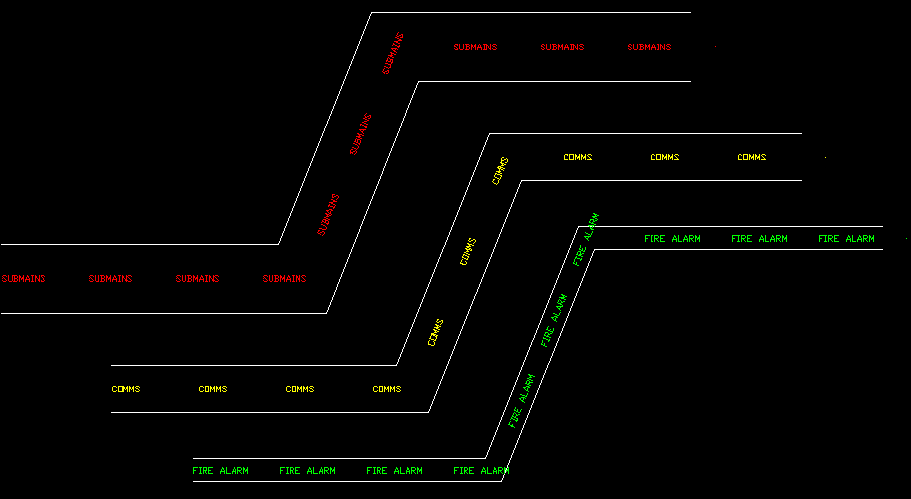 Of course, there are the "issues" that text-containing complex linetypes can have, such as overrunning a corner when the text part falls in the "wrong" relationship to it, the continuous portions at the ends [I used Stretch to minimize them down to nearly nothing at the right ends], etc. http://www.cadforum.cz/forum_en/uploads/353260/MlineUtilities.txt" rel="nofollow - uploads/353260/MlineUtilities.txt
[Note that the system won't let me upload a .lin file, so I changed the filetype extension to .txt, which you'll need to change back in order to use the linetype definitions.]
|
Posted By: CAD7875
Date Posted: 23.Oct.2014 at 08:55
|
Kent!!! this is exactly what i'm after. ive copied your linetypes into notepad and have loaded them into a dwg however when I draw a multiline, its filled in like a polyline? When I draw the multiline, it looks just as the screenshot of yours do but as soon as I end the line, it fills in? any ideas?
|
Posted By: CAD7875
Date Posted: 23.Oct.2014 at 09:00
|
its ok - I'd got the 'fill' option on! duh you are official my hero!!!  this makes my job soooo much easier this makes my job soooo much easierthanks
|