Flexible Hose Linetype
Printed From: CAD Forum
Category: EN
Forum Name: AutoCAD
Forum Description: Discussion about AutoCAD and AutoCAD LT, viewers, DWG and DXF formats, Design Review, AutoCAD web, Drive, add-ons
URL: https://www.cadforum.cz/forum_en/forum_posts.asp?TID=10757
Printed Date: 05.Sep.2026 at 00:45
Topic: Flexible Hose Linetype
Posted By: mmaurigi
Subject: Flexible Hose Linetype
Date Posted: 29.Oct.2014 at 21:40
|
I need a linetype for flexible hose that I can use on a Flow Diagram. I don't know how to create one, so if you have one you can share, it would be appreciate it. Thanks
|
Replies:
Posted By: John Connor
Date Posted: 29.Oct.2014 at 22:26
|
I would recommend you create a symbol rather than a linetype. ------------- "Humans have a strength that cannot be measured. This is John Connor. If you are reading this, you are the resistance." <<AutoCAD 2015>> |
Posted By: Kent Cooper
Date Posted: 30.Oct.2014 at 15:01
|
A web search can often be productive, for example: http://www.cadtutor.net/forum/showthread.php?42606-Does-anyone-know-how-to-make-a-flexible-hose-lintype-in-LT" rel="nofollow - http://www.cadtutor.net/forum/showthread.php?42606-Does-anyone-know-how-to-make-a-flexible-hose-lintype-in-LT
Here's a site that seems to have a program available for all of that sort of thing:
http://www.svlele.com/iso.htm" rel="nofollow - http://www.svlele.com/iso.htm
If those don't do it, can you post an image of what such a linetype should look like, for those of us not in lines of work that need such a thing?
|
Posted By: John Connor
Date Posted: 30.Oct.2014 at 15:07
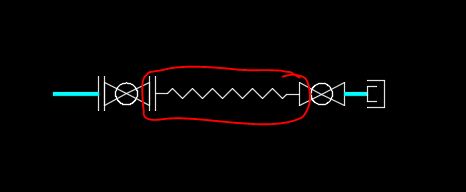 One of a handful of flexible connection symbols we use. This one happens to be flanged on one end and threaded on the other. ------------- "Humans have a strength that cannot be measured. This is John Connor. If you are reading this, you are the resistance." <<AutoCAD 2015>> |
Posted By: Kent Cooper
Date Posted: 30.Oct.2014 at 15:11
That [the flexible-hose aspect, apart from the fittings] appears to be just AutoCAD's ZIGZAG linetype. Might I assume that mmaurigi is looking for something different?
|
 John Connor wrote:
Posted By: John Connor
Date Posted: 30.Oct.2014 at 15:17
|
That zigzag was drawn from scratch. I know; I drew it a long, long time ago in a land far, far away and before AutoCAD even had a zigzag linetype. I think the zigzag linetype would be just what the OP is looking for. He might have to adjust the linetype scale which is easy to do. ------------- "Humans have a strength that cannot be measured. This is John Connor. If you are reading this, you are the resistance." <<AutoCAD 2015>> |
Posted By: Kent Cooper
Date Posted: 30.Oct.2014 at 17:08
|
Something sort-of like the "look" of the flexible-hose indication in the second link in my first reply, though a little wider in comparison with the S-curvature spacing:
*FlexHose,Flexible Hose graphic, continuous S-configuration
A,0,-.333333,["U",Standard,x=-.333333,y=-.6,s=1.0],-.666666,["U",Standard,x=.333333,y=.6,s=1.0,r=180],-.333333 That's assuming the "STANDARD" Text Style has the default TXT.shx font assigned. It gets that "U" text element idea from the N12 linetype in my first link [which makes a "drawing" representation of a physical hose, rather than the second link's and this linetype's graphic symbol approach], placing one U on each side alternating [and scaling them differently].
If you don't mind the result being wider, you can eliminate the little crossings of the U's verticals on curves by replacing the .6's in the y coordinates of the text-element positionings with 1.0.
Of course, something with a look more exactly like whatever you want can be done with a Shape definition and a linetype definition incorporating it, or possibly a text element taken from some symbol font such as Wingdings, if you find such a font with a character of the right shape.
|
Posted By: Kent Cooper
Date Posted: 04.Nov.2014 at 17:45
*FlexHose,Flexible Hose continuous S-configuration
A,0,-.333333,["c",Standard,x=-.333333,y=.666666,s=1.0,r=270],-.666666,["c",Standard,x=.333333,y=-.666666,s=1.0,r=90],-.333333 |