problem in drowing
Printed From: CAD Forum
Category: EN
Forum Name: AutoCAD
Forum Description: Discussion about AutoCAD and AutoCAD LT, viewers, DWG and DXF formats, Design Review, AutoCAD web, Drive, add-ons
URL: https://www.cadforum.cz/forum_en/forum_posts.asp?TID=10784
Printed Date: 05.Sep.2026 at 03:00
Topic: problem in drowing
Posted By: esfahan2000
Subject: problem in drowing
Date Posted: 15.Nov.2014 at 14:30
|
Hi every body. how can i connect this 2 lines: the Angle isnot important.just the distance is important thanks all. 
|
Replies:
Posted By: John Connor
Date Posted: 15.Nov.2014 at 18:28
|
You could draw two circles using 6.4 and 4.8 as the radii. Where they cross will be the location of the upper right corner of the object. I'm assuming you know where to locate the centerpoint of each circle. Yes? ------------- "Humans have a strength that cannot be measured. This is John Connor. If you are reading this, you are the resistance." <<AutoCAD 2015>> |
Posted By: sourcecad
Date Posted: 16.Nov.2014 at 06:36
|
the best and easy method is to follow the steps Go to fillet command > click on radius on command line or type R and enter > enter a radius of 0 > click on end points of both lines. the lines will get connected at their apparent point of intersection, Hope it helps  ------------- Admin thesourcecad.com |
Posted By: esfahan2000
Date Posted: 16.Nov.2014 at 07:38
it chang's the length |
 sourcecad wrote:
Posted By: esfahan2000
Date Posted: 16.Nov.2014 at 07:39
could you explain more? |
Posted By: John Connor
Date Posted: 16.Nov.2014 at 13:02
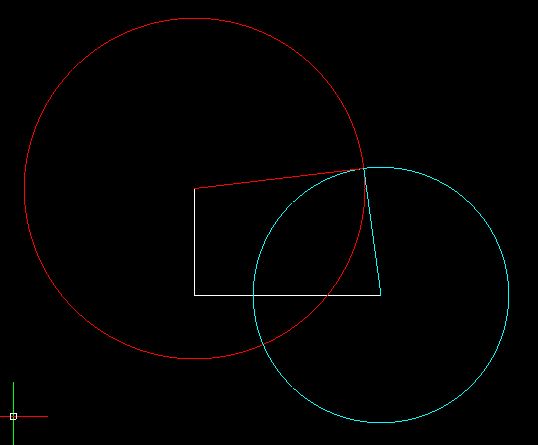 Really? The red circle has a radius of 6.4 and the cyan circle has a radius of 4.8. You said you did not care about the angle of the lines so there you go. The red and cyan lines are the lengths you specified. > ------------- "Humans have a strength that cannot be measured. This is John Connor. If you are reading this, you are the resistance." <<AutoCAD 2015>> |
Posted By: sourcecad
Date Posted: 16.Nov.2014 at 13:40
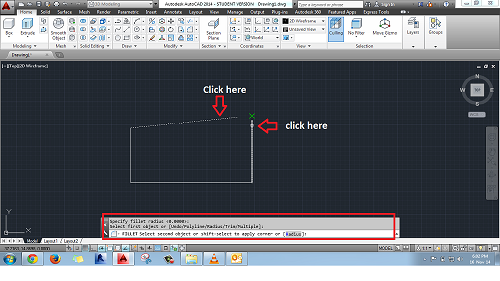 I hope this image makes things clear ------------- Admin thesourcecad.com |
Posted By: John Connor
Date Posted: 16.Nov.2014 at 18:42
|
sourcecad: The OP states the angle is not important but the distances are. Your solution using the Fillet command would make each line longer. Note too the OP has not provided an angle for the line that is 6.4 so depending on what the angle might be the final length using Fillet could, at this point, vary widely. ------------- "Humans have a strength that cannot be measured. This is John Connor. If you are reading this, you are the resistance." <<AutoCAD 2015>> |
Posted By: sourcecad
Date Posted: 17.Nov.2014 at 09:43
Constrain length of both the lines using parametric tool of AutoCAD and then connect line ends using grip editing. 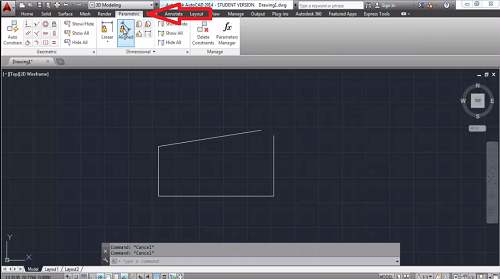 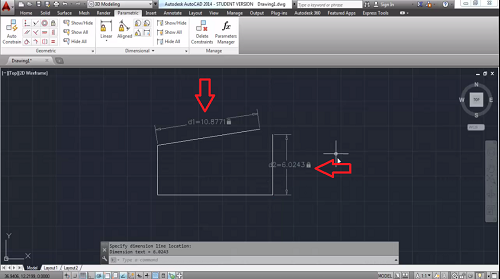 ------------- Admin thesourcecad.com |
Posted By: John Connor
Date Posted: 17.Nov.2014 at 11:31
|
That would be another way to do it. Not sure if the OP knows what constraints are or how to apply them. ------------- "Humans have a strength that cannot be measured. This is John Connor. If you are reading this, you are the resistance." <<AutoCAD 2015>> |
Posted By: John Connor
Date Posted: 19.Nov.2014 at 20:03
|
Looks like esfahan gave up. Too bad. ------------- "Humans have a strength that cannot be measured. This is John Connor. If you are reading this, you are the resistance." <<AutoCAD 2015>> |