Not able to reduce door size less than 24
Printed From: CAD Forum
Category: EN
Forum Name: AutoCAD
Forum Description: Discussion about AutoCAD and AutoCAD LT, viewers, DWG and DXF formats, Design Review, AutoCAD web, Drive, add-ons
URL: https://www.cadforum.cz/forum_en/forum_posts.asp?TID=10808
Printed Date: 06.Sep.2026 at 03:47
Topic: Not able to reduce door size less than 24
Posted By: ramy_send2010
Subject: Not able to reduce door size less than 24
Date Posted: 29.Nov.2014 at 20:21
|
Hello All, I'm new to work with Autocad. I want to reduce imperial door size less than 24. But Autocad put restrictions and I'm not able to reduce it less than 24. 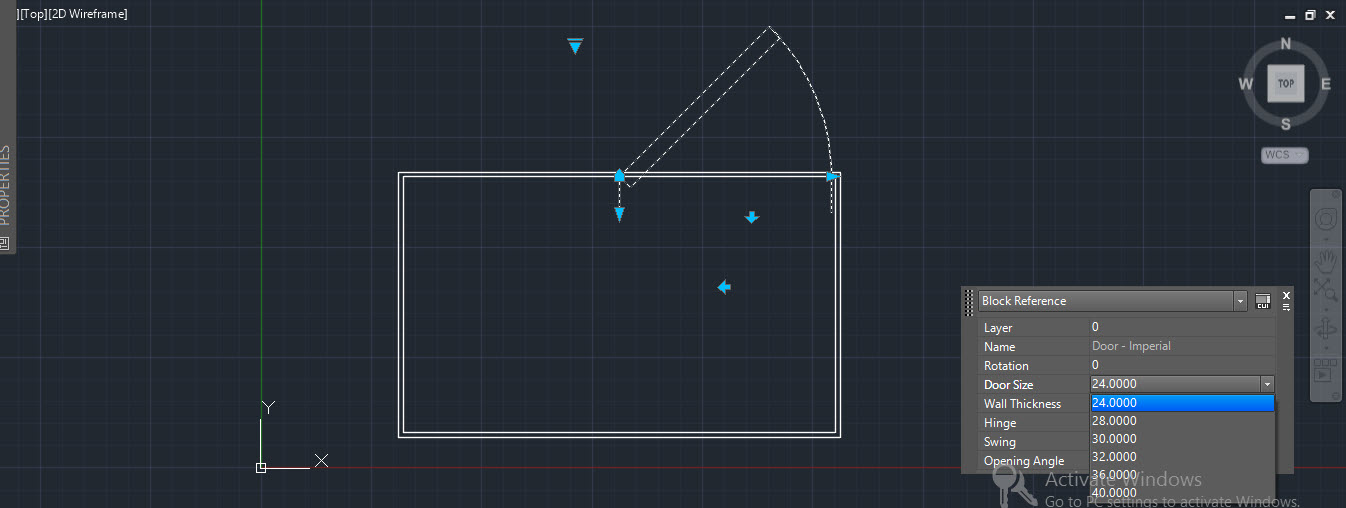 uploads/518895/draw1.dwg" rel="nofollow - uploads/518895/draw1.dwg uploads/518895/draw1.dwg" rel="nofollow - uploads/518895/draw1.dwg please help. |
Replies:
Posted By: philippe JOSEPH
Date Posted: 29.Nov.2014 at 22:21
|
Hello ramy, it looks like you are using a dynamic block not of your own. The doors are set at the various width indicated from 24 inches ( 609.6 mm ) to 40 inches ( 1016 mm ). If you want an other width you will have to do an other block or an assembly of lines. You can also modify the original dynamic block but it's not easy to do for a beginner. A not so difficult way would be to open the file : Door - imperial and learn about dynamic blocks. If you don't have it, create a file with the same name, insert the block inside it with its insertion point at the coordonate 0,0 and explode it one time do modify it and insert it a new in your file : draw1.dwg. Maybe all this is not a good idea because standards doors of that type should be between 24 and 40 inches ( to be verified ). OK, later I have seen this : http://www.1doors.co.uk/size-conversion-guide.php and standard doors sizes can be less than 24 inches.
|