Split or trim ellipses without destroying drawing
Printed From: CAD Forum
Category: EN
Forum Name: Inventor
Forum Description: Discussion about Autodesk Inventor
URL: https://www.cadforum.cz/forum_en/forum_posts.asp?TID=10934
Printed Date: 05.Sep.2026 at 10:37
Topic: Split or trim ellipses without destroying drawing
Posted By: 4M_Peri
Subject: Split or trim ellipses without destroying drawing
Date Posted: 23.Jan.2015 at 23:21
|
Hi, I'm a student and have the task of modelling a spanner, that changes proportions depending upon the distance specified for the jaw opening. (Distance AF) I have a drawing that works perfectly (as far as I can tell) - If the AF distance changes, everything else updates. How can I convert the 3 marked lines in the drawing into construction geometry (so I'm left with the coloured area) without it destroying the functionality? I've tried splitting the lines (that results in unconstrained geo and it doesn't update properly), trimming them (that failed as well), and even building the entire drawing in construction geometry and trying to convert the bits I want to keep. Am I missing something really obvious? Thank you. uploads/531242/spanner12b.ipt" rel="nofollow - uploads/531242/spanner12b.ipt 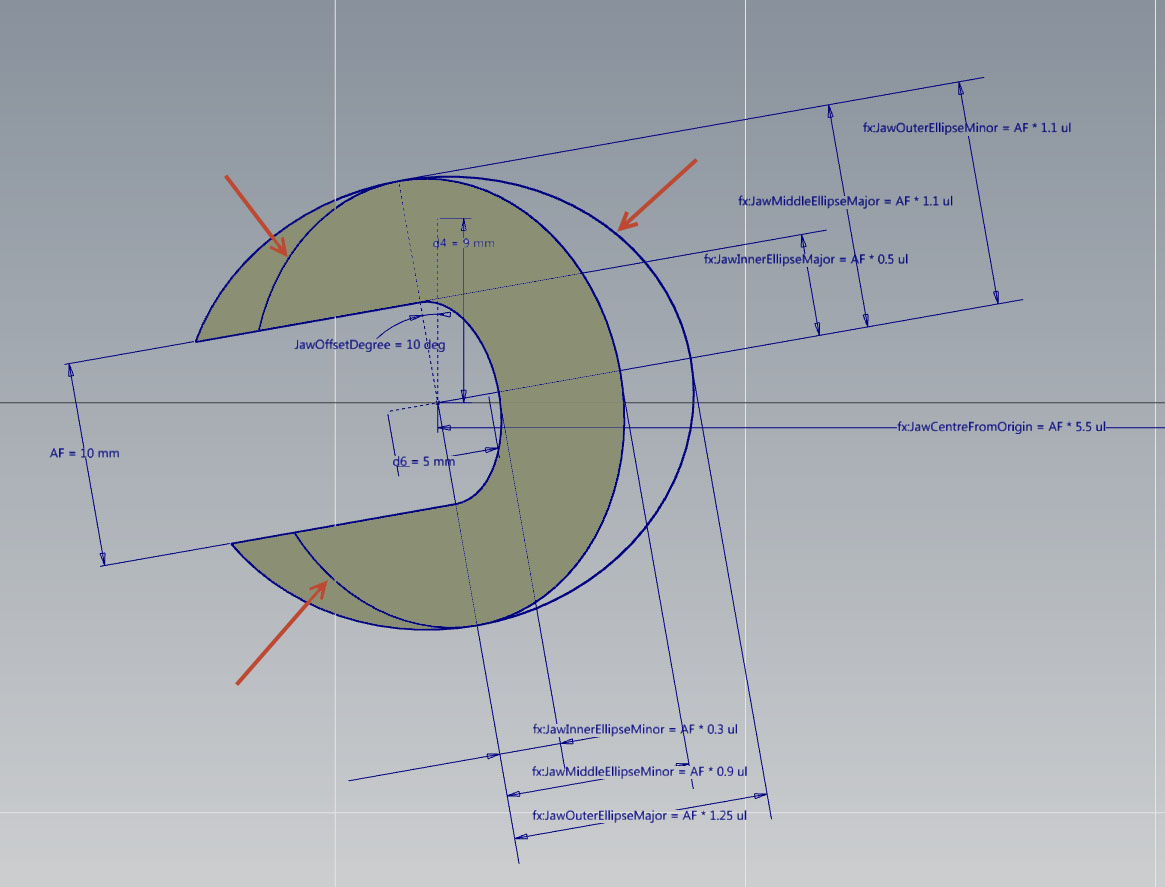 |
Replies:
Posted By: John Connor
Date Posted: 24.Jan.2015 at 12:34
|
I doubt you'll get any better a response here as you did at CADTutor. You would be better off posting your question to the Inventor Discussion Group at the AutoDesk website. ------------- "Humans have a strength that cannot be measured. This is John Connor. If you are reading this, you are the resistance." <<AutoCAD 2015>> |
Posted By: 4M_Peri
Date Posted: 24.Jan.2015 at 12:37
|
Thanks :) |