Can't perform boolean substraction
Printed From: CAD Forum
Category: EN
Forum Name: AutoCAD
Forum Description: Discussion about AutoCAD and AutoCAD LT, viewers, DWG and DXF formats, Design Review, AutoCAD web, Drive, add-ons
URL: https://www.cadforum.cz/forum_en/forum_posts.asp?TID=11034
Printed Date: 05.Sep.2026 at 21:05
Topic: Can't perform boolean substraction
Posted By: bavdeyka
Subject: Can't perform boolean substraction
Date Posted: 05.Mar.2015 at 23:08
|
Please have a look at my model. I can't perform boolean substraction on it. Could you please prompt on what the problem is? http://www.4shared.com/photo/Ep01Sbdkba/mul_1_.html |
Replies:
Posted By: bavdeyka
Date Posted: 06.Mar.2015 at 06:30
| I guess the first link is faulty, here's a download one: http://www.4shared.com/download/Ep01Sbdkba/mul_1_.dwg?lgfp=3000" rel="nofollow - http://www.4shared.com/download/Ep01Sbdkba/mul_1_.dwg?lgfp=3000 |
Posted By: John Connor
Date Posted: 06.Mar.2015 at 12:25
|
What program was used to create the 3D model? What are you trying to extract from the model? ------------- "Humans have a strength that cannot be measured. This is John Connor. If you are reading this, you are the resistance." <<AutoCAD 2015>> |
Posted By: bavdeyka
Date Posted: 06.Mar.2015 at 12:58
|
This was created in Solidworks by another person. It won't substract even from primitive blocks, such as box. So I'm sure that the problem is in this model.
|
Posted By: John Connor
Date Posted: 06.Mar.2015 at 13:00
|
Can't you reproduce the 3D model in AutoCAD? ------------- "Humans have a strength that cannot be measured. This is John Connor. If you are reading this, you are the resistance." <<AutoCAD 2015>> |
Posted By: philippe JOSEPH
Date Posted: 06.Mar.2015 at 14:11
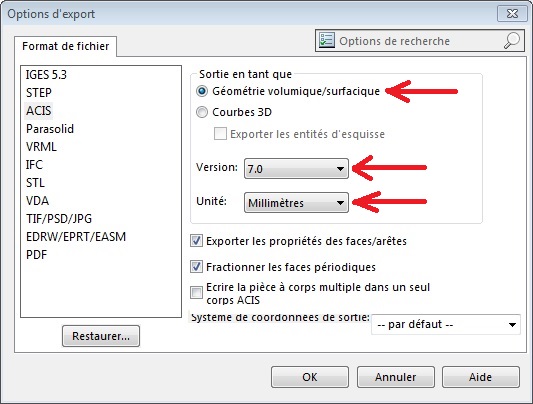
Hello bavdeyka, can you still have the Solidwoks file or can you ask the other person to do a "save as .sat file with the good options" here shown.
maybe if it has be done as a .step or not with the good options you will get surfaces and not solids.
Then you will have to rotate by -90° around Z ( OK with UCS world ) then rotate by +90° around Y ( set a special UCS for this ) your model to have it in AutoCAD with the same way as Solidworks.
|