Data Link problems with Excel in 2010
Printed From: CAD Forum
Category: EN
Forum Name: AutoCAD
Forum Description: Discussion about AutoCAD and AutoCAD LT, viewers, DWG and DXF formats, Design Review, AutoCAD web, Drive, add-ons
URL: https://www.cadforum.cz/forum_en/forum_posts.asp?TID=11042
Printed Date: 18.Oct.2026 at 19:35
Topic: Data Link problems with Excel in 2010
Posted By: tulip3D
Subject: Data Link problems with Excel in 2010
Date Posted: 10.Mar.2015 at 19:22
|
Hello all! New job new problems! LOL So here goes: I need to link an excel spreadsheet (parts list) to our CAD drawings to reduce confusion between purchasing and us desginers. I've figured out how to use data link to accomplish this, and it works. Problem is, whenever I 'update table data links', my nicely shaped parts list on the DWG gos all screwy, changing shape. My parts list is SUPPOSED to look like this: 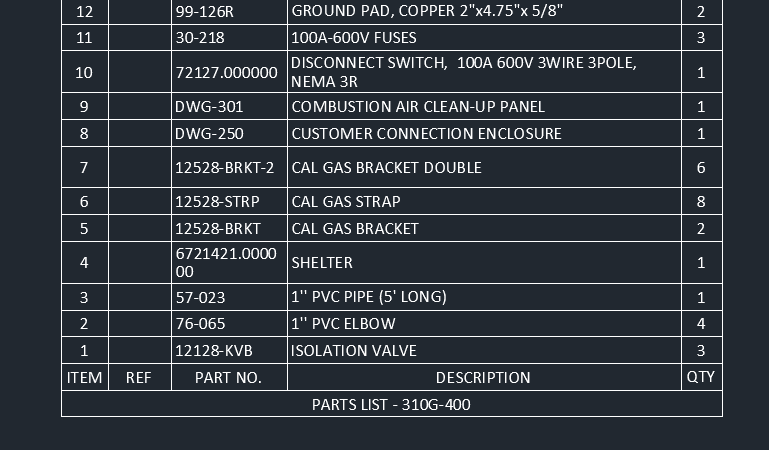 but then it looks like this after update:  so what can I do to prevent this?
|
Replies:
Posted By: tulip3D
Date Posted: 10.Mar.2015 at 19:23
|
|
Posted By: John Connor
Date Posted: 10.Mar.2015 at 22:05
|
If I remember correctly it is an option found in one of the DataLink dialog windows. I can't recall off the top of my head and I am not on my CAD computer at the moment. ------------- "Humans have a strength that cannot be measured. This is John Connor. If you are reading this, you are the resistance." <<AutoCAD 2015>> |
Posted By: tulip3D
Date Posted: 11.Mar.2015 at 13:57
|
Still farting around with this. got it to not be so dramatic, but it still changes the column width...its not keeping things exact. If I dont get it perfect, folks here wont adopt it...'oh its fine the way it is, all manual an slow and problem prone'...i can hear it now lol.
|
Posted By: John Connor
Date Posted: 11.Mar.2015 at 14:40
|
There's no crying in CAD! No moaning, bitching or complaining either. Prior to using the DataLink feature were you inserting spreadsheets using the Paste Special command? ------------- "Humans have a strength that cannot be measured. This is John Connor. If you are reading this, you are the resistance." <<AutoCAD 2015>> |
Posted By: tulip3D
Date Posted: 11.Mar.2015 at 15:42
|
Heck no. Dude here before me has no clue how things work...he just started using tables LOL before that all of the parts lists are text and lines... I'm essentially trying to teach an old dog new tricks, that never had a chance to know any tricks to begin with...he was a QA guy before being thrown to the CAD wolves...
|
Posted By: tulip3D
Date Posted: 11.Mar.2015 at 15:46
|
Posted By: tulip3D
Date Posted: 11.Mar.2015 at 15:47
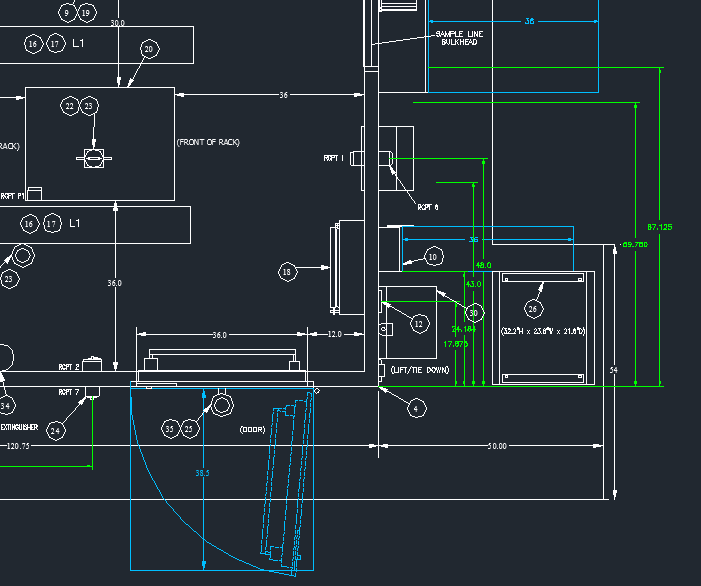
| thats what im dealing with ↑ |
Posted By: tulip3D
Date Posted: 11.Mar.2015 at 15:50
|
pretty sure some of those dims don't actually measure anything LOL Simply atrocious...
|
Posted By: John Connor
Date Posted: 11.Mar.2015 at 16:06
|
You did not answer my question re: PasteSpec. Thank you for just one more good example of what not to do in a CAD drawing. I've used datalinks maybe a couple dozen times and have never had a spreadsheet reformat itself as you show in your original post. The results you get are simply astounding. ------------- "Humans have a strength that cannot be measured. This is John Connor. If you are reading this, you are the resistance." <<AutoCAD 2015>> |
Posted By: tulip3D
Date Posted: 11.Mar.2015 at 16:27
|
I did: 'heck no' was the response. Man you love to state the obvious LOL... Problem is, now the columns are changing width. I figured out that last issue was attributed to settings in the data link dialog box, matching formatting to either acad or excel...excel uses 'font size' aka 8 or 10 or 12. acad dosnt have that, so it defaults to something close. I think my 'column width' issue is something related to the same 'conversion' issues as the font... |
Posted By: John Connor
Date Posted: 11.Mar.2015 at 17:05
|
Maybe you should try using PasteSpec instead (as a test). Perhaps you'll have better results. ------------- "Humans have a strength that cannot be measured. This is John Connor. If you are reading this, you are the resistance." <<AutoCAD 2015>> |
Posted By: tulip3D
Date Posted: 11.Mar.2015 at 18:13
| It works but theres no link?I simply selected cells in excel, 'paste special' and insert an OLE object...I can double click and it opens the excel file...but when i changed in excel it did not 're'import back to CAD file? Do I need to invoke something? |
Posted By: John Connor
Date Posted: 11.Mar.2015 at 18:26
|
I just delete the previous one and reinsert. I don't use the method all that often. I just suggested it because I thought there would be a better chance of retaining the original format from Excel. ------------- "Humans have a strength that cannot be measured. This is John Connor. If you are reading this, you are the resistance." <<AutoCAD 2015>> |
Posted By: tulip3D
Date Posted: 11.Mar.2015 at 18:58
|
Well your right on that point, it does retain the same physical size... I'm essentially trying to replace a whole ERP system with a common excel file and autoCAD...guess I'm shooting the moon LOL Love working here, but their systems and design process is stoneage, at best. I saw one of those programs (I think the 'parts dept' was using) that you have to use arrow keys and letters to navigate....about to party like its 1999 LOL
|
Posted By: tulip3D
Date Posted: 11.Mar.2015 at 18:59
|
Consider this thead DEAD. As always, your help and expertise is much appreciated John C.
|