to cover on the solid
Printed From: CAD Forum
Category: EN
Forum Name: AutoCAD
Forum Description: Discussion about AutoCAD and AutoCAD LT, viewers, DWG and DXF formats, Design Review, AutoCAD web, Drive, add-ons
URL: https://www.cadforum.cz/forum_en/forum_posts.asp?TID=11075
Printed Date: 28.Oct.2026 at 00:06
Topic: to cover on the solid
Posted By: ejder
Subject: to cover on the solid
Date Posted: 28.Mar.2015 at 18:37
Hi everybody,i'm from France and i'm new in the forum , this is why i'm sorry for the grammar :) i have a problem, i cant differentiate the surface for cover the different material.you will see in the picture what i uploaded i want to cover the palces green of the differents materials but when i cover for the solid it cover all of the palce ..what i have to do please ? thank you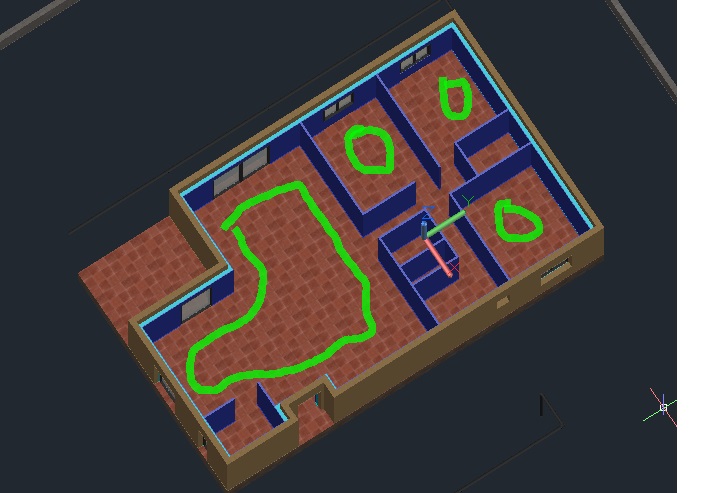 ------------- carpediem |
Replies:
Posted By: philippe JOSEPH
Date Posted: 28.Mar.2015 at 19:40
|
Hello ejder, maybe I will say something stupid but I see that you have succeded in applying materials to all that stuff, was if you just separate the different solids to be rendered so that you could apply different materials. I suppose that the big room will be covered with stone and the other rooms with wood. Warning : if you use the french release, the french commands SECTION ( _SLICE or SLICE ) and COUPE ( _SECTION or SECTION ) will give the exact contrary of what it's supose to do. SECTION will cut the solids in 2 parts with the option to keep the 2 parts or delete one of the two. COUPE will create a REGION at the place of the COUPE without deleting anything. In your case I would separate the different solids with the command SECTION. In any case do it on a copy of the original solids in the same file.
|
Posted By: ejder
Date Posted: 28.Mar.2015 at 21:19
|
Thak you very much Philippe :) thanks to you i finally succeded .i used the commend slice and i distinguished the rooms now i can work on the differents solids et merci beaucoup :)
------------- carpediem |