EXTRUDE
Printed From: CAD Forum
Category: EN
Forum Name: AutoCAD
Forum Description: Discussion about AutoCAD and AutoCAD LT, viewers, DWG and DXF formats, Design Review, AutoCAD web, Drive, add-ons
URL: https://www.cadforum.cz/forum_en/forum_posts.asp?TID=11085
Printed Date: 28.Oct.2026 at 00:05
Topic: EXTRUDE
Posted By: careldewet
Subject: EXTRUDE
Date Posted: 05.Apr.2015 at 08:02
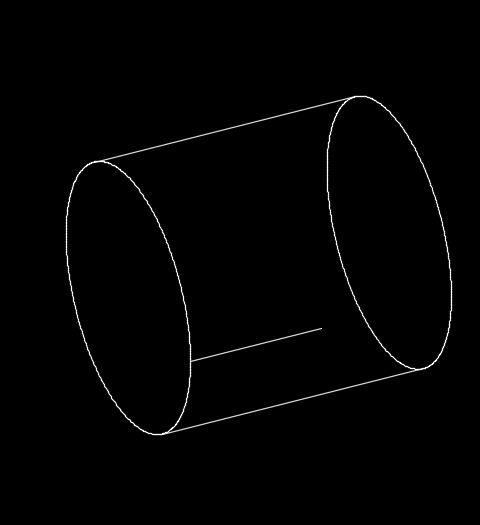 I'm using AutoCAD 2015. I am new to this forum. This is my first post. Whe I extrude a already extruded solid, a line appears. Can anybody help me to get rid of this line or to avoid it happening. It is part of the solid. Isoline=0 does not work. Thank you.
|
Replies:
Posted By: John Connor
Date Posted: 05.Apr.2015 at 12:34
|
You extruded a solid then extruded it a second time? I did not know that was possible. What visual style are you working in? 2Dwireframe or 3Dhidden? Could that line be a piece of 2D geometry? ------------- "Humans have a strength that cannot be measured. This is John Connor. If you are reading this, you are the resistance." <<AutoCAD 2015>> |
Posted By: careldewet
Date Posted: 05.Apr.2015 at 14:23
|
Hi John, I produced a solid. Days later I realized it was too short. Then I
extruded (lengthened it). Came up with this unerasable line or isoline in the
lengthened part. This never happened with previous versions. Only now with
2015. I’m working in 2D wireframe. |
Posted By: John Connor
Date Posted: 05.Apr.2015 at 18:36
|
Without a copy of the drawing I can't say for sure what the origin of the line might be. Could be an anomaly in your 3D model. ------------- "Humans have a strength that cannot be measured. This is John Connor. If you are reading this, you are the resistance." <<AutoCAD 2015>> |
Posted By: careldewet
Date Posted: 06.Apr.2015 at 07:12
|
Hi John, Here is the file, please see what you can make of it. Thank you. |