objects in layout becomes tilted
Printed From: CAD Forum
Category: EN
Forum Name: AutoCAD
Forum Description: Discussion about AutoCAD and AutoCAD LT, viewers, DWG and DXF formats, Design Review, AutoCAD web, Drive, add-ons
URL: https://www.cadforum.cz/forum_en/forum_posts.asp?TID=11140
Printed Date: 05.Sep.2026 at 00:03
Topic: objects in layout becomes tilted
Posted By: sysuwzx
Subject: objects in layout becomes tilted
Date Posted: 30.Apr.2015 at 06:57
|
Hello, everyone~ I'm new here and i come across one problem. here it follows. I draw one rectangle in model area , then build one layout and rotate the WCS by 30 degrees,. Below are the pictures.  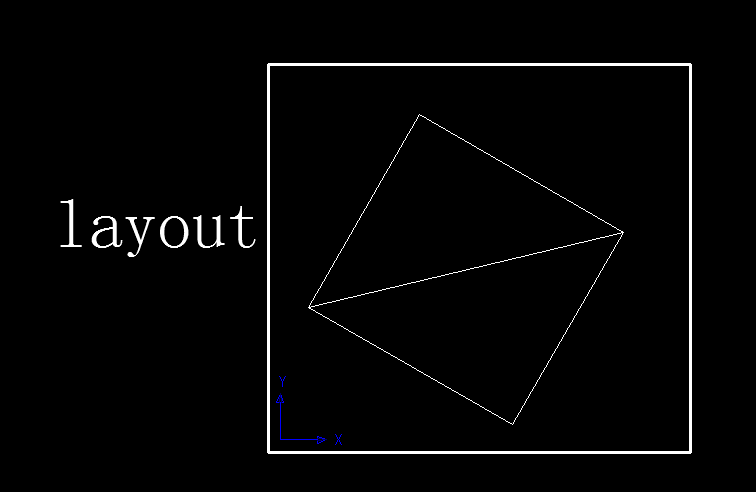 But the problem is, when i try to copy the rectangle and paste it somewhere in layout, the pasted objects seem to be rotated by certain angle. Like here: 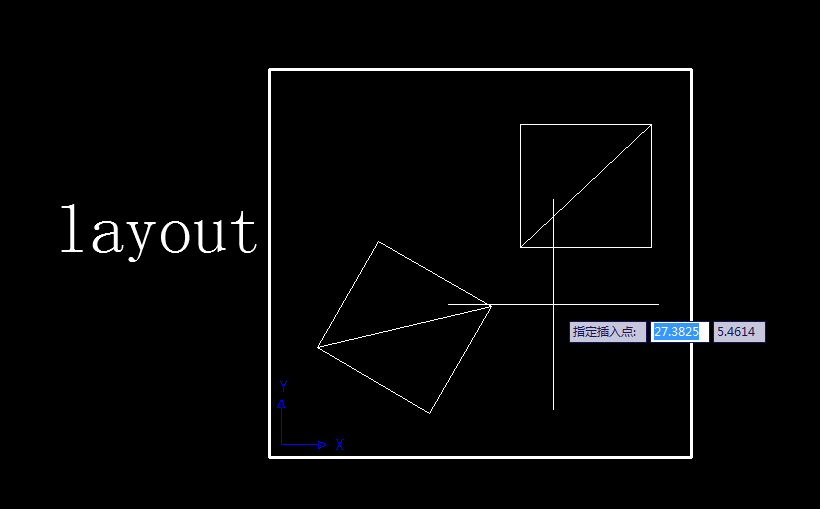 What can i do with this problem? I dont want it to be tilted. Thanks!!!
|
Replies:
Posted By: John Connor
Date Posted: 30.Apr.2015 at 12:01
|
Yeah, the pasted object is rotated 30 degrees. Why are you surprised? Rotate the viewport. ------------- "Humans have a strength that cannot be measured. This is John Connor. If you are reading this, you are the resistance." <<AutoCAD 2015>> |
Posted By: sysuwzx
Date Posted: 02.May.2015 at 04:51
| I know it's 30 degrees and is there any way to solve the problem without rotate the viewpoint,just in the layout itself. |
Posted By: philippe JOSEPH
Date Posted: 02.May.2015 at 11:59
|
Hello sysuwzw, you are creating alone your own misery by rotating the UCS and then finding that pasted object are rotated by the same angle. A ( or the good way ) would be to use the different UCS settings correctly or use them when needed. Maybe you are nor obliged to rotate the viewport and/or use the command PLAN to set the angle of the viewport after setting a special UCS ( that can eventually not be 30° but 29.12345678987654345678998765....... ). You can set an UCS conformably to a view ( UCS , option View ) and set a view conformably to an UCS ( command PLAN ). Have a nice day.
|
Posted By: John Connor
Date Posted: 04.May.2015 at 14:20
|
Simply rotate the VIEW in the viewport itself. Read this then do it. http://docs.autodesk.com/ACD/2010/ENU/AutoCAD%202010%20User%20Documentation/index.html?url=WS1a9193826455f5ffa23ce210c4a30acaf-74a2.htm,topicNumber=d0e35964 ------------- "Humans have a strength that cannot be measured. This is John Connor. If you are reading this, you are the resistance." <<AutoCAD 2015>> |