View Port in Model Space
Printed From: CAD Forum
Category: EN
Forum Name: AutoCAD
Forum Description: Discussion about AutoCAD and AutoCAD LT, viewers, DWG and DXF formats, Design Review, AutoCAD web, Drive, add-ons
URL: https://www.cadforum.cz/forum_en/forum_posts.asp?TID=11236
Printed Date: 23.Oct.2026 at 00:49
Topic: View Port in Model Space
Posted By: mavrick42
Subject: View Port in Model Space
Date Posted: 30.Jun.2015 at 23:27
|
OK I have a problem and wanted some help with it. I just got a drawing from one of my ARCH and I am in model space and noticed that there is a view port in Model Space. What is is is there is a block and when I click on the block a boarder opens around it. I can move the edges of the viewport and it will show more of the block. If I double click on the block it will take me to the block editor portal. I have not been able to figure out how to do this. Does anyone have any ideas. Let me know if you are as confused as I am or if you know how to do this. I appreciate all of the help. |
Replies:
Posted By: John Connor
Date Posted: 01.Jul.2015 at 00:27
|
While there are model space and paper space viewports they are not the same thing. Upload a copy of the drawing so we can see what you have or use a file sharing service like Dropbox and post a link to the drawing file here. Someone will have a look at it. ------------- "Humans have a strength that cannot be measured. This is John Connor. If you are reading this, you are the resistance." <<AutoCAD 2015>> |
Posted By: philippe JOSEPH
Date Posted: 01.Jul.2015 at 07:21
|
Hello mavrick42, it looks like your block has been XDELIM that's to say that you can create "viewports" in the model space by surrounding a block so that you can see only a part of it.
The real block has still all the entities OK and you can work on a copy of it without problems and the modifications on it will update all the others blocks of the same name.
If you launch the command XDELIM you will be able to modify the limits of you XDELIM block, etc...
You can also have various "viewports" in your model space, clic on the top left part of your model space to have access to the settings :
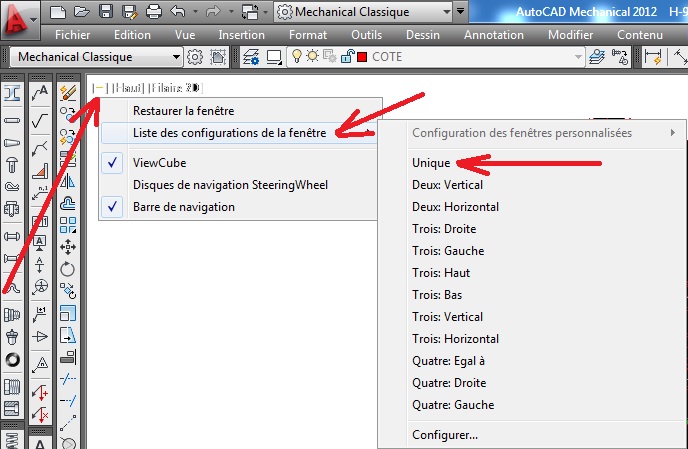 |
Posted By: John Connor
Date Posted: 01.Jul.2015 at 12:26
|
XDELIM? Are you referring to XClip? XCLIP Crops the display of a selected external reference or block reference to a specified boundary. The clipping boundary determines the portion of an xref or block instance that is hidden, either outside or inside the boundary. The visibility of the clipping boundary is controlled by the XCLIPFRAME system variable. For a further explanation you can consult the AutoCAD Help file and search on the command XCLIP. ------------- "Humans have a strength that cannot be measured. This is John Connor. If you are reading this, you are the resistance." <<AutoCAD 2015>> |
Posted By: philippe JOSEPH
Date Posted: 01.Jul.2015 at 12:46
|
Oups, yes you are wright John ( my access to the AutoCAD Dictionary is not working anymore ). |
Posted By: mavrick42
Date Posted: 01.Jul.2015 at 16:03
| That did exactly what I was looking for! Thank you guys for the help! I greatly appreciate it!! |