Problem with ACAD 3d model
Printed From: CAD Forum
Category: EN
Forum Name: AutoCAD
Forum Description: Discussion about AutoCAD and AutoCAD LT, viewers, DWG and DXF formats, Design Review, AutoCAD web, Drive, add-ons
URL: https://www.cadforum.cz/forum_en/forum_posts.asp?TID=11352
Printed Date: 03.Sep.2026 at 20:24
Topic: Problem with ACAD 3d model
Posted By: mmaurigi
Subject: Problem with ACAD 3d model
Date Posted: 10.Sep.2015 at 14:14
|
I have a 3d model I have been working on. Everything is fine except one component, a pump. When I close the drawing and reopen it, all the components show up in the model. However, have a longer than usual initial regeneration waiting for the command line to show up, the pump disappears. If I zoom in, I still can't see it. If I hover my over the area where the pump is supposed to be, I can see it in a phantom-like appearance. The model of the pump is a separate file that I insert into the main model as a block. I've also inserted it by just "cutting & pasting" it into the main model and the same thing happens. Anyone have any idea what might cause this and what I can do to resolve it? Thanks alot! |
Replies:
Posted By: John Connor
Date Posted: 10.Sep.2015 at 15:57
|
Inserted as a block and not xreffed? What is the source of the block? ------------- "Humans have a strength that cannot be measured. This is John Connor. If you are reading this, you are the resistance." <<AutoCAD 2015>> |
Posted By: mmaurigi
Date Posted: 10.Sep.2015 at 16:07
|
Yes, inserted as a block, not xref'd. The block is a separate 3D .dwg file I created. I ran the Recover and Audit commands on that file and it reports back that no errors are found. |
Posted By: John Connor
Date Posted: 10.Sep.2015 at 16:35
|
What are the specifications on your system? Maybe it is a graphics related problem. Is hardware acceleration enabled? Are you utilizing clipping planes? ------------- "Humans have a strength that cannot be measured. This is John Connor. If you are reading this, you are the resistance." <<AutoCAD 2015>> |
Posted By: mmaurigi
Date Posted: 10.Sep.2015 at 16:59
|
Hardware acceleration is ENABLED. System is Intel Core i5-4200M CPU @ 2.5GHz, 8GB RAM, 64bit OS |
Posted By: John Connor
Date Posted: 10.Sep.2015 at 17:14
|
And are you running a dedicated graphics card or is an onboard graphics chip installed? Are you making use of clipping planes? Can you provide a copy of the drawing via DropBox? Someone here could take a look at it and see if they see the same thing happening as you do. It doesn't have to be the entire drawing; just enough to visualize the problem. What is the file size for the 3D pump drawing? What is the file size of the drawing you are inserting it into? Is it just the one insertion? ------------- "Humans have a strength that cannot be measured. This is John Connor. If you are reading this, you are the resistance." <<AutoCAD 2015>> |
Posted By: mmaurigi
Date Posted: 10.Sep.2015 at 17:38
I am not making use of clipping plane. I actually never have. File size of the pump drawing is 4,210 KB. File size of the drawing it is being inserting it into is 22,060 KB. I'm checking with our IT group regarding your questions about the graphics card/chip. I don't use DropBox. Can I attach the 22,060 KB file here?
|
 John Connor wrote:
Posted By: John Connor
Date Posted: 10.Sep.2015 at 17:57
|
I doubt you can attach a file of that size to a post but you might be able to upload it to the CAD Blocks area. The file size for the pump seems overly large compared to your entire drawing 3D drawing file size don't you think? ------------- "Humans have a strength that cannot be measured. This is John Connor. If you are reading this, you are the resistance." <<AutoCAD 2015>> |
Posted By: mmaurigi
Date Posted: 10.Sep.2015 at 18:18
|
I'm going to place the model in the CAD BLOCKS area. The file is called Pontoon.dwg Looking at some of the other models of pumps I've done, they're around the 3,600 KB size so this pump model file size is a little larger, but I didn't think it was outrageous.
|
Posted By: mmaurigi
Date Posted: 10.Sep.2015 at 18:28
|
Got the file down to 19,000 KB, but could not load it to the CAD BLOCKS area. It said file size was too big. Turns out I have used DropBox. I uploaded the file there. Now how do can you or anyone else get to it? |
Posted By: mmaurigi
Date Posted: 10.Sep.2015 at 18:35
| https://www.dropbox.com/s/su12un3idkawlfa/Pontoon.dwg?dl=0 |
Posted By: John Connor
Date Posted: 10.Sep.2015 at 18:46
|
Just some of the junk in your drawing. Command: -PURGE Enter type of unused objects to purge [Blocks/DEtailviewstyles/Dimstyles/Groups/LAyers/LTypes/MAterials/MUltileaderstyles/Plotstyles/SHapes/textSTyles/Mlinestyles/SEctionviewstyles/Tablestyles/Visualstyles/Regapps/Zero-length geometry/Empty text objects/Orphaned data/All]: r Enter name(s) to purge <*>: Verify each name to be purged? [Yes/No] <Y>: n Deleting registered application "_PLOTMARKAPP_". Deleting registered application "ACAD_EXEMPT_FROM_CAD_STANDARDS". Deleting registered application "ACAD_MLEADERVER". Deleting registered application "ACAD_OBJECT_CHANGE_GUID". Deleting registered application "ACAD_PSEXT". Deleting registered application "AcadAnnoPO". Deleting registered application "AVE_ENTITY_MATERIAL". Deleting registered application "AVE_GLOBAL". Deleting registered application "AVE_MATERIAL". Deleting registered application "AVE_RENDER". 10 registered applications deleted. Command: -PURGE Enter type of unused objects to purge [Blocks/DEtailviewstyles/Dimstyles/Groups/LAyers/LTypes/MAterials/MUltileaderstyles/Plotstyles/SHapes/textSTyles/Mlinestyles/SEctionviewstyles/Tablestyles/Visualstyles/Regapps/Zero-length geometry/Empty text objects/Orphaned data/All]: all Enter name(s) to purge <*>: Verify each name to be purged? [Yes/No] <Y>: n Deleting block "40' - REAR BOTTOM". Deleting block "40' - REAR SPACER". Deleting block "40' HI - REAR PANEL". Deleting block "40' REAR". Deleting block "40-FLOOR". Deleting block "40-LH BOTTOM LENGTH". Deleting block "40-REAR END CROSS BEAM". Deleting block "40-REAR LONGITUDINAL". Deleting block "40-REAR LONGITUDINAL TOP". Deleting block "40-RH BOTTOM LENGTH". Deleting block "40-ROOF". Deleting block "40-SIDE FLOOR". Deleting block "40-STIFFENING CROSS BEAM". Deleting block "40-STIFFENING CROSS BEAM TOP". Deleting block "40-UPPER LENGTH". Deleting block "40HI - SIDE PANEL". Deleting block "801-040". Deleting block "801-582". Deleting block "80A-SC". Deleting block "80D-SC". Deleting block "847-080". Deleting block "851-080". Deleting block "A$C64B31FB9". Deleting block "Bolted Connection". Deleting block "Bolted Connection$1$ATF". Deleting block "Bolted Connection$10$ATF". Deleting block "Bolted Connection$11$ATF". Deleting block "Bolted Connection$12$ATF". Deleting block "Bolted Connection$13$ATF". Deleting block "Bolted Connection$14$ATF". Deleting block "Bolted Connection$15$ATF". Deleting block "Bolted Connection$16$ATF". Deleting block "Bolted Connection$17$ATF". Deleting block "Bolted Connection$18$ATF". Deleting block "Bolted Connection$19$ATF". Deleting block "Bolted Connection$2$ATF". Deleting block "Bolted Connection$20$ATF". Deleting block "Bolted Connection$21$ATF". Deleting block "Bolted Connection$22$ATF". Deleting block "Bolted Connection$23$ATF". Deleting block "Bolted Connection$3$ATF". Deleting block "Bolted Connection$4$ATF". Deleting block "Bolted Connection$5$ATF". Deleting block "Bolted Connection$6$ATF". Deleting block "Bolted Connection$7$ATF". Deleting block "Bolted Connection$8$ATF". Deleting block "Bolted Connection$9$ATF". Deleting block "CORNER$$BOTTOM$LEFT". Deleting block "CORNER$$BOTTOM$RIGHT". Deleting block "CORNER$$TOP$LEFT". Deleting block "CORNER$$TOP$RIGHT". Deleting block "DIN EN 24017 M12 x 25". Deleting block "DIN EN 24032 M12". Deleting block "DOOR BRACKET - 1". Deleting block "DOOR BRACKET - 2". Deleting block "DOOR HINGE". Deleting block "DOOR LOCK BAR". Deleting block "DOOR PANEL". Deleting block "DOOR POST". Deleting block "DOOR SEAL". Deleting block "DOOR WIDTH". Deleting block "flange 8 in slipon 150". Deleting block "FLOOR C-BEAM". Deleting block "FLOOR C-BEAM SMALL". Deleting block "FRONT BOTTOM". Deleting block "FRONT TOP". Deleting block "generic dredge pump". Deleting block "HANDLE". Deleting block "HI-LH FRONT POST". Deleting block "HI-LH REAR POST". Deleting block "HI-RH FRONT POST". Deleting block "HI-RH REAR POST". Deleting block "HI - LH DOOR". Deleting block "HI - RH DOOR". Deleting block "ISO CONTAINER - 1AAA - (HICUBE) 40' (12m)". Deleting block "LATCH". Deleting block "LATCH BLOCK". Deleting block "LATCH PAD". Deleting block "SPEARSHDL1". Deleting block "SPEARSHDL2". Deleting block "SPEARSHDL3". Deleting block "SPEARSHDL4". Deleting block "SPEARSHDL5". Deleting block "SPEARSHDL5B". Deleting block "SPEARSHDL6". Deleting block "SPEARSHDL7". Deleting block "SPEARSHDL8". Deleting block "SPEARSHDL9". Deleting block "SPEARSL2". Deleting block "SPEARSLOGO". Deleting block "STEEL FLOOR". Deleting block "UCHANNEL". Deleting block "UPPER REAR WIDTH". Deleting block "Waste Block 2". 94 blocks deleted. Deleting layer "3D HOSE". Deleting layer "65% SCREENING". Deleting layer "AIR HANDLING". Deleting layer "AUX_EQUIP". Deleting layer "BORDER-LGT". Deleting layer "BORDER_TXT-HVY". Deleting layer "BORDER_TXT-LGT". Deleting layer "BUILDING". Deleting layer "CENTERLINES". Deleting layer "CLIENT_PIPING". Deleting layer "Defpoints". Deleting layer "DIMENSIONS". Deleting layer "DIMTXT". Deleting layer "DWGTXT". Deleting layer "DWGTXT_HVY". Deleting layer "EQUIPMENT". Deleting layer "EQUIPMENT_INTERNALS". Deleting layer "EXIST_PIPING". Deleting layer "FLOATS". Deleting layer "FOUNDATIONS". Deleting layer "FRAME". Deleting layer "GEOTUBE". Deleting layer "HARDWARE". Deleting layer "HIDDEN". Deleting layer "HOSE". Deleting layer "INSTRUMENTATION". Deleting layer "LADDER". Deleting layer "LAND". Deleting layer "LINER". Deleting layer "MAJOR PIPING". Deleting layer "MEMBRANE". Deleting layer "MINOR PIPING". Deleting layer "NOPLOT". Deleting layer "OPTIONAL EQUIPMENT". Deleting layer "PHANTOM". Deleting layer "PLATFORM". Deleting layer "spears_c". Deleting layer "spears_h". Deleting layer "spears_l". Deleting layer "SPEARS_LOGO". Deleting layer "spears_n". Deleting layer "spears_s". Deleting layer "spears_x". Deleting layer "TAR". Deleting layer "USER DEFINED". Deleting layer "VIEWPORT". Deleting layer "WATER". Deleting layer "XHATCH". 48 layers deleted. Deleting linetype "CENTER". Deleting linetype "CENTER2". Deleting linetype "HIDDEN". Deleting linetype "HIDDEN2". Deleting linetype "PHANTOM2". 5 linetypes deleted. Deleting text style "TECH". 1 text style deleted. No unreferenced shape files found. Deleting dimension style "Standard". 1 dimension style deleted. No unreferenced mlinestyles found. No unreferenced plotstyles found. No unreferenced table styles found. Deleting material "Canvas - White". Deleting material "Flat - Broom Gray". Deleting material "Galvanized". Deleting material "Mesh 1". Deleting material "Murky River". Deleting material "Reflecting Pool". Deleting material "Retaining Wall - Striated Cinder Blocks". Deleting material "Rough - Black". Deleting material "Rubber - Black". Deleting material "Rubber - Black(1)". Deleting material "Smooth - Light Orange". Deleting material "Swimming Pool". 12 materials deleted. No unreferenced visual styles found. No unreferenced multileader styles found. No unreferenced groups found. No unreferenced Detail view styles found. No unreferenced Section view styles found. ------------- "Humans have a strength that cannot be measured. This is John Connor. If you are reading this, you are the resistance." <<AutoCAD 2015>> |
Posted By: John Connor
Date Posted: 10.Sep.2015 at 19:00
|
Pretty damn interesting. I'm seeing the same thing happen. This warrants further investigation. Thanks for sharing. Could it have anything to do with the material you assigned to it? ------------- "Humans have a strength that cannot be measured. This is John Connor. If you are reading this, you are the resistance." <<AutoCAD 2015>> |
Posted By: mmaurigi
Date Posted: 10.Sep.2015 at 19:02
|
Just purged the pump file. Dropped from 4,000 KB to 1,000KB. I'm going to try inserting again now and seeing what happens.
|
Posted By: mmaurigi
Date Posted: 10.Sep.2015 at 19:04
|
same thing happens with the smaller file. |
Posted By: John Connor
Date Posted: 10.Sep.2015 at 19:12
|
I thought you said you inserted it as a block? When I click on it and check Properties it says 3D Solid not Block Reference. I just noticed that if I switch to a Top view I can get the pump to show up once in a while. I also noticed that your pump geometry on the intake(?) is whack. Something is not right with it. ------------- "Humans have a strength that cannot be measured. This is John Connor. If you are reading this, you are the resistance." <<AutoCAD 2015>> |
Posted By: John Connor
Date Posted: 10.Sep.2015 at 19:24
Something is wrong with your 3D pump geometry. Maybe that is why AutoCAD is having a problem with it.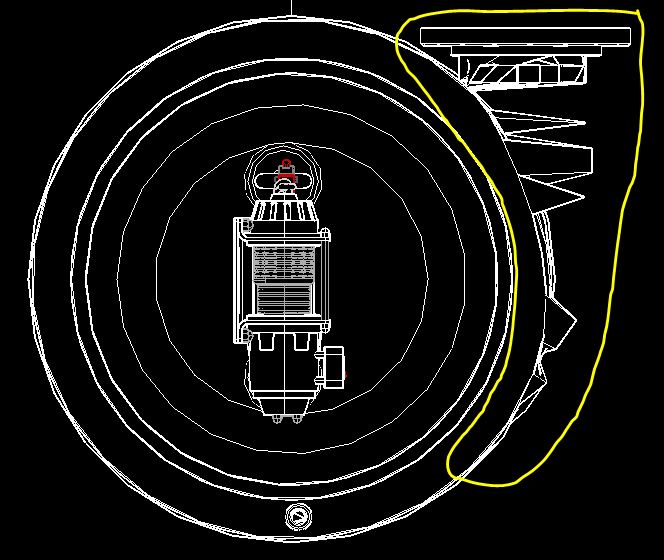 ------------- "Humans have a strength that cannot be measured. This is John Connor. If you are reading this, you are the resistance." <<AutoCAD 2015>> |
Posted By: mmaurigi
Date Posted: 10.Sep.2015 at 19:26
|
I have inserted as a block and as a "Copy and Paste". Result is the same. Yes the intake on the pump. That's another issue I forgot to mention. No idea why that's happening. The geometry for that intake was taken from another pump model that has no problems at all.
|
Posted By: John Connor
Date Posted: 10.Sep.2015 at 19:27
|
I also notice that if I zoom in (using a 3D isometric view) at some point the pump will show up even if my visual style is set to Conceptual or Realistic. ------------- "Humans have a strength that cannot be measured. This is John Connor. If you are reading this, you are the resistance." <<AutoCAD 2015>> |
Posted By: John Connor
Date Posted: 10.Sep.2015 at 19:38
I finally got it to display and you can quite clearly see that you have a problem with the 3D geometry just behind the flange.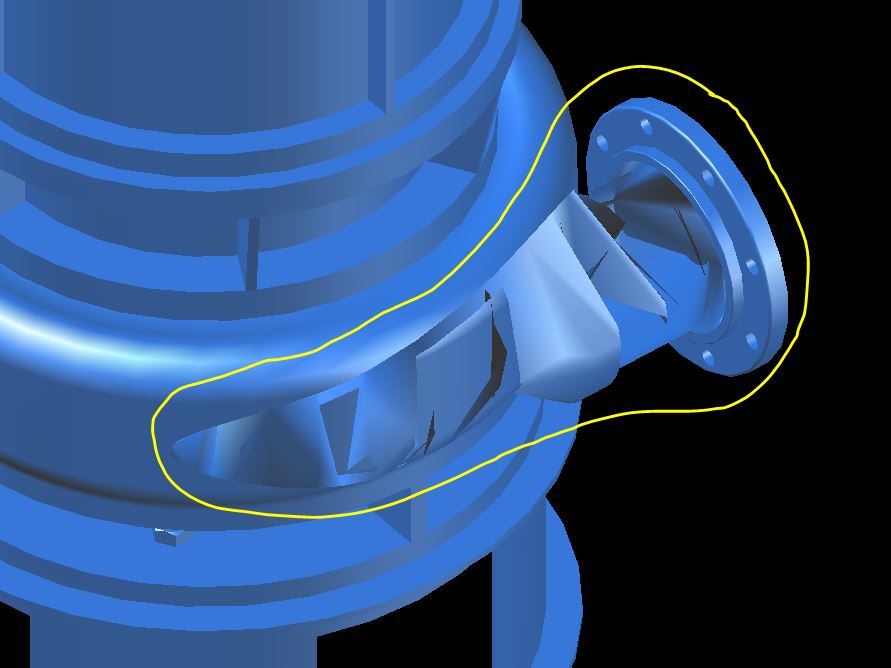 ------------- "Humans have a strength that cannot be measured. This is John Connor. If you are reading this, you are the resistance." <<AutoCAD 2015>> |
Posted By: mmaurigi
Date Posted: 10.Sep.2015 at 19:54
|
I recreated the pump in a completely new file. Inserted it into the main model and it seams fine. Interesting thing. The file size of the new pump file is only 880 KB as compared to the original 4,200 KB. Thank you for your help! |
Posted By: John Connor
Date Posted: 10.Sep.2015 at 20:05
|
As it turns out I just discovered that if I subtracted out the corrupted 3D geometry that the pump would display no matter how far in or out I was zoomed and no matter the visual style. You really ought to be more careful when creating your 3D objects as inconsistencies like the one seen in your pump can cause no end of trouble and frustration. As regards the file size of the new 3D pump compared to the original I see that I was on the right track all along. The pump isn't all that complicated and the fact that one pump was 1/5th the file size of the drawing you were inserting it in made me suspicious. Glad to hear you got it all sorted out. ------------- "Humans have a strength that cannot be measured. This is John Connor. If you are reading this, you are the resistance." <<AutoCAD 2015>> |