dimensions from m to cm
Printed From: CAD Forum
Category: EN
Forum Name: AutoCAD
Forum Description: Discussion about AutoCAD and AutoCAD LT, viewers, DWG and DXF formats, Design Review, AutoCAD web, Drive, add-ons
URL: https://www.cadforum.cz/forum_en/forum_posts.asp?TID=11383
Printed Date: 21.Oct.2026 at 04:38
Topic: dimensions from m to cm
Posted By: eldiego
Subject: dimensions from m to cm
Date Posted: 30.Sep.2015 at 20:14
|
Hi everyone I'm sure you have all been through this: I'm used to drawing in m, I have a new project and drawings (to use as Xref) come in cm. I know how to scale a drawing to what I want, so I can start designing in cm. Problem comes with the dimensions, when I incorporate the dims i usually use they don't work (they are set to m) Is there a way to change the dimensions to what I need? I've tried to change the scale factor 100 but it doesn't do anything. Any help would be much appreciated I don't want to have to draw all the dimensions from scratch. I'm posting two images first is my drawing in M second in cm drawing in cm: 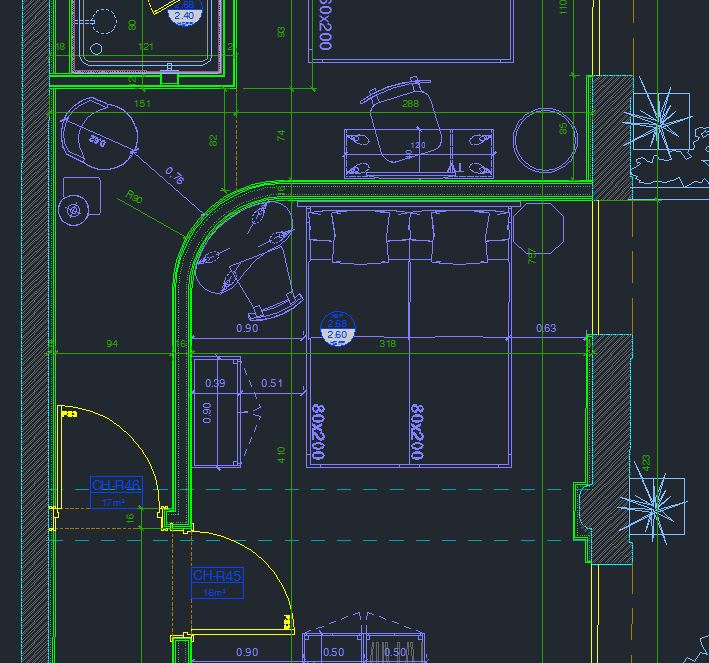 drawing in m:  |
Replies:
Posted By: John Connor
Date Posted: 30.Sep.2015 at 20:21
|
You're doing all of this in model space aren't you? ------------- "Humans have a strength that cannot be measured. This is John Connor. If you are reading this, you are the resistance." <<AutoCAD 2015>> |
Posted By: eldiego
Date Posted: 01.Oct.2015 at 09:41
|
yes, model space. what do you mean by dimensions being annotative? |
Posted By: John Connor
Date Posted: 01.Oct.2015 at 12:13
|
Forget about annotative. So you created a new dimstyle, clicked on the Modify button, then clicked on the Primary Units tab and where it says Measurement Scale > Scale Factor you set this to 100. Is that correct? If you did then a dimension of 1 unit would now read 100 units wouldn't it? But you say it did not work. That would only happen if you did NOT set the new dimstyle as Current. ------------- "Humans have a strength that cannot be measured. This is John Connor. If you are reading this, you are the resistance." <<AutoCAD 2015>> |