fill void space
Printed From: CAD Forum
Category: EN
Forum Name: AutoCAD
Forum Description: Discussion about AutoCAD and AutoCAD LT, viewers, DWG and DXF formats, Design Review, AutoCAD web, Drive, add-ons
URL: https://www.cadforum.cz/forum_en/forum_posts.asp?TID=11388
Printed Date: 06.Sep.2026 at 05:09
Topic: fill void space
Posted By: nakaakist
Subject: fill void space
Date Posted: 02.Oct.2015 at 04:18
|
I'm working on AutocCAD 3D 2016 and I drew a solid with a void space inside. The image below is an example of the solid (actual solid is much more complicated, but topology is the same). Now I want to fill the void space with another solid, but I couldn't find commands to do that simply. Is there any solution? 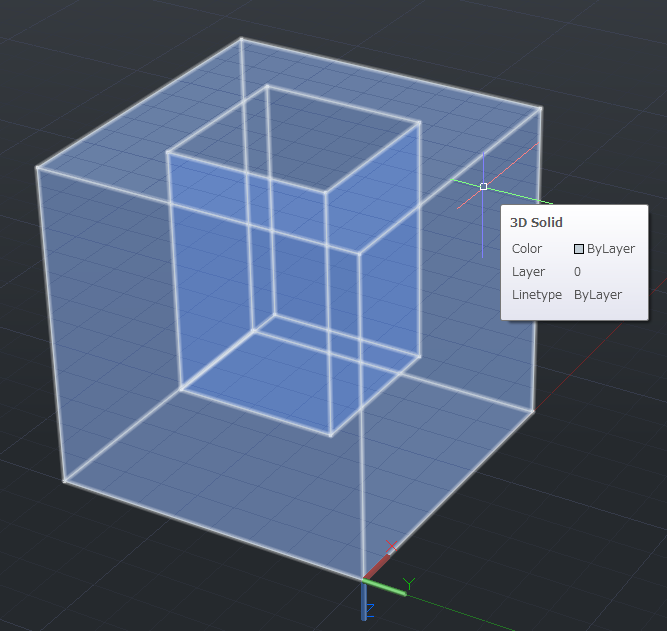 |
Replies:
Posted By: John Connor
Date Posted: 02.Oct.2015 at 11:45
|
Yes, UNION would be one option. INTERFERE + UNION would be a second option. However, without an actual copy of the drawing to view and test it is difficult to say for sure. Upload a copy of the drawing to a file sharing website like DropBox and post a link to it here. Someone will take a look at it and get back to you. ------------- "Humans have a strength that cannot be measured. This is John Connor. If you are reading this, you are the resistance." <<AutoCAD 2015>> |
Posted By: Kent Cooper
Date Posted: 02.Oct.2015 at 19:16
|
I assume from the word "another" that you want the Solid that fills the void to be separate from the one with the void in it, in which case UNION is not what you want. If it's not too complicated to make another Solid exactly like the one shown but without the void in it, you can then make a copy of the one shown, and SUBTRACT that copy from the no-void version, and the result will be another Solid filling the void.
|
Posted By: nakaakist
Date Posted: 04.Oct.2015 at 10:55
|
Thank you for your advice! The problem has been resolved. I made the copy of the solid without void by COPY and SURFSCULPT. Then, I used SUBTRACT. It worked perfectly. |