shortcut file restore
Printed From: CAD Forum
Category: EN
Forum Name: AutoCAD
Forum Description: Discussion about AutoCAD and AutoCAD LT, viewers, DWG and DXF formats, Design Review, AutoCAD web, Drive, add-ons
URL: https://www.cadforum.cz/forum_en/forum_posts.asp?TID=11505
Printed Date: 04.Nov.2026 at 19:06
Topic: shortcut file restore
Posted By: khacho
Subject: shortcut file restore
Date Posted: 30.Nov.2015 at 09:25
|
i am using autocad 2008. my problem is that, my important drawing file deleted by mistake and i checked recycle bin, it is empty. but i have left shortcut file in my desktop. my question is that can i restore shortcut file? if anybody can solve my problme, pl. sugguest me, i will be very grateful to you. thank you. krishna, kathmandu |
Replies:
Posted By: John Connor
Date Posted: 30.Nov.2015 at 11:35
|
Is there a .bak file for this drawing? ------------- "Humans have a strength that cannot be measured. This is John Connor. If you are reading this, you are the resistance." <<AutoCAD 2015>> |
Posted By: khacho
Date Posted: 01.Dec.2015 at 07:01
| sorry, no .bak file |
Posted By: philippe JOSEPH
Date Posted: 01.Dec.2015 at 07:31
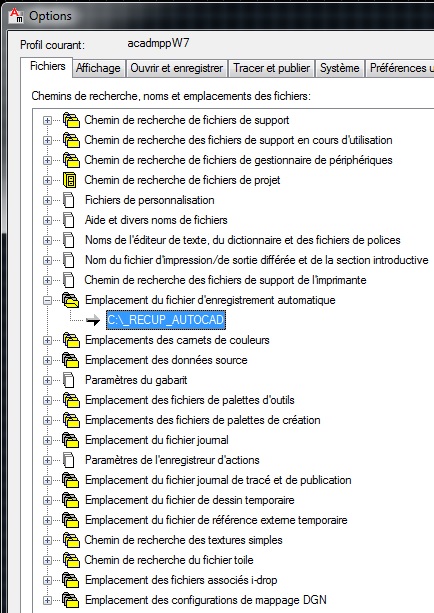
Hello khacho, take a look at your settings in Option, Files, .......
Take a look at the printscreen shown here ( in french sorry ) to see where your "automatic saved files" are stored ( XXXXXX.sv$
You have them if any "savetime" is set.
|
Posted By: John Connor
Date Posted: 01.Dec.2015 at 11:38
|
1.
Automatic saves are only done if a drawing has been modified after the
last save. QSAVE, SAVE, and SAVEAS will delete the current .sv$ file and halt the automatic save timer until an edit is made to the drawing. 2. The Autosave file will contain all drawing information as of the last time Autosave ran. When AutoCAD closes normally, .sv$ files are deleted. ------------- "Humans have a strength that cannot be measured. This is John Connor. If you are reading this, you are the resistance." <<AutoCAD 2015>> |
Posted By: khacho
Date Posted: 02.Dec.2015 at 11:07
|
there is no .sv$ file, not working till date. thanks |
Posted By: John Connor
Date Posted: 02.Dec.2015 at 11:43
|
Personally I never thought there would be a .sv$ file. Many users assume there will always be one because they are not aware of the two points I made in my previous post. So here we are. No .dwg, .bak, .sv$ files. Now what? I'm assuming the shortcut points to a location for a file that no longer exists as well. Are you on a network or on a standalone computer? There might be a slim chance to recover the file via an undelete program but in all the time that has passed I assume you have continued to use your computer meaning that it is possible in the course of doing so you may have overwritten the sector on the hard drive where the file was located. That wouldn't be good. You would end up not being able to recover the file at all or only able to recover a portion of it which I doubt AutoCAD could successfully open. ------------- "Humans have a strength that cannot be measured. This is John Connor. If you are reading this, you are the resistance." <<AutoCAD 2015>> |
Posted By: khacho
Date Posted: 03.Dec.2015 at 07:51
|
thanks to all for suggest, it don't work, lets close this matter. thanks. |
Posted By: John Connor
Date Posted: 03.Dec.2015 at 11:58
|
Maybe you'll learn a lesson from all this and keep at least backup up your drawing files on a timely basis so you don't have to start from square one if you somehow manage to lose a file. ------------- "Humans have a strength that cannot be measured. This is John Connor. If you are reading this, you are the resistance." <<AutoCAD 2015>> |