From lines to boundary
Printed From: CAD Forum
Category: EN
Forum Name: AutoCAD
Forum Description: Discussion about AutoCAD and AutoCAD LT, viewers, DWG and DXF formats, Design Review, AutoCAD web, Drive, add-ons
URL: https://www.cadforum.cz/forum_en/forum_posts.asp?TID=11576
Printed Date: 05.Sep.2026 at 00:47
Topic: From lines to boundary
Posted By: johnthelegend
Subject: From lines to boundary
Date Posted: 13.Jan.2016 at 08:16
|
Hello. I am just learning AutoCAD 2016 by myself and of course it has a lot of dificulties. As one of them, I wonder how to make lines into a complete boundary(of course it is closed). I usually use 'Extrude' to make solid, because the working piece has simple structure(several cylinders, so all I need to do was just extrude a circle.) But when I define a boundary by drawing several lines and extrude it, that doesn't give a solid but a surface made by each line(thus they are just boundary surfaces). I have to make a pillar with such boundary but don't know how to do. I tried to make a group with that lines but extrude still doesn't give me a pillar. Anyone have similar experiences before?
|
Replies:
Posted By: John Connor
Date Posted: 13.Jan.2016 at 11:23
|
Try using the PressPull command. You can also try creating a region first from your groups of lines, etc. then extrude. I am a bit confused though. First you mention trying to extrude a circle then you say you had a bunch of lines that you extruded by ended up with surfaces. Finally you talk about creating a pillar. I'm not really sure what it is you are trying to do. Can you post an image or upload an actual .dwg file? If one extrudes a circle they should end up with a closed cylinder. This could be used to create a pillar (an ornamental column). Then one would add the base and top cap. Is the pillar going to be tapered? ------------- "Humans have a strength that cannot be measured. This is John Connor. If you are reading this, you are the resistance." <<AutoCAD 2015>> |
Posted By: John Connor
Date Posted: 13.Jan.2016 at 12:41
|
A simple 3D pillar created using solids. > 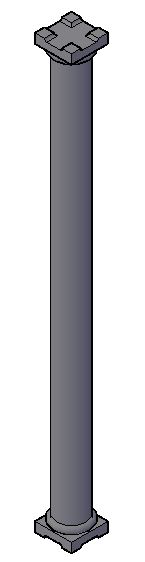
------------- "Humans have a strength that cannot be measured. This is John Connor. If you are reading this, you are the resistance." <<AutoCAD 2015>> |
Posted By: Kent Cooper
Date Posted: 13.Jan.2016 at 17:01
| To make a closed boundary of Lines into a single object so that when it's Extruded you get a 3D Solid, use the PEDIT command and its Join option, to make the Lines into a closed Polyline. [If it's not clear enough what to do from the prompts, read about it in Help.] |
Posted By: John Connor
Date Posted: 13.Jan.2016 at 17:58
|
Try using PressPull first as it will work even if the "boundary" is comprised of a couple of lines, a polyline, an arc and a spline. The result will still be a 3Dsolid. ------------- "Humans have a strength that cannot be measured. This is John Connor. If you are reading this, you are the resistance." <<AutoCAD 2015>> |