2:1 semi elliptical head
Printed From: CAD Forum
Category: EN
Forum Name: AutoCAD
Forum Description: Discussion about AutoCAD and AutoCAD LT, viewers, DWG and DXF formats, Design Review, AutoCAD web, Drive, add-ons
URL: https://www.cadforum.cz/forum_en/forum_posts.asp?TID=11588
Printed Date: 05.Sep.2026 at 00:03
Topic: 2:1 semi elliptical head
Posted By: mac265
Subject: 2:1 semi elliptical head
Date Posted: 18.Jan.2016 at 18:58
|
I have recently finished learning AUTOCAD fundamental course (2015 version). Will someone guide me in detail?I would like to draw a 2:1 semi elliptical head (usually used in Pressure Vessel manufacturing). Data : Head ID - 2000 mm, Thk - 20mm plate, SF (Straight Flange) - 50 mm, Crown Radius (1800 mm - 0.90 of ID), Knuckel Radius (340 mm - 0.17 of ID). Thanks & regards, Mac
|
Replies:
Posted By: John Connor
Date Posted: 18.Jan.2016 at 21:47
|
One would think this type of information could be found online or in a book from your local library. ------------- "Humans have a strength that cannot be measured. This is John Connor. If you are reading this, you are the resistance." <<AutoCAD 2015>> |
Posted By: philippe JOSEPH
Date Posted: 19.Jan.2016 at 07:55
Hello mac265, do a little search on the internet and :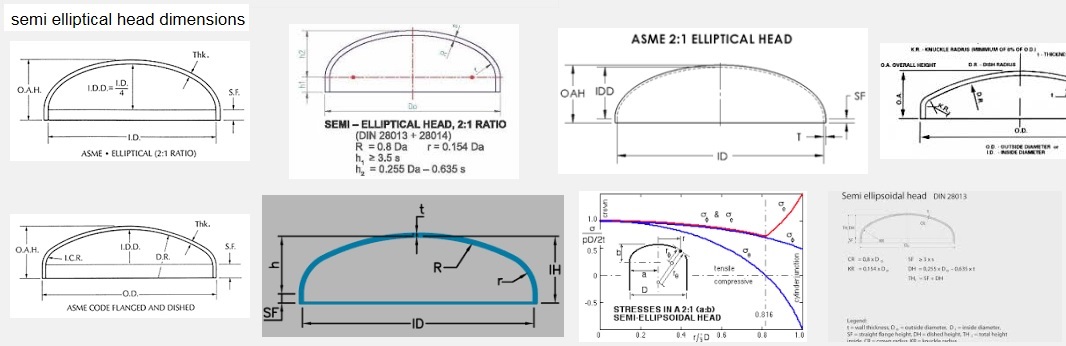 |
Posted By: John Connor
Date Posted: 21.Jan.2016 at 13:03
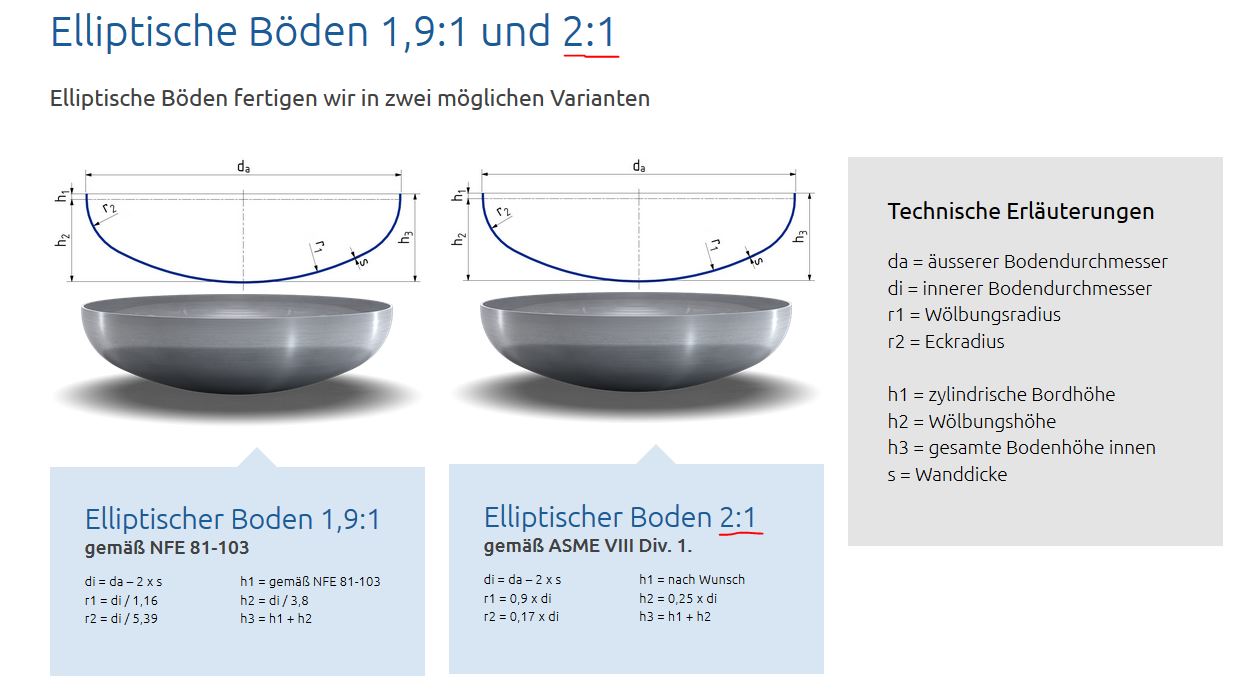 Here you go. Here you go.
------------- "Humans have a strength that cannot be measured. This is John Connor. If you are reading this, you are the resistance." <<AutoCAD 2015>> |
Posted By: Kent Cooper
Date Posted: 22.Jan.2016 at 18:43
|
I suspect the question is not what they are like, but rather how to go about drawing one. I would do it this way: Draw a center LINE that's longer than your expected end result. Offset it to both sides by half the inside diameter, to get LINEs that will become inside faces of the straight-flange portion. Draw a CIRCLE with its center on that center Line, using the crown radius. Draw another CIRCLE with the TTR option, tangent to the crown Circle and one of the straight-flange Lines, using the knuckle radius. Mirror that to the other side across the center Line. Some TRIMming will get you down to the crown and knuckle Arcs and the straight-flange Lines extending in only the right direction from the knuckle Arcs. Use LENGTHEN and its Total-length option to get the straight-flange Lines the right length. PEDIT the two Lines and three Arcs together with the Join option, OFFSET that outward by the plate thickness, and draw Lines to connect the ends [which you can also PEDIT/Join to the rest].
|
Posted By: philippe JOSEPH
Date Posted: 25.Jan.2016 at 07:17
| Yes Mister Kent,I was waiting for that question from mac265 as in fact the only "difficulty" is TTR. |