Autocad Text Style (Dimension Style)
Printed From: CAD Forum
Category: EN
Forum Name: AutoCAD
Forum Description: Discussion about AutoCAD and AutoCAD LT, viewers, DWG and DXF formats, Design Review, AutoCAD web, Drive, add-ons
URL: https://www.cadforum.cz/forum_en/forum_posts.asp?TID=11605
Printed Date: 06.Sep.2026 at 03:48
Topic: Autocad Text Style (Dimension Style)
Posted By: Gianni123
Subject: Autocad Text Style (Dimension Style)
Date Posted: 26.Jan.2016 at 13:58
|
Hello you all, I have an question to an Text Style in autocad 2015 Mac ( If you only know it for Windows its also okay). I had this Text Style in one autocad file which i liked very much. It's just a little detail, but i hope somebody can help my to find the place where I can change it again in an other file. You can see it on the picture. Its just that the letters are filled Grey and the border is black. 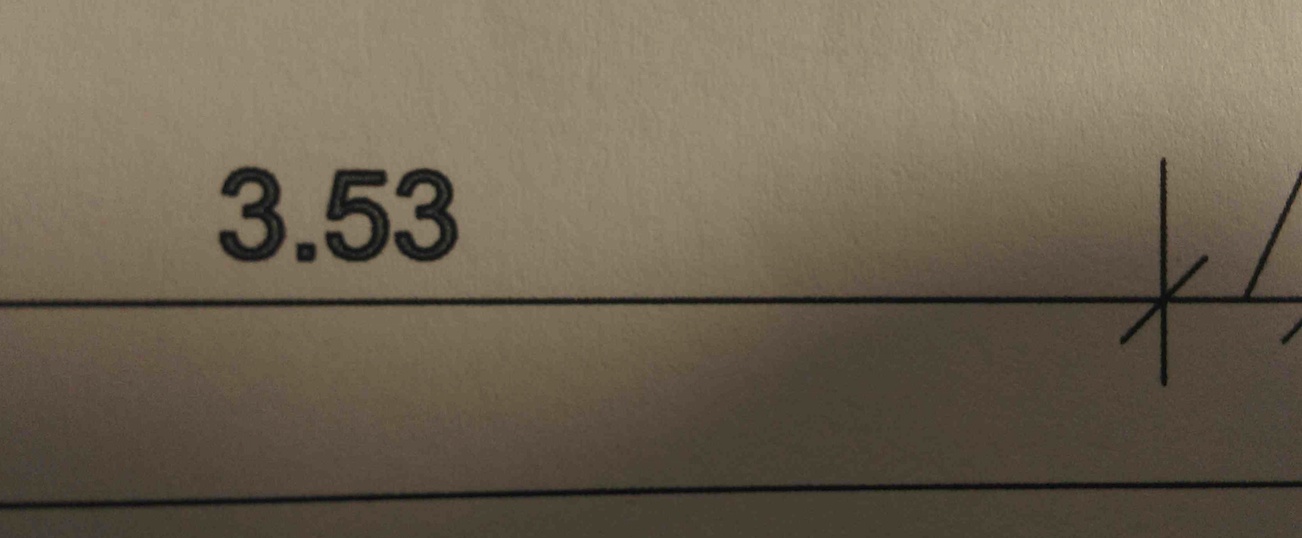 Thank you, Gianni
|
Replies:
Posted By: philippe JOSEPH
Date Posted: 26.Jan.2016 at 14:11
|
Hello Gianni123, if OK on your MAC you can copy/paste that particular dimension into an other file and set the DDIM style on that one to place others dimensions or copy the properties on existing ones. In any case you should set "proto" settings on any file that you begin. Each company is suposed to give a "proto" file with all the settings : lines, dimension styles, tittle blocks, etc... If you lauch the command DDIM you will have access to the settings of each dimension styles that you have in your file ( including the color of the text ).
|
Posted By: John Connor
Date Posted: 26.Jan.2016 at 14:21
|
Re: proto. Are you referring to a custom template? ------------- "Humans have a strength that cannot be measured. This is John Connor. If you are reading this, you are the resistance." <<AutoCAD 2015>> |
Posted By: Gianni123
Date Posted: 26.Jan.2016 at 16:08
|
Hi thank you! I think it will work with the copy of the Dimension style, but what i was thinking about was to find the place where i can turn it on off. Like an command...."border on" or sth like this in the text options. And its not the text which belongs to the dimension only which gets this border, its also the normal Text... So could it be in a text style Menu? And im not really sure what you meant with custom template John, but I don't need an template for every file. It's just for one detail plan im drawing currently. |
Posted By: John Connor
Date Posted: 26.Jan.2016 at 16:14
|
My question was to Philippe. Most people would not recognize "proto" as a substitute for "template". I've never encountered a text style with a "border" (your terminology) that can be turned on and off. Anyways, AutoCAD for Mac probably has some fonts that wouldn't necessarily be found on a Windows based machine. Maybe the font you have pictured above is one such font. ------------- "Humans have a strength that cannot be measured. This is John Connor. If you are reading this, you are the resistance." <<AutoCAD 2015>> |
Posted By: philippe JOSEPH
Date Posted: 27.Jan.2016 at 07:24
| Yes John, I use "proto" for Template as I don't use DWT file but a "read only" file each time I begin a drawing.Also as we are working with the customer's layers, tittle blocks... the Template is not always the same.Gianni if you want to modificate a batch of dimensions you can go to DDIM and do that modification to be operated on each entity that belongs to that dimension style provide that property hasn't been modified individually on some dimensions.In that case you will have to modify the dimension style and launch the command MATCHPROP on the dimensions eventually not affected by your modification. |