Non coplanar lines
Printed From: CAD Forum
Category: EN
Forum Name: AutoCAD
Forum Description: Discussion about AutoCAD and AutoCAD LT, viewers, DWG and DXF formats, Design Review, AutoCAD web, Drive, add-ons
URL: https://www.cadforum.cz/forum_en/forum_posts.asp?TID=11774
Printed Date: 06.Sep.2026 at 05:10
Topic: Non coplanar lines
Posted By: autocadpape
Subject: Non coplanar lines
Date Posted: 19.Apr.2016 at 21:29
|
Please can someone tell me how I can fix this, I cannot FILLET certain lines, and now a new one, when I use PERPENDICULAR SNAP, the meeting of my vertical line with the horizontal line misleads to a left point of the horizontal line, as if the encounter point has been changed from the vertical path. Thanks Jaime
|
Replies:
Posted By: philippe JOSEPH
Date Posted: 20.Apr.2016 at 07:53
|
Hello autocadpape, are you using 3D ? If yes it should be simple to fix. If no then try and verify if you are in the UCS world, then open the properties panel ( Ctrl + 1 ) , select a batch of lines ( with no arcs inside ) and set to 0 ( zero ) the beginnings and ends. 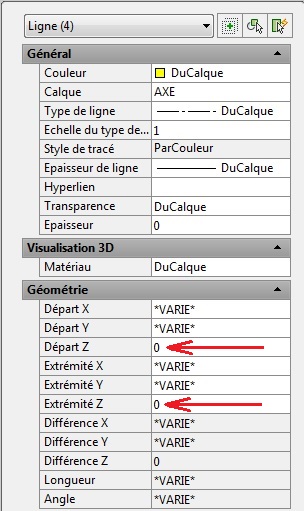 See that print screen in French. If it doesn't work than try and test the MOVE ( do a test on a copied file, not the original ! ) : Move the objects from : 0,0 to 0,0,1E99 than remove the same objects from 0,0,1E99 to 0,0,0. This should be OK after. Please tell me ( us ) if this helped or not. P.S. Please note the fillet doesn't work on non coplanar entities but works with TRIM even if the entities are not at the same level ( do be done with a good UCS and viewpoint ). P.S. See also the related TIP here under : TIP 2248 : http://www.cadforum.cz/cadforum_en/qaID.asp?tip=2248" rel="nofollow - |
Posted By: John Connor
Date Posted: 20.Apr.2016 at 11:26
|
Did you try using the FLATTEN command? ------------- "Humans have a strength that cannot be measured. This is John Connor. If you are reading this, you are the resistance." <<AutoCAD 2015>> |
Posted By: philippe JOSEPH
Date Posted: 21.Apr.2016 at 07:17
|
hello again ( ? ) autocadpape and John, for LT releases see : https://forums.autodesk.com/t5/autocad-lt-general-discussion/lt-flatten-z-0/td-p/366784" rel="nofollow - https://forums.autodesk.com/t5/autocad-lt-general-discussion/lt-flatten-z-0/td-p/366784
|
Posted By: Vladimir Michl
Date Posted: 21.Apr.2016 at 10:03
|
Or directly here: http://www.cadforum.cz/cadforum_en/qaID.asp?tip=872" rel="nofollow - http://www.cadforum.cz/cadforum_en/qaID.asp?tip=872 ------------- Vladimir Michl (moderator) https://www.linkedin.com/in/vmichl/" rel="nofollow - LinkedIn , Autodesk Expert Elite |
Posted By: philippe JOSEPH
Date Posted: 21.Apr.2016 at 10:37
|
Yes mister Vladimir, and the talented author is the same ! Personally I found mine here ( it's in French, sorry ) : http://www.rebcao.fr/docs-rebcao/TOP_QUIZ_des_Galeres_AutoCAD_probleme_question_solution.pdf" rel="nofollow - http://www.rebcao.fr/docs-rebcao/TOP_QUIZ_des_Galeres_AutoCAD_probleme_question_solution.pdf
|