How to draw thiss shape
Printed From: CAD Forum
Category: EN
Forum Name: AutoCAD
Forum Description: Discussion about AutoCAD and AutoCAD LT, viewers, DWG and DXF formats, Design Review, AutoCAD web, Drive, add-ons
URL: https://www.cadforum.cz/forum_en/forum_posts.asp?TID=11834
Printed Date: 21.Oct.2026 at 04:37
Topic: How to draw thiss shape
Posted By: rdjavi
Subject: How to draw thiss shape
Date Posted: 01.Jun.2016 at 19:24
Can I get some help how I draw shape like in image below? This bulges is problem for me.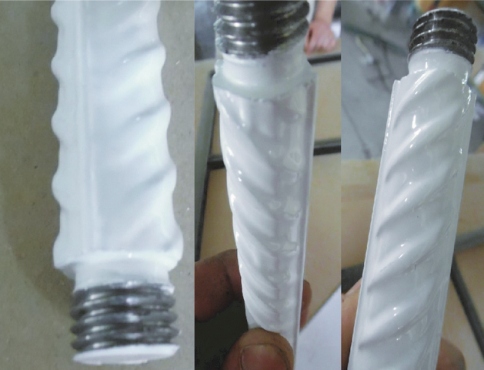 |
Replies:
Posted By: John Connor
Date Posted: 01.Jun.2016 at 19:47
|
The "bulge" appears to be helical. Is it? Is the object itself cylindrical or tapered? ------------- "Humans have a strength that cannot be measured. This is John Connor. If you are reading this, you are the resistance." <<AutoCAD 2015>> |
Posted By: rdjavi
Date Posted: 01.Jun.2016 at 20:19
|
The object is cylindrical and bulge is helical only to the longitudinally bulge which runs the entire length and which divides the object into two parts which is why I can not draw simple helix and with swip command draw deired shape. |
Posted By: philippe JOSEPH
Date Posted: 02.Jun.2016 at 07:16
|
Hello rdjavi and John, you can find in the CAD/BIM Blocks library the file : Dywidag.dwg from Vladimir but it's 2D.
|
Posted By: John Connor
Date Posted: 02.Jun.2016 at 11:28
|
Too bad the drawing bears no resemblance to the object that is pictured in the first post of this thread. ------------- "Humans have a strength that cannot be measured. This is John Connor. If you are reading this, you are the resistance." <<AutoCAD 2015>> |
Posted By: John Connor
Date Posted: 02.Jun.2016 at 13:09
You could but the real problem would be that it looks like the bulge is tapered at both ends which means that extruding a simple profile (ex. - a circle) along the helix wouldn't give you what is shown in the image you posted. Your bulge looks like a "slug". The bulge is tapered is it not? ------------- "Humans have a strength that cannot be measured. This is John Connor. If you are reading this, you are the resistance." <<AutoCAD 2015>> |
 rdjavi wrote:
Posted By: rdjavi
Date Posted: 02.Jun.2016 at 19:23
|
Thanks to everyone for the help! John, yes bulge is tapered and looks like slug. I find the way to draw thiss shape. I draw helix only for one slug, and on ends of helix I draw the small circle and on the centar helix I draw the bigest circle end use Loft command to make a slug shape with helix path. Then I copy slug to the end of the object end switch to the Top view end rotate all slugs with copy option to the other side of object. Then I use Union command to union the slugs end object. 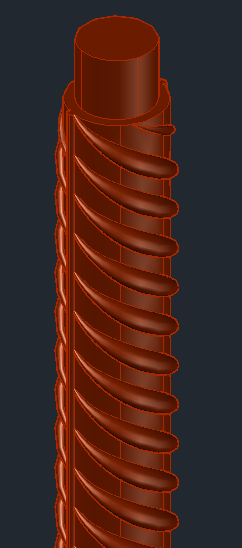 |
Posted By: John Connor
Date Posted: 02.Jun.2016 at 20:24
|
And the two ends curve opposite each other like the letter "S"? ------------- "Humans have a strength that cannot be measured. This is John Connor. If you are reading this, you are the resistance." <<AutoCAD 2015>> |