I need your help please
Printed From: CAD Forum
Category: EN
Forum Name: AutoCAD
Forum Description: Discussion about AutoCAD and AutoCAD LT, viewers, DWG and DXF formats, Design Review, AutoCAD web, Drive, add-ons
URL: https://www.cadforum.cz/forum_en/forum_posts.asp?TID=11866
Printed Date: 09.Sep.2026 at 10:19
Topic: I need your help please
Posted By: darbi
Subject: I need your help please
Date Posted: 21.Jun.2016 at 11:14
|
I was installed AUTOCAD2016 and when i run it i get 3D workspace ..so how can i change 2D workspace ? in workspace setting i have just 2 choices"3D basics "or drafting and annotation ------------- scqcqscs |
Replies:
Posted By: John Connor
Date Posted: 21.Jun.2016 at 11:22
|
Drafting and Annotation is the 2D workspace you're looking for. ------------- "Humans have a strength that cannot be measured. This is John Connor. If you are reading this, you are the resistance." <<AutoCAD 2015>> |
Posted By: darbi
Date Posted: 21.Jun.2016 at 11:27
|
i tick drafting and annotation but we have the same problem (O,X,Y,Z) plan ..3D workspace ------------- scqcqscs |
Posted By: philippe JOSEPH
Date Posted: 21.Jun.2016 at 11:39
|
Hello darbi ( and John ), maybe you are only in a 3D point of view and you want to work only in 2D. If yes, check if the UCS is on World and type the command PLAN option Current to go back to your 2D point of view. You can also have the 2D and 3D points of view in the menus.
|
Posted By: darbi
Date Posted: 21.Jun.2016 at 11:51
|
hi joseph yes i want 2D please can you send me a tutorial or screenshot..sorry i'm a beginner ------------- scqcqscs |
Posted By: John Connor
Date Posted: 21.Jun.2016 at 12:07
|
You don't need a tutorial to change your point of view. Follow the advice given. However, you probably do need a tutorial, or several, in order to get the best use out of AutoCAD. Try either or both of these websites: CADTutor.net mycadsite.com ------------- "Humans have a strength that cannot be measured. This is John Connor. If you are reading this, you are the resistance." <<AutoCAD 2015>> |
Posted By: philippe JOSEPH
Date Posted: 21.Jun.2016 at 12:44
|
Hello again darbi, sorry my AutoCAD is Mechanical classical in french. See if you can do this : 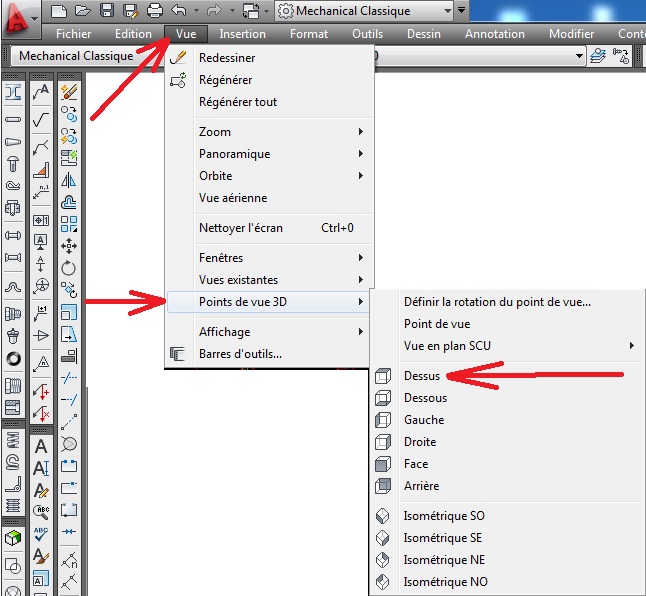 |