AC2008 Plot/Scale
Printed From: CAD Forum
Category: EN
Forum Name: AutoCAD
Forum Description: Discussion about AutoCAD and AutoCAD LT, viewers, DWG and DXF formats, Design Review, AutoCAD web, Drive, add-ons
URL: https://www.cadforum.cz/forum_en/forum_posts.asp?TID=11944
Printed Date: 05.Sep.2026 at 02:23
Topic: AC2008 Plot/Scale
Posted By: martingtc
Subject: AC2008 Plot/Scale
Date Posted: 03.Aug.2016 at 14:58
|
Hi guys, I need some help! I have a paperspace tab with title blocks as standard. I have a viewport preset to the remaining space. Some objects I can fit in here at 1:1 scale. However when I plot and print, it's never to 1:1 scale! I've set everything up as far as I know is correct, but instance my 90mm x 90mm square printed 1:1 at A4 is about 60mm x 60mm. Ideally I want to print to scale, but still show my titlebars with info/company details etc Help!?
|
Replies:
Posted By: John Connor
Date Posted: 03.Aug.2016 at 16:09
|
Nothing in model space. Was there supposed to be? ------------- "Humans have a strength that cannot be measured. This is John Connor. If you are reading this, you are the resistance." <<AutoCAD 2015>> |
Posted By: martingtc
Date Posted: 03.Aug.2016 at 16:13
|
No, there wasn't supposed to be anything there. I just wanted to show a template of what I use and if someone can help with my problem. My X layer is for the title block and borders on the paperspace. I don't change the layer or anything so called it X to keep it at the bottom of the list. Do you have any advice on my scaling issue, rather than critiquing the way in which I work?
|
Posted By: John Connor
Date Posted: 03.Aug.2016 at 16:17
|
Yeah. Why did you set the scale to 1'-0"=1'-0"? That's an imperial scale. You are working in a metric drawing. You should have selected 1:1. Layer "X" should be renamed to something that makes sense. Your viewport layer should be set to "no print". ------------- "Humans have a strength that cannot be measured. This is John Connor. If you are reading this, you are the resistance." <<AutoCAD 2015>> |
Posted By: martingtc
Date Posted: 03.Aug.2016 at 16:18
|
From what I can see my scale is set to 1:1. Where did you find this and how can I change it please? Thanks for your reply
|
Posted By: John Connor
Date Posted: 03.Aug.2016 at 16:19
|
I found it by double clicking in the viewport and then looking at the bottom right hand corner of my screen where it tells you the scale of the viewport. ------------- "Humans have a strength that cannot be measured. This is John Connor. If you are reading this, you are the resistance." <<AutoCAD 2015>> |
Posted By: martingtc
Date Posted: 03.Aug.2016 at 16:21
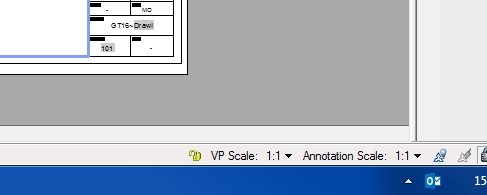
Strange...this says I'm already on 1:1!
|
Posted By: John Connor
Date Posted: 03.Aug.2016 at 16:26
|
Draw a square in model space on layer RED that is 90 x 90. Switch to the layout, activate the viewport and do a Zoom > Extents. Look at the scale that is reported. Is it something like 3.08....? ------------- "Humans have a strength that cannot be measured. This is John Connor. If you are reading this, you are the resistance." <<AutoCAD 2015>> |
Posted By: martingtc
Date Posted: 03.Aug.2016 at 16:29
|
Yes, 3.095... But if I change it to 1:1, why doesn't it work/print as 1:1? More importantly, what do I need to change or do to have it work correctly? :) Doesn't zoom extents just show the drawing tight to the viewport, regardless of size or scale?
|
Posted By: John Connor
Date Posted: 03.Aug.2016 at 16:33
|
Did you change the viewport scale to read 1:1 or 1'-0"=1'-0"? If you did change it to 1:1 it will be easy to verify. Make sure OSnaps are enabled then dimension the top of the square in your layout not in model space. It should read "90". Mine does. ------------- "Humans have a strength that cannot be measured. This is John Connor. If you are reading this, you are the resistance." <<AutoCAD 2015>> |
Posted By: martingtc
Date Posted: 03.Aug.2016 at 16:35
|
Yes, dimension from the layout shows 90... So, how do I resolve this please? :)
|
Posted By: John Connor
Date Posted: 03.Aug.2016 at 16:42
|
Resolve what? Save the drawing and print it. Normally one prints from a layout at 1:1 scale. You do know that your title block and border is roughly equivalent to a A3 size drawing and to downsize it to fit an A4 sheet of paper means the square will measure smaller (which is exactly the results you first got). If you want it to print to scale then you'll have to set up a new A4 size sheet with title block and border. ------------- "Humans have a strength that cannot be measured. This is John Connor. If you are reading this, you are the resistance." <<AutoCAD 2015>> |
Posted By: martingtc
Date Posted: 03.Aug.2016 at 16:50
|
When I print at 1:1, the 90mm prints at about 60mm. I'd like it to print at 1:1 including the title blocks, or have I set this up incorrectly from the start?
|
Posted By: John Connor
Date Posted: 03.Aug.2016 at 16:53
|
Understand that your existing sheet size is set for A3 yet you want to print to a smaller sheet size (i.e. - A4). To do so will result in a smaller drawing. Create a new A3 size sheet with title block and border. As a matter of fact you should have a title block and border for every different size paper you normally print to. These drawings should be saved as your standard drawing templates (.dwt). ------------- "Humans have a strength that cannot be measured. This is John Connor. If you are reading this, you are the resistance." <<AutoCAD 2015>> |
Posted By: martingtc
Date Posted: 03.Aug.2016 at 16:59
|
Think I've got it. Good man :) thanks for your help
|