How to bring construction line from command tool
Printed From: CAD Forum
Category: EN
Forum Name: AutoCAD
Forum Description: Discussion about AutoCAD and AutoCAD LT, viewers, DWG and DXF formats, Design Review, AutoCAD web, Drive, add-ons
URL: https://www.cadforum.cz/forum_en/forum_posts.asp?TID=11946
Printed Date: 05.Sep.2026 at 09:20
Topic: How to bring construction line from command tool
Posted By: SayanCR
Subject: How to bring construction line from command tool
Date Posted: 05.Aug.2016 at 19:21
| Hi, Can anyone give me some suggestions on how can i drag the CONSTRUCTION LINE ICON to the modelspace or on the ribbons? Another word is that i just want the command set on the screen just like Line, polyline,Arc commands where it is easy to get to, I use this command a lot. It's currently under Draw Panel. Greatly appreciate any suggestions. |
Replies:
Posted By: SayanCR
Date Posted: 05.Aug.2016 at 19:22
|
 SayanCR wrote:
Posted By: John Connor
Date Posted: 06.Aug.2016 at 12:15
|
Wouldn't this be best accomplished by editing the CUI? ------------- "Humans have a strength that cannot be measured. This is John Connor. If you are reading this, you are the resistance." <<AutoCAD 2015>> |
Posted By: SayanCR
Date Posted: 09.Aug.2016 at 06:50
| Yes I open the CUI and tried to import, dragged the icon and drop in model space but It won't let me drop, I tried to drag and drop within the CUI interface as well but Did not work, I was able to do it in CAD 2014 but not 2016. |
Posted By: John Connor
Date Posted: 09.Aug.2016 at 11:32
|
Make a new panel and populate it with the commands you use the most often. ------------- "Humans have a strength that cannot be measured. This is John Connor. If you are reading this, you are the resistance." <<AutoCAD 2015>> |
Posted By: SayanCR
Date Posted: 09.Aug.2016 at 16:17

|
Posted By: SayanCR
Date Posted: 09.Aug.2016 at 16:19
| I had most of the commands I need on the screen except this one, I can't move to the front of the screen where it's easy to get to. |
Posted By: John Connor
Date Posted: 09.Aug.2016 at 16:53
|
Why not pick the command off the DRAW toolbar which can be placed anywhere on your screen? Or...put the command on the QAT. It will always be there at the top of your screen right above the left hand corner of the Ribbon no matter what Tab is active. ------------- "Humans have a strength that cannot be measured. This is John Connor. If you are reading this, you are the resistance." <<AutoCAD 2015>> |
Posted By: SayanCR
Date Posted: 11.Aug.2016 at 03:11
| Thank for your input for try to help me. I am aware that the construction line command is under the DRAW drop down but i tried to drag from there and drop on the screen, it won't let me. as i mentioned, it's not that hard to get from the DRAW DROP DOWN LIST but i used to be able to do this in different vision of CAD. If you have any Youtube or instruction let me know. I have been looking but found none. thanks |
Posted By: John Connor
Date Posted: 11.Aug.2016 at 11:37
|
Put the command on the Quick Access Toolbar and be done with it. It will ALWAYS be available no matter what tab is active at the time. ------------- "Humans have a strength that cannot be measured. This is John Connor. If you are reading this, you are the resistance." <<AutoCAD 2015>> |
Posted By: John Connor
Date Posted: 11.Aug.2016 at 12:54
I have an option for you. Switch places between the Ellipse command and the Construction Line command. I'm assuming of course that you don't use the Ellipse command anywhere near as often as the Construction Line command which you seem so overly fond of. Your Draw panel will then look like this: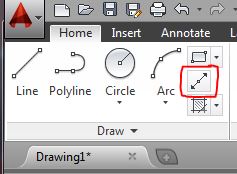 Now you can get on with your work instead of driving yourself crazy because you had to use the Draw drop down to access the command. Is everybody happy???????????? ------------- "Humans have a strength that cannot be measured. This is John Connor. If you are reading this, you are the resistance." <<AutoCAD 2015>> |
Posted By: John Connor
Date Posted: 11.Aug.2016 at 13:24
|
Here's another option. Rename the GROUP panel to something else (ex. - MINE!). Substitute a command like Construction Line for one of the commands on the panel such as Ungroup. Click on the Apply button and close the CUI editor. Now move the renamed panel such that it falls immediately after the Draw panel. It should look like this: 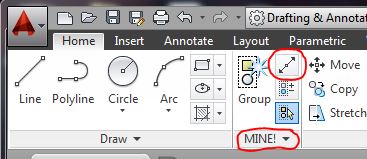 Now you're just one click away from your beloved command. BTW...remember to save your new workspace otherwise the renamed panel will assume its old position the next time you start AutoCAD. ------------- "Humans have a strength that cannot be measured. This is John Connor. If you are reading this, you are the resistance." <<AutoCAD 2015>> |
Posted By: SayanCR
Date Posted: 11.Aug.2016 at 16:34
How do i replace with Ellipse? Click and drop won't work. I opened the CUI I saw the construction line is there but still not able to move to replace Ellipse.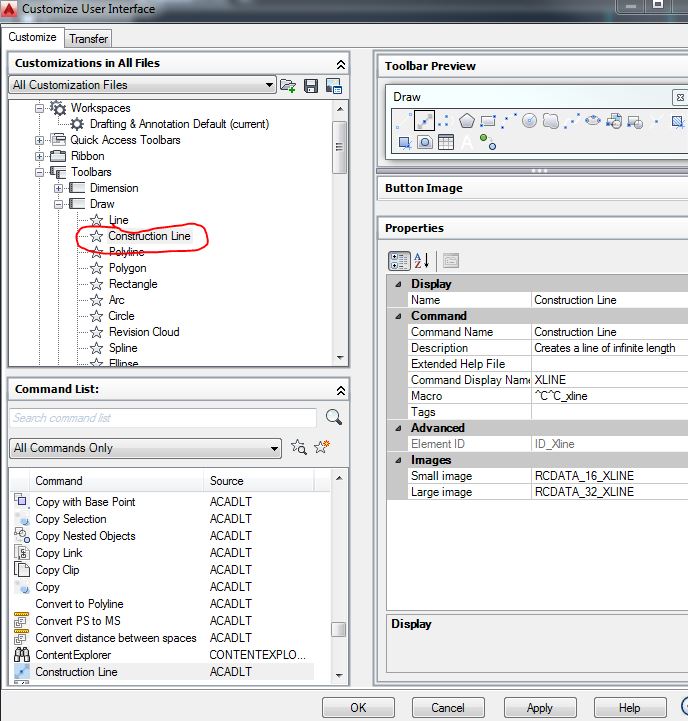 |
Posted By: John Connor
Date Posted: 11.Aug.2016 at 16:36
|
Drag and drop from the Command List! You're trying to drag and drop from a toolbar which won't work. ------------- "Humans have a strength that cannot be measured. This is John Connor. If you are reading this, you are the resistance." <<AutoCAD 2015>> |