Dimension Style Order
Printed From: CAD Forum
Category: EN
Forum Name: AutoCAD
Forum Description: Discussion about AutoCAD and AutoCAD LT, viewers, DWG and DXF formats, Design Review, AutoCAD web, Drive, add-ons
URL: https://www.cadforum.cz/forum_en/forum_posts.asp?TID=12021
Printed Date: 05.Sep.2026 at 18:50
Topic: Dimension Style Order
Posted By: pweeks
Subject: Dimension Style Order
Date Posted: 20.Sep.2016 at 21:24
|
Hey guys, I know there are ways to edit attributes and the order that you can fill in the blanks. I also know there is a way to do the same with viewport scales. I want my dimensions to do the same thing. I've attached an image of how my dimensions show up in the drop down menu when I'm selecting one. The 1-2 is listed far down the line with 2-1 but I want it just below the 1-1 dimension style. Anyway I can edit this? The dimension style manager doesn't give me the option to choose the order. It is already how I like it in there. Thanks 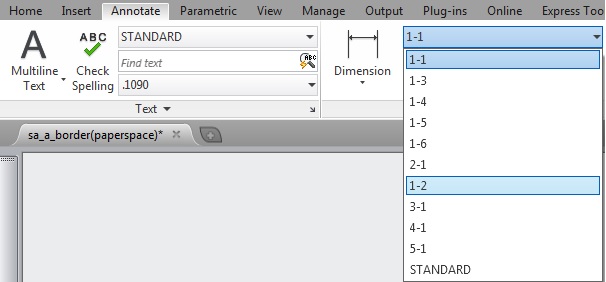 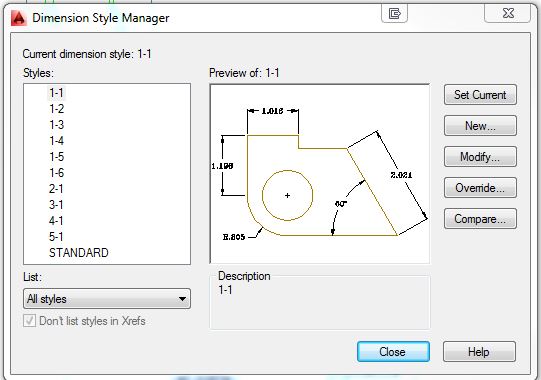 |
Replies:
Posted By: John Connor
Date Posted: 21.Sep.2016 at 11:32
|
I wish that were my biggest worry. ------------- "Humans have a strength that cannot be measured. This is John Connor. If you are reading this, you are the resistance." <<AutoCAD 2015>> |
Posted By: pweeks
Date Posted: 21.Sep.2016 at 16:34
|
I had another question I posted on here about attributes but no one ever answered so I guess this is my second biggest worry. Everything else I've been able to figure out on my own. :) |
Posted By: John Connor
Date Posted: 21.Sep.2016 at 17:00
|
Delete and recreate the dimension style. It should assume its correct position in the list. Another option is to Rename to something like 9-9. Then rename back to 1-2. ------------- "Humans have a strength that cannot be measured. This is John Connor. If you are reading this, you are the resistance." <<AutoCAD 2015>> |
Posted By: pweeks
Date Posted: 21.Sep.2016 at 18:37
|
I had to purge and redesign them anyway. So deleting and remaking worked. Thanks |