create solid model
Printed From: CAD Forum
Category: EN
Forum Name: AutoCAD
Forum Description: Discussion about AutoCAD and AutoCAD LT, viewers, DWG and DXF formats, Design Review, AutoCAD web, Drive, add-ons
URL: https://www.cadforum.cz/forum_en/forum_posts.asp?TID=12028
Printed Date: 05.Sep.2026 at 09:57
Topic: create solid model
Posted By: f-yazdand
Subject: create solid model
Date Posted: 25.Sep.2016 at 21:12
|
HI Guys, I have a model which created in sketchup but I want to have the forms in solid in order to import and use it in Vasari, but I tried different methods and coudnt make it as solid ( by soild I mean the rectangles as well as curved surfaces). Attach is my model. uploads/298250/file_rar.zip" rel="nofollow - uploads/298250/file_rar.zip thank you !
|
Replies:
Posted By: John Connor
Date Posted: 26.Sep.2016 at 12:59
|
Can you export the model from Sketchup in a file type that can be opened in AutoCAD (like DXF)? ------------- "Humans have a strength that cannot be measured. This is John Connor. If you are reading this, you are the resistance." <<AutoCAD 2015>> |
Posted By: f-yazdand
Date Posted: 29.Sep.2016 at 18:42
|
uploads/298250/model_dwg.zip" rel="nofollow - uploads/298250/model_dwg.zip
Thank you for your reply, here is the dwg format. thank you!
|
Posted By: John Connor
Date Posted: 29.Sep.2016 at 19:17
|
Don't thank me yet; I haven't done anything. From the looks of it your geometry came in as blocks and once exploded it's a bunch of polyline triangles. Not the best geometry to work with. Some redrawing would be necessary. ------------- "Humans have a strength that cannot be measured. This is John Connor. If you are reading this, you are the resistance." <<AutoCAD 2015>> |
Posted By: John Connor
Date Posted: 29.Sep.2016 at 19:54
The easy stuff first then comes the challenging part which I won't be able to get to for a few hours. I have things to do.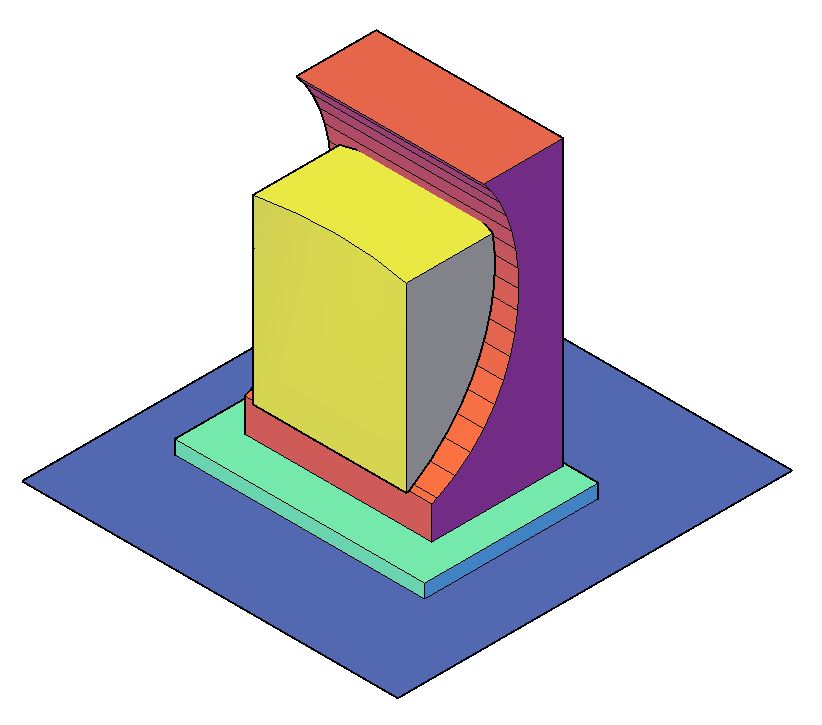
------------- "Humans have a strength that cannot be measured. This is John Connor. If you are reading this, you are the resistance." <<AutoCAD 2015>> |
Posted By: John Connor
Date Posted: 30.Sep.2016 at 12:31
Making progress.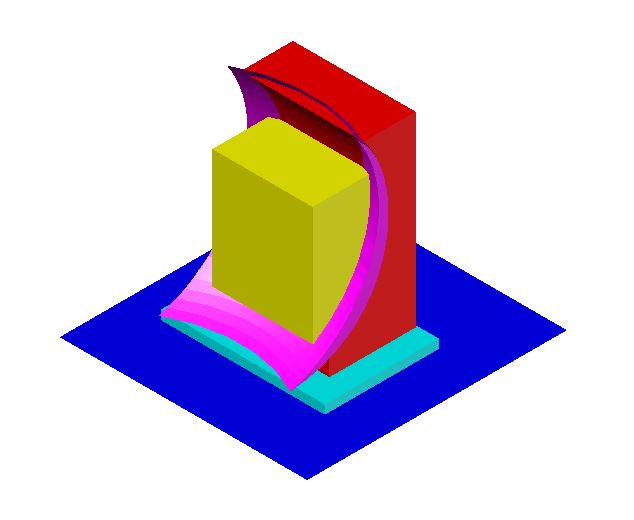 ------------- "Humans have a strength that cannot be measured. This is John Connor. If you are reading this, you are the resistance." <<AutoCAD 2015>> |
Posted By: f-yazdand
Date Posted: 30.Sep.2016 at 12:38
|
HI John, the point is I dont find the solution to make each peice in solid( as you see there are three geometry) if you give me clue then I can try .. thank you
|
Posted By: John Connor
Date Posted: 30.Sep.2016 at 12:50
|
I created profiles of different shapes using polylines then used the LOFT command (with Guide option in two instances) to create the solids. ------------- "Humans have a strength that cannot be measured. This is John Connor. If you are reading this, you are the resistance." <<AutoCAD 2015>> |
Posted By: John Connor
Date Posted: 30.Sep.2016 at 13:36
OK...I'm done. I had to remove a portion of the red solid that projected through the curved magenta solid. I did this using the Subtract command (on a copy of the objects) followed by the Separate command then erasing the protruding portion of the solid.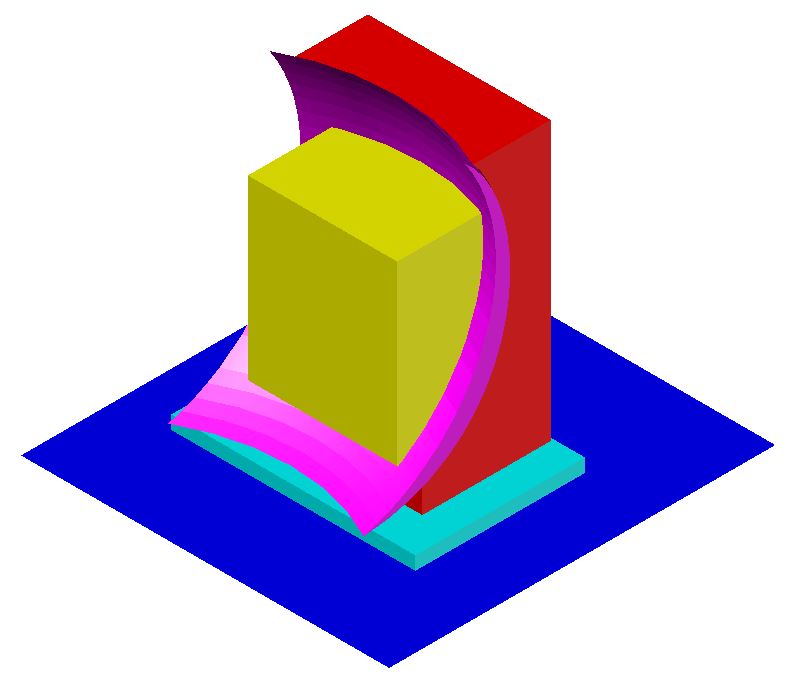 ------------- "Humans have a strength that cannot be measured. This is John Connor. If you are reading this, you are the resistance." <<AutoCAD 2015>> |
Posted By: John Connor
Date Posted: 30.Sep.2016 at 13:58
Last one then I am done (I think). Four views.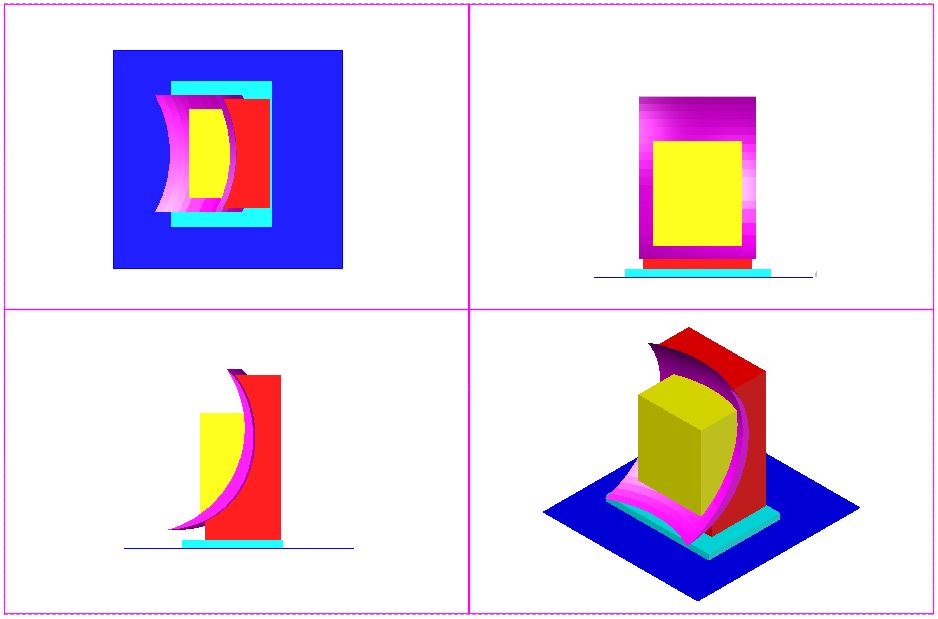 ------------- "Humans have a strength that cannot be measured. This is John Connor. If you are reading this, you are the resistance." <<AutoCAD 2015>> |
Posted By: f-yazdand
Date Posted: 30.Sep.2016 at 14:53
|
thats great , so I go ahead with creating profiles , but I did for instance the crescent shape with Extrude ( I selected the section and extruded along the curved path) the result not solid though. for the crescent did you take the vertical curves and then loft? thank you
|
Posted By: John Connor
Date Posted: 30.Sep.2016 at 14:58
|
I had no luck trying to extrude or loft a crescent shape created with a polyline so I switched to using a 3DPolyline. I used the Loft command with the Guides option. ------------- "Humans have a strength that cannot be measured. This is John Connor. If you are reading this, you are the resistance." <<AutoCAD 2015>> |
Posted By: f-yazdand
Date Posted: 30.Sep.2016 at 15:20
|
two more points, 1- after subtract is the form still solid, since i did it and the object not solid anymore 2- what if I use the Contour command in rhino to create profiles and then loft them, are you using autocad? thank you
|
Posted By: John Connor
Date Posted: 30.Sep.2016 at 15:27
|
After doing a subtraction the model section you are working with should remain a solid. I am using AutoCAD 2015 at the moment. I am not familiar with Rhino. ------------- "Humans have a strength that cannot be measured. This is John Connor. If you are reading this, you are the resistance." <<AutoCAD 2015>> |
Posted By: f-yazdand
Date Posted: 30.Sep.2016 at 15:47
|
I did the front shape( polyline just regular pline and then loft) so I keep working on the rest hope it comes out right, thank you so much
|
Posted By: John Connor
Date Posted: 30.Sep.2016 at 15:51
|
Make sure you don't end up with any surfaces. ------------- "Humans have a strength that cannot be measured. This is John Connor. If you are reading this, you are the resistance." <<AutoCAD 2015>> |
Posted By: f-yazdand
Date Posted: 30.Sep.2016 at 17:58
|
uploads/298250/polyline.zip" rel="nofollow - uploads/298250/polyline.zip
I am doing the 3dpolyline on the crescent form, I have attached the way im tracing it on the form, is this right? I think I m wrong since in this way is really cumbersome... thank you
|
Posted By: John Connor
Date Posted: 30.Sep.2016 at 18:36
|
I would not recommend trying to create a crescent by tracing from side to side. Too much work and it is too easy to click on the wrong geometry. I did it vertically along one edge. ------------- "Humans have a strength that cannot be measured. This is John Connor. If you are reading this, you are the resistance." <<AutoCAD 2015>> |
Posted By: f-yazdand
Date Posted: 30.Sep.2016 at 18:52
|
so you mean tracing vertically and then lofting the crescents together ( what I have is two crescent on both ends but when lofting the form is straight not following the cuvrature) uploads/298250/crescent.zip" rel="nofollow - uploads/298250/crescent.zip thank you
|
Posted By: John Connor
Date Posted: 01.Oct.2016 at 12:42
|
You have to use the GUIDES option when lofting the pull the model into its proper shape. In this case it would be at least one guide at the bottom or the top of the crescent. ------------- "Humans have a strength that cannot be measured. This is John Connor. If you are reading this, you are the resistance." <<AutoCAD 2015>> |
Posted By: f-yazdand
Date Posted: 01.Oct.2016 at 18:48
|
Hi Jhon, I do appreciate if you take look in my model since i follow your instruction but not getting solid. thank you http://https://www.dropbox.com/s/y7ef2n1o465z4x0/model%20%20soliddwg.zip?dl=0" rel="nofollow - http://https://www.dropbox.com/s/y7ef2n1o465z4x0/model%20%20soliddwg.zip?dl=0 attached is the link to the file.
|
Posted By: John Connor
Date Posted: 02.Oct.2016 at 00:43
|
I am not on my CAD computer and won't be able to look at your drawing until tomorrow (Sunday). Update: I tried the link above twice this morning but it did not work. ------------- "Humans have a strength that cannot be measured. This is John Connor. If you are reading this, you are the resistance." <<AutoCAD 2015>> |
Posted By: John Connor
Date Posted: 03.Oct.2016 at 11:44
|
Still getting a "server not found" error when clicking on the link you provided. What's up with that? ------------- "Humans have a strength that cannot be measured. This is John Connor. If you are reading this, you are the resistance." <<AutoCAD 2015>> |
Posted By: f-yazdand
Date Posted: 03.Oct.2016 at 17:45
|
uploads/298250/loft_step.zip" rel="nofollow - uploads/298250/loft_step.zip
Hi Jhon, so to make sure i am following the right steps I created an image from the shapes Im trying to loft 1- I have the crescent as Cross sections which I select both of them 2- I choose Guides and then select the curve ( the one in the bottom of the crescent) but loft not giving me any shape ....it fails... thank you
|
Posted By: John Connor
Date Posted: 03.Oct.2016 at 17:56
|
Where are you located exactly? I've attached a copy of the crescent created as a solid. Have fun. uploads/165260/yazdand_crescent_solid.dwg" rel="nofollow - uploads/165260/yazdand_crescent_solid.dwg ------------- "Humans have a strength that cannot be measured. This is John Connor. If you are reading this, you are the resistance." <<AutoCAD 2015>> |
Posted By: f-yazdand
Date Posted: 03.Oct.2016 at 20:53
|
Thank you but not matched ... uploads/298250/not_matching.zip" rel="nofollow - uploads/298250/not_matching.zip
|
Posted By: John Connor
Date Posted: 03.Oct.2016 at 23:23
|
I outlined the steps I used to create the shape in the form of a solid. You'll just have to keep at it until you get it right. So as it turns out it wasn't the shape of the crescent you were talking about but how it lines up with the geometry directly behind it. My guess from the image you provided is that you located it incorrectly. BTW...you can attach images to your posts directly. There is no need to zip the image file. It is totally unnecessary. Once you have the crescent located correctly portions of the geometry behind it will have to be removed. You cannot use the Trim command and you cannot use the Slice command. Copy both pieces off to one side and subtract the crescent from the piece behind it. Next, use the Separate command to break the main piece (the one you want to keep) from the portion of the geometry that is of no use. Once you run that command and the pieces are separated delete the one(s) you don't need. Now swap what remains with its original. At this point the back of the crescent and the front of the geometry behind it should fit like a glove. In the future, when you are commenting about something another user has provided you, free of charge and after much work, be a little bit more clear in your explanation of what you think may be "different" than what you expected otherwise someone may just get the wrong idea. Got it? ------------- "Humans have a strength that cannot be measured. This is John Connor. If you are reading this, you are the resistance." <<AutoCAD 2015>> |
Posted By: f-yazdand
Date Posted: 04.Oct.2016 at 09:43
| oh.. I didnt want to make you angry at all, thank you very much was a great help and I learned new commands. |
Posted By: John Connor
Date Posted: 04.Oct.2016 at 16:23
Yes, it does match. Here's proof.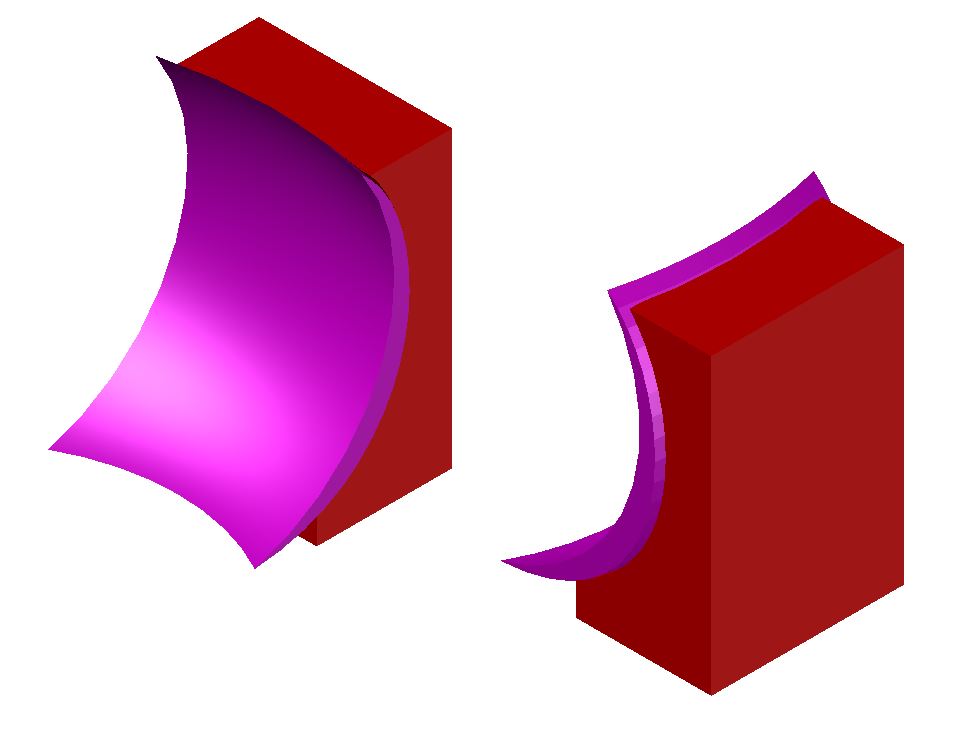 ------------- "Humans have a strength that cannot be measured. This is John Connor. If you are reading this, you are the resistance." <<AutoCAD 2015>> |