Confusing (linetype?) problem... please help
Printed From: CAD Forum
Category: EN
Forum Name: AutoCAD
Forum Description: Discussion about AutoCAD and AutoCAD LT, viewers, DWG and DXF formats, Design Review, AutoCAD web, Drive, add-ons
URL: https://www.cadforum.cz/forum_en/forum_posts.asp?TID=12099
Printed Date: 05.Sep.2026 at 04:15
Topic: Confusing (linetype?) problem... please help
Posted By: Dehorn85
Subject: Confusing (linetype?) problem... please help
Date Posted: 09.Nov.2016 at 15:42
|
Hi everyone... Some help and guidance needed. We do laser profiling of steel. We've got a customer who would like us the make a cut out of the British Isles. He's sent us a dxf file of the outline of the british isles as he wants it. We normally load such drawings into our 'Swiftcut' profiling machine, and it cuts exactly as the drawing. What's happening here though, is that the drawing seems to be made up of dots rather than continuous lines, so the machine won't do a continuous cut. I've zoomed right in, and that seems to be the case. although the 'dots' are incredibly small/close together, and so appear to be a continuous line. Questions: How could a line be drawn like that? How can I change it into a continous line? Any help would be much appreciated, as I'm stumped! Thanks Will ------------- Amateur |
Replies:
Posted By: John Connor
Date Posted: 09.Nov.2016 at 15:49
|
I'd call the client and ask if a dotted linetype was used in the original drawing from which the DXF file was created. If so ask if the linetype can be changed, in the original drawing, to continuous and a new DXF file generated. ------------- "Humans have a strength that cannot be measured. This is John Connor. If you are reading this, you are the resistance." <<AutoCAD 2015>> |
Posted By: Dehorn85
Date Posted: 09.Nov.2016 at 19:21
|
Don't know if this helps get an answer.... but if I click Modify/properties then select the shape.... it shows as thousands of the little blue squares along the line... what does that mean? Will (sorry if i'm being dim!) ------------- Amateur |
Posted By: John Connor
Date Posted: 09.Nov.2016 at 19:34
|
Maybe they are all very, very, very small LINE segments derived from a spline that was converted to a polyline then exploded. ------------- "Humans have a strength that cannot be measured. This is John Connor. If you are reading this, you are the resistance." <<AutoCAD 2015>> |
Posted By: Kent Cooper
Date Posted: 10.Nov.2016 at 21:13
If that's from selecting the shape once, and you're using AutoCAD, then it's probably a Polyline with lots of segments, or a Spline with lots of fit points or control points. Those blue squares are "grips." Right-click when it's selected, and pick Properties. There's a Linetype "slot" [where it says ByLayer to the right] where it will probably say Dot, or Dot2, or some such thing, and where you should be able to pull down a list and change that to Continuous. 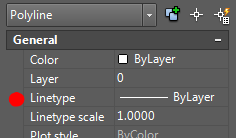 It's possible it's some other king of thing [entity type in the top of the image], though it doesn't seem likely if one pick brings up a host of grips. But if it is, let us know, and someone may have other suggestions about what you can do.
|
 Dehorn85 wrote: