XREF layers
Printed From: CAD Forum
Category: EN
Forum Name: AutoCAD
Forum Description: Discussion about AutoCAD and AutoCAD LT, viewers, DWG and DXF formats, Design Review, AutoCAD web, Drive, add-ons
URL: https://www.cadforum.cz/forum_en/forum_posts.asp?TID=12101
Printed Date: 06.Sep.2026 at 03:47
Topic: XREF layers
Posted By: LeepyLee
Subject: XREF layers
Date Posted: 11.Nov.2016 at 09:59
|
Help please!! I have a drawing which includes a couple of XREFs. One of these XREFs is a shop floor outline with what appears to be a hatch. This is on it's own layer. On the XREF drawing, this layer is turned off, but on the main drawing, the layer is displayed and I cannot turn it off. I've saved the XREF drawing with the layer turned off and reloaded the XREF in the main drawing, but this layer remains visible in the main drawing. What am I missing; how can I get rid of this layer? Thanks, Lee
|
Replies:
Posted By: Kent Cooper
Date Posted: 11.Nov.2016 at 17:51
What have you tried, to turn that Layer off? Does it just not appear in your Layer Manager to be able to? Maybe you don't have Xref Layers displayed: 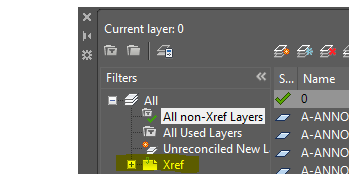 In the above image, it's set to show All non-Xref Layers. If yours is set the same, pick on that yellow-highlighted Xref category, and you should be able get at it, to turn it off. Then look into the VISRETAIN System Variable, to keep it on or off as you have it set in the main drawing, despite any changes in its state in the Xref'd source drawing.
|
 LeepyLee wrote:
Posted By: LeepyLee
Date Posted: 12.Nov.2016 at 11:12
|
Thank you... that's the issue - didn't have the XREF layers displayed This is the first time I've had to do anything with XREFs, so still learning. Thanks again! |