How to remove xyz dot within assembly?
Printed From: CAD Forum
Category: EN
Forum Name: Inventor
Forum Description: Discussion about Autodesk Inventor
URL: https://www.cadforum.cz/forum_en/forum_posts.asp?TID=12123
Printed Date: 05.Sep.2026 at 14:53
Topic: How to remove xyz dot within assembly?
Posted By: tsteffen84
Subject: How to remove xyz dot within assembly?
Date Posted: 30.Nov.2016 at 23:01
|
Hello all, I have a xyz with yellow dot appearing on many but not all parts within an assembly. I have tried many ways to turn them off with no success. Anyone out there think they might know how to do this? Thank you, Travis 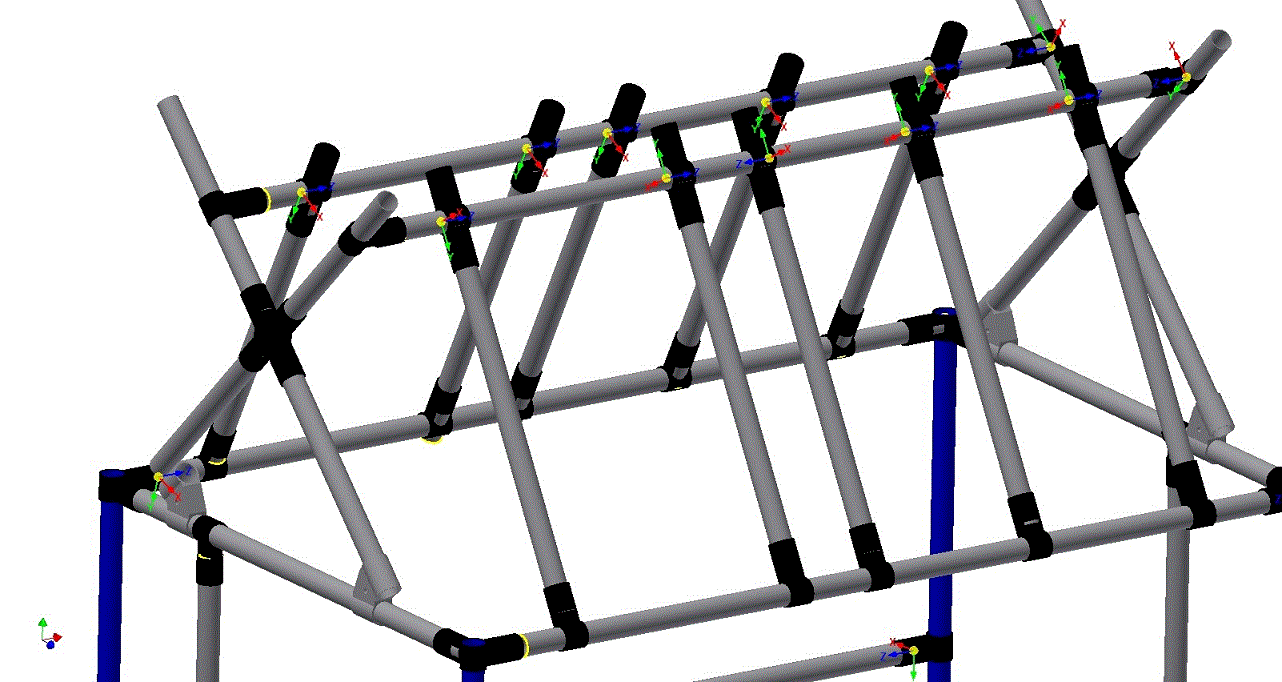 |
Replies:
Posted By: John Connor
Date Posted: 01.Dec.2016 at 12:02
|
The feature is called a "Connector" which displays as a yellow sphere with an axis triad (the three arrows you see) similar to a user coordinate system. So what you need to find is the command in Inventor that controls connector visibility and disable it. Sorry, but I don't use Inventor. In the model browser if you right-click on one of the joints where the Connector symbol is displayed are you given any options referencing connectors? Does Configurator 360 ring any bells? ------------- "Humans have a strength that cannot be measured. This is John Connor. If you are reading this, you are the resistance." <<AutoCAD 2015>> |